16 August 2026 · Twitter Ban Service · 11 min read
How to delete all tweets in 2026, and what deletion cannot reach
X has no button to delete all tweets, so every route is a workaround: the native menu removes one post at a time, a browser script clears your archive for nothing, and paid tools bill against an API that charges a cent per deletion. None of them touch a quote post someone else wrote.
Is there a delete all tweets button on X?
No, and there never has been. X documents exactly one deletion route and it handles a single post at a time: open the post, tap the ••• icon, choose Delete post, then confirm. Nothing in Settings batches that action. If you searched how to delete all your posts on x and landed on a page promising an official mass-delete switch, the page is describing a third-party product, not an X feature.
That single omission is what created an entire software category. Everything below is somebody's workaround for a gap X has left open for well over a decade, and each workaround pays for itself in a different currency: your time, your money, or your willingness to run an unofficial script against your own account.
Three ways to mass delete tweets, and what each one costs
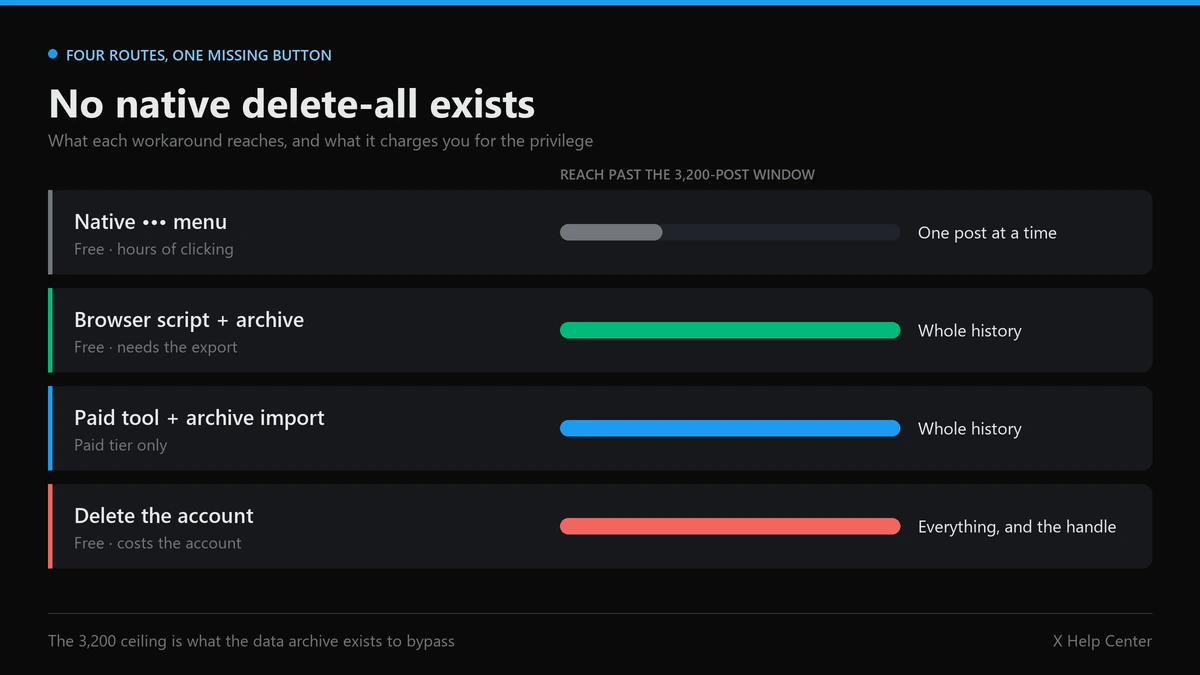
Four routes exist in practice, and they are not interchangeable. The deciding factor is almost never the interface. It is whether the route can see past the 3,200 most recent posts that X's timeline endpoints expose, because on any account older than a few years that ceiling hides the majority of what you are trying to remove.
| Route | Reaches past 3,200 posts | Cost | Replies and DMs | Reversible |
|---|---|---|---|---|
| Native ••• menu, one post at a time | Yes, if you scroll far enough | Free, but hours of manual work | Replies yes, DMs one thread at a time | No |
| Browser script driven by your data archive | Yes, the archive holds everything | Free | Replies and DMs yes, likes barely | No |
| Paid bulk tool with archive import | Only on the paid tier | Subscription, because the API bills per call | Replies yes, DMs on some tools | No |
| Deleting the account itself | Yes, all of it | Free, costs you the handle | Everything goes | Yes, for 30 days |
The named tools in this space are Circleboom, Redact, TweetDeleter and TweetEraser on the paid side, and tweetXer on the free side. Their feature lists converge almost exactly, which tells you the constraint is not engineering talent. They are all building against the same metered pipe.
Why does deleting tweets stop being free?
Because X now charges per action, and deletion is one of the actions. The X API runs on pay-per-usage pricing with, in its own words, no subscriptions and no free allowance to draw down. The published rate card puts an Interaction: Delete request at $0.010. Reading a post costs $0.005, and reading your own data is discounted to $0.001. Pay-per-usage accounts are capped at three million post reads per monthly billing cycle.
Run the arithmetic and the whole market makes sense. A 20,000-post history is roughly $200 in delete calls before a single read is billed, and the tool has to read your timeline to know what to delete. That is the real reason a free tier stops at 3,200 posts and archive import sits behind the paywall: 3,200 deletions is about $32 of someone else's money, which is roughly what a vendor will spend to acquire you. Past that, you are the cost centre.
This also explains a complaint that shows up constantly in tool reviews, where people describe paying for date filtering and receiving what felt like a plain delete-all. Filtering is not a cosmetic feature. Every post the tool has to inspect and reject is a metered read it paid for and you did not, so the incentive runs toward the cheapest possible pass over your timeline. Read the refund terms before you buy, and test on a narrow date range first.
One caveat worth keeping: X's pricing page describes what developers pay, not what any specific vendor charges you. A tool with grandfathered legacy access or its own caching may sit on very different economics. The rate card sets the floor under the market, not the price of any one product.
Can you delete all tweets free of charge?
Yes, by going around the API entirely. tweetXer is a browser script that, in the project's own description, intercepts requests from your browser to Twitter and replaces the Tweet-IDs with IDs pulled from your tweets.js file. Because your browser session does the work, no per-call bill exists. It handles posts, replies and direct messages, and it runs at roughly 5 to 10 posts per second.
The honest limits: it needs your full data export before it can do anything, its own documentation warns that browsers crash more often on Chrome and Chrome-based browsers above about 15,000 posts, and likes are largely out of reach because only the last few hundred can be removed even by hand. It is free in money and expensive in patience.
How to delete tweets in bulk from your X archive
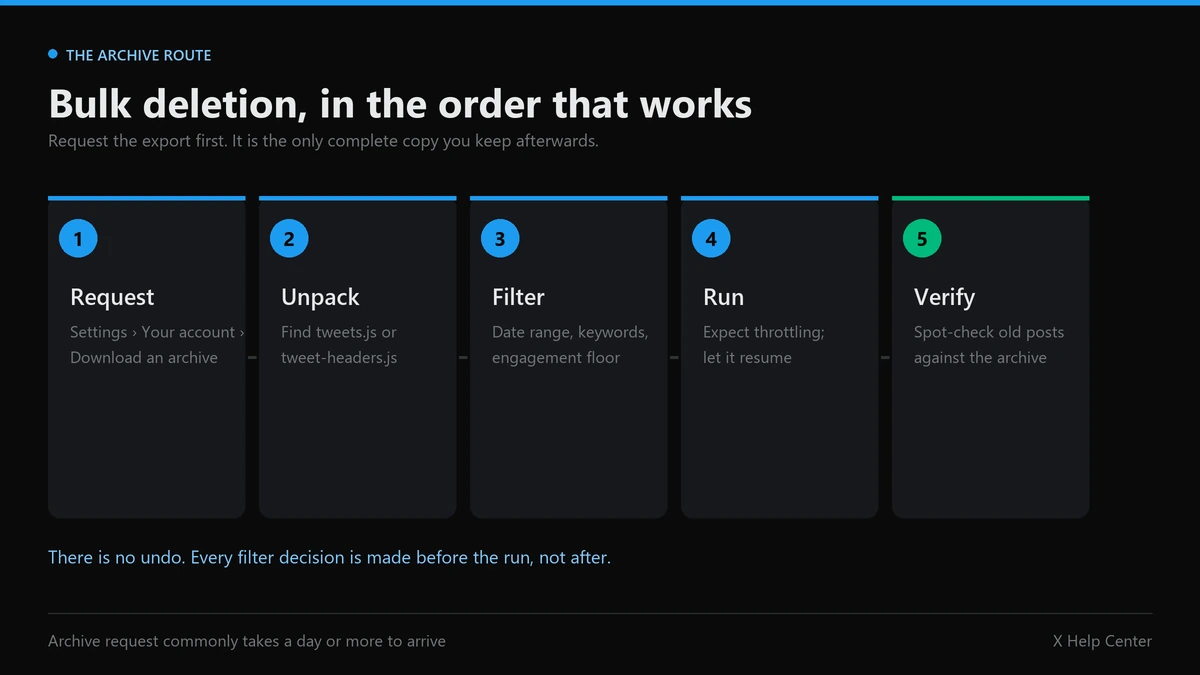
The archive is the step that decides whether the rest works, and it is the step people skip. Request it first, because it takes time to build and it is the only complete copy of your own words you will still have when the run finishes.
- Request the archive before anything else. The path runs Settings and privacy → Your account → Download an archive of your data, and X re-checks your password before it starts building the file. Expect to wait a day or more for it to land.
- Unpack it and find the data file. Inside you are looking for
tweets.js, ortweet-headers.jsif the tool asks for the lighter index. This is what carries the posts that the 3,200 window hides. - Pick your route. Feed the file to the browser script, or import it into a paid tool on the tier that accepts archive uploads. Anything that does not ask for the archive cannot see your old posts.
- Filter before you run, not after. Set the date range, keywords or engagement threshold while the run is still hypothetical. There is no undo once it starts.
- Expect throttling and let it resume. Rate limiting is normal behaviour, not a failed job. Tools that stop and continue later are working correctly.
- Verify against the archive. Search your profile for a handful of posts you know were old. Leftovers are usually reposts of accounts that have since been deactivated.
How to delete old tweets without wiping the ones worth keeping
Filter on date first and everything else second. Every serious tool exposes a date range, keyword and hashtag matching, media-only selection, and an engagement floor that keeps posts above a set number of likes or reposts. A cutoff date plus an engagement floor is the combination that clears a decade of noise while leaving the handful of posts people still link to. Run it against a single month first and check the result before you point it at ten years.
Does deleting a Twitter account delete tweets?
Eventually, yes, but it is the wrong instrument for this job. Deactivation hides the profile straight away and starts a 30-day window in which a single login restores everything; only after that window closes does the removal become permanent. People searching does deleting twitter account delete tweets are usually looking for a shortcut past the tooling above, and it does technically work.
What it costs you is everything attached to the posts. The handle goes with them, and a released handle is something other people actively watch for and try to claim as an inactive username. You lose your followers, your direct message history and any verification. Deleting an account to clean up a timeline is a demolition where a filtered run would have done, and it still leaves the copies described further down untouched.
How to delete twitter DMs when only your copy disappears
This is the one that genuinely surprises people, and X states it plainly in its direct message documentation: "When you delete a Direct Message or conversation (sent or received), it is deleted from your account only. Others in the conversation will still be able to see Direct Messages or conversations that you have deleted."
There is no unsend. Each participant holds an independent copy, and the option in the menu is labelled Delete for you precisely because that is its entire scope. Long-press a message, choose it, and the message leaves your inbox alone. To clear a whole thread, open the conversation info and choose Delete conversation. If your reason for learning how to delete twitter dms is that a message is being held over you, deletion on your side accomplishes nothing at all, and the route that matters is a report against the X account holding it.
How to delete twitter replies without orphaning a thread
Replies delete through the same menu as posts, and every bulk tool treats "reply" as a filterable type you can switch on or off. Worth knowing before you do: a reply sits inside somebody else's conversation, so removing yours leaves the replies underneath it visible but detached from the point they were answering. Nobody at X documents this, it is simply what the threading does. If you are clearing a specific argument rather than a decade of noise, deleting your side often makes the exchange read worse rather than better.
Which copies of your posts survive the delete?
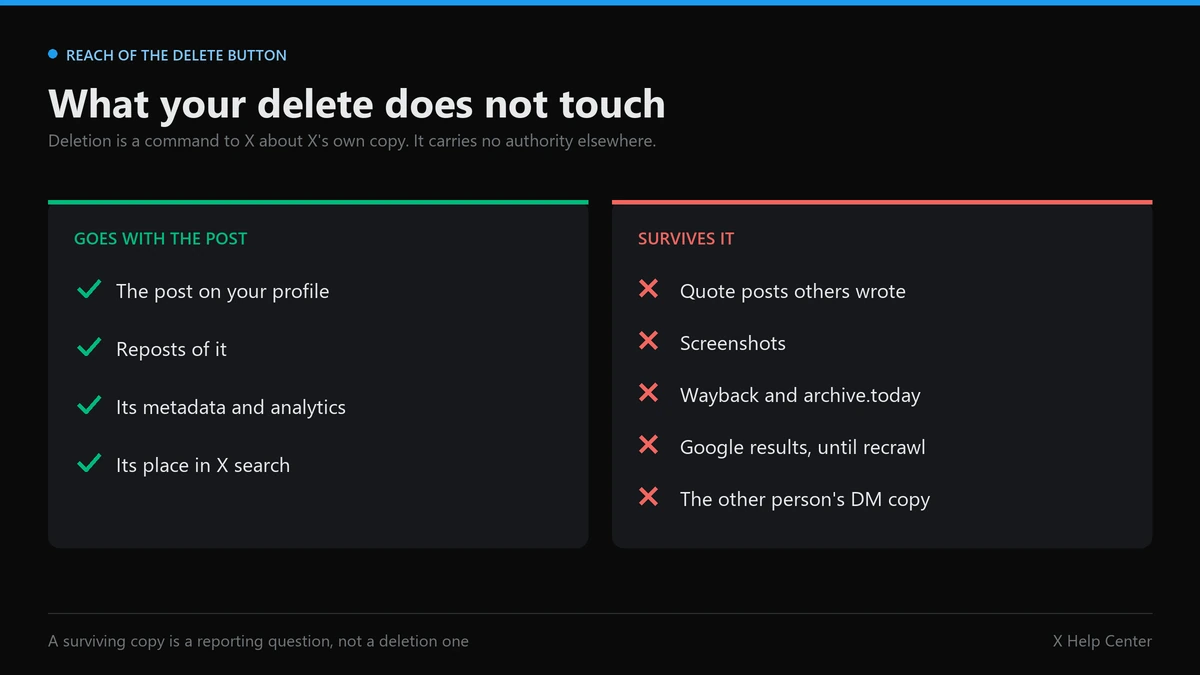
Deletion is a command to X about X's own copy. It carries no authority anywhere else, and this is where most people's expectations break.
| Where a copy lives | Does your deletion remove it | What actually can |
|---|---|---|
| Reposts of your post | Yes, they go with the original | Nothing further needed |
| Quote posts written by others | No, that post belongs to them | A report, only if it breaks a rule |
| Screenshots | No | A policy or legal route against the poster |
| Wayback Machine and archive.today | No | A request to that archive, often refused |
| Google results | Not immediately | Recrawl, or the outdated content tool |
| The other person's DM inbox | No | Nothing, by design |
X's own guidance on deleting posts makes the same point from the other direction: once a post is deleted its contents, metadata and analytics stop being publicly available on X, while material that was copied elsewhere or reposted with somebody's own comment attached is not removed. Your delete button and their post are two different objects.
The cases that reached us after a wipe kept arriving in the same shape, and eventually we changed what we asked for first. The timeline was already clean. One quote post from years earlier had survived with the original text embedded inside it, and the wipe had made it easier to find rather than harder, because nothing of yours competed with it any more. So we stopped opening with the post link and started asking two questions instead: is there a permanent link rather than a screenshot, and which rule does the surviving post actually break. The second answer settled most of them. Frequently it settled them as no, because an old post being embarrassing is not a violation of anything, and a service that tells you otherwise is selling you a report it knows will be declined.
Where a route does exist it depends entirely on what the copy is doing. Content of yours republished as somebody else's is a copyright question handled by DMCA. An account rebuilding your identity from your old posts is an impersonation report, and if it is a whole profile rather than one post, the wider account takedown routes apply. A single post about you is a post removal question, and the limits on who may act at all are set out in our note on who can delete someone else's X account.
Two closing cautions, because they are the reason this page exists. First, volume does not substitute for grounds: the tools sold as a mass report bot, the promises around getting someone banned from Twitter, and the mechanics of mass reporting an account all run into the same wall, and coordinated false reporting is itself against the X Rules. Second, a stalled case is usually a filing problem rather than a conspiracy, which is what our notes on counterfeit reports that get ignored and on brigading and job scam reports are for. If you are checking whether your own reach is limited rather than removed, that is a shadowban checker question, and the general reporting tools note covers what each form does.
Clear your own history first, then deal with the copies. In that order, because a filtered run through your archive costs an afternoon, while the surviving copies need evidence you may still be able to collect right now. If you want a second opinion before you start, tell us what you are trying to remove and we will say plainly whether a route exists. Our full set of X and cross-platform notes covers the neighbouring cases, including Instagram account takedown, Instagram mass reporting, Instagram spam report bots and whether mass reporting works on TikTok. Twitter Ban Service works only on genuine X Rules and legal breaches.
Sources
- How to delete a post · X Help Center
- About Direct Messages · X Help Center
- X API pay-per-usage pricing · X developer documentation
- How to deactivate your X account · X Help Center
- tweetXer, delete all your tweets · project documentation
FAQ
Can you get tweets back after a bulk delete?
No. There is no recycle bin on X and no restore button, for you or for support. The data archive you downloaded before the run is the only complete copy you will keep, which is why the archive step comes first rather than last. Treat every bulk run as one-way.
How long does it take to clear twenty thousand posts?
The browser script route quotes roughly 5 to 10 posts per second, so twenty thousand lands somewhere between thirty and seventy minutes of unattended running. API-based tools are slower because they batch and back off against rate limits, and they stop and resume rather than failing outright.
Do deleted posts disappear from Google straight away?
Not automatically. Google drops the page on its own recrawl schedule, which can run days or weeks behind your deletion. Google's Refresh Outdated Content tool speeds up removal of pages that are already gone, but it only works once the live URL genuinely returns nothing.
Is it safe to hand a deletion tool access to your account?
Only through OAuth, never by typing your password into a third-party form. A legitimate tool sends you to X to authorise it and never sees your credentials. Revoke the connection afterwards under Settings and privacy, then Security and account access, then Apps and sessions.
Do likes and reposts go with the posts?
No, they are separate content types and each needs its own pass. Likes are the awkward one: the free browser script can only clear the most recent few hundred, and X exposes no bulk unlike route, so a long like history is the job that tends to stay unfinished.
Does deletion remove your posts from the Wayback Machine?
No. Archived snapshots sit on servers X does not control, so deleting the original changes nothing there. Removal from an archive is a separate request to that archive, judged by its own policy, and it is refused more often than it is granted.