16 August 2026 · Twitter Ban Service · ~11 min read
Delete a Twitter account permanently: 4 steps, a 30-day queue, and the locked-out routes
To delete a Twitter account you deactivate it first, then wait. X ships no delete button. The control sits under Settings and privacy, then Your account, then Deactivate your account, and it starts a 30-day countdown; the account is only erased once that window closes untouched. Request your data archive before you start.
Deactivate vs delete Twitter, and why only one of them is a choice
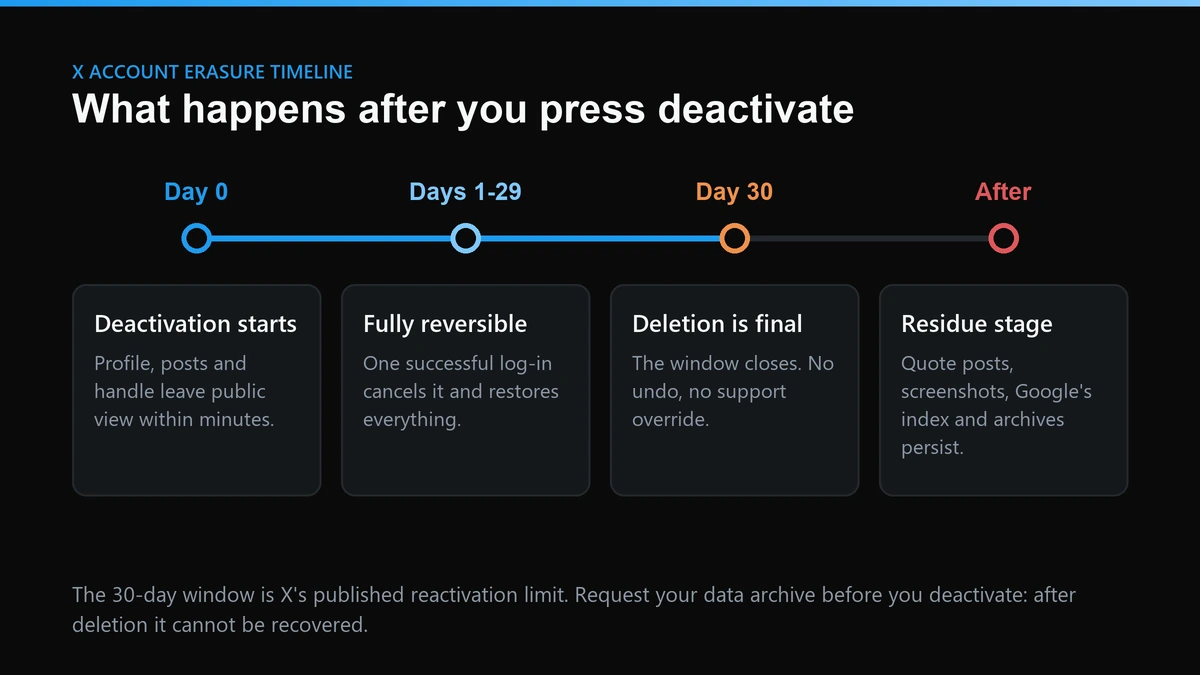
X built account removal as a waiting period rather than an action. Deactivation pulls your profile, posts and handle out of public view within minutes, and then a clock runs. X's deactivation guidance puts the length at 30 days: fail to access the account inside that window and it is deleted, and the username stops being associated with it.
So the pair is not really a menu. Deactivation is the opening move of deletion, and deletion is what deactivation becomes when you leave it alone. Everything that reads like a difference between the two is a difference between day 1 and day 31.
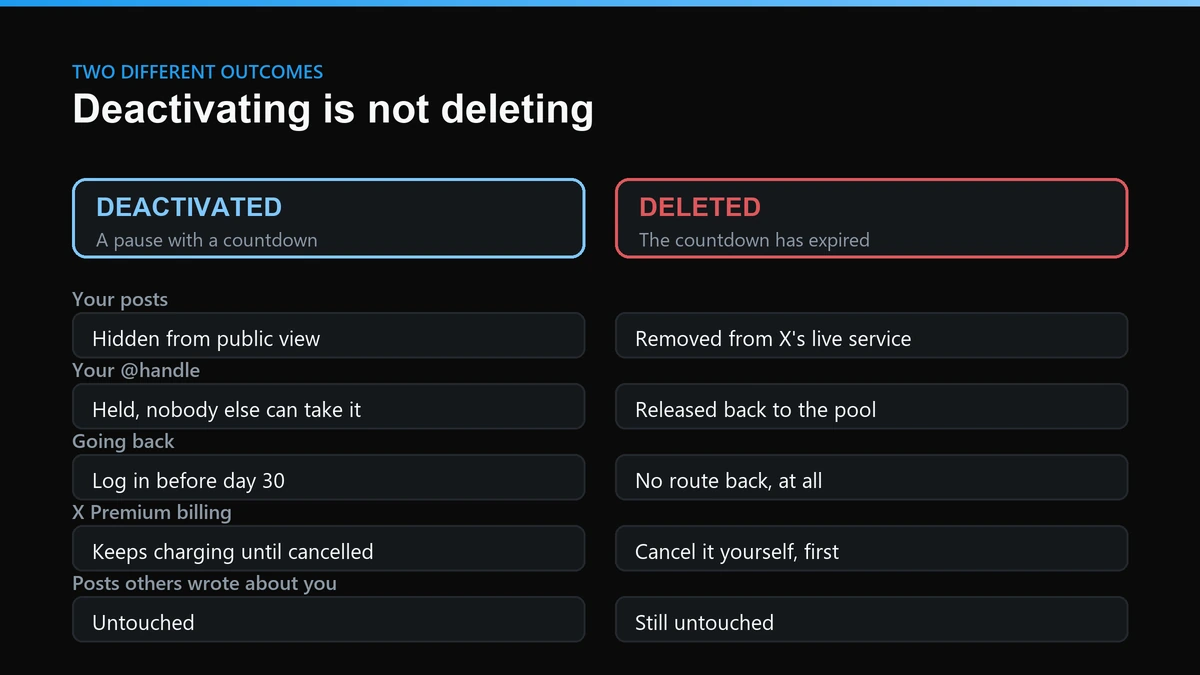
| What you are asking about | Deactivated (days 1–30) | Deleted (after day 30) |
|---|---|---|
| Your profile and posts | Out of public view, still held by X | Gone from X's live service |
| Reversibility | One successful log-in restores it | None, by any route |
| Your @handle and email | Reserved so reactivation works | Released for use on another account |
| Your data archive | Cannot be requested any more | Cannot be requested any more |
| X Premium billing | Keeps renewing unless cancelled | Cancel at the billing source |
| Posts other people wrote about you | Untouched | Untouched |
How to delete a Twitter account permanently, in the order that works
Order matters more than the steps do. The last several of these we handled had all failed at the same point: the person deactivated on impulse, then went looking for a data archive that stopped being reachable the moment they confirmed. Do these four in sequence.
- Request your archive. Settings and privacy, then Your account, then Download an archive of your data. X asks you to request it before you deactivate, and confirms by email when the file is ready. Several archive guides report the download link expiring about a week later, so collect it promptly.
- Cancel anything that bills you. X Premium bought through the App Store or Google Play is managed by Apple or Google. Deactivating your X account does not touch that renewal, and neither does deleting the app.
- Revoke connected apps. Settings and privacy, then Security and account access, then Apps and sessions. Third-party tools holding write access to a dormant account are the quiet risk in this whole process.
- Deactivate. Settings and privacy, then Your account, then Deactivate your account. Confirm with your password. The countdown starts here.
That first step carries more weight than it looks. If you are wiping posts rather than closing the account, the archive is also the only way past X's interface ceiling: only your most recent 3,200 posts are reachable through the API every bulk-delete tool depends on, so those tools stall there until you feed them the archive file. Anything older than that ceiling is invisible to them.
How to delete a Twitter account on iPhone
The iOS app exposes the same control, despite a run of guides still claiming deactivation is desktop-only. Tap your profile picture, open Settings and privacy, then Your account, then Deactivate your account.
One trap here is genuinely iPhone-specific, and it is billing. A Premium subscription bought inside the app belongs to Apple's system, so cancel it in iOS Settings under your name and then Subscriptions; X cannot reach an Apple-billed renewal on your behalf, and removing the app does not touch it either.
How long can you deactivate Twitter before the account is gone?
Thirty days, and the clock cannot be paused. X is explicit that after more than 30 days you will not be able to reactivate the account. What surprises people is the other half of that page: the username and the email address stay tied to the deactivated account for those 30 days precisely so reactivation can work, and become available for another account only once the window has closed.
Logging back in does not extend the window. It ends it. The account returns to normal service, and a second deactivation opens a fresh 30 days from that moment, which is how people keep an account dormant for years without ever losing it.
Deleting an account you cannot log into
This is where the mainstream guides stop being useful, and it is the case we field most often. Three very different situations sit behind the same search, and each has its own answer. None of them is a delete button.
Delete a Twitter account without login details you still have
Match your situation to a row before you fill in anything. The wrong form does not fail loudly; it just goes quiet.
| Your situation | Where it goes | What it actually produces |
|---|---|---|
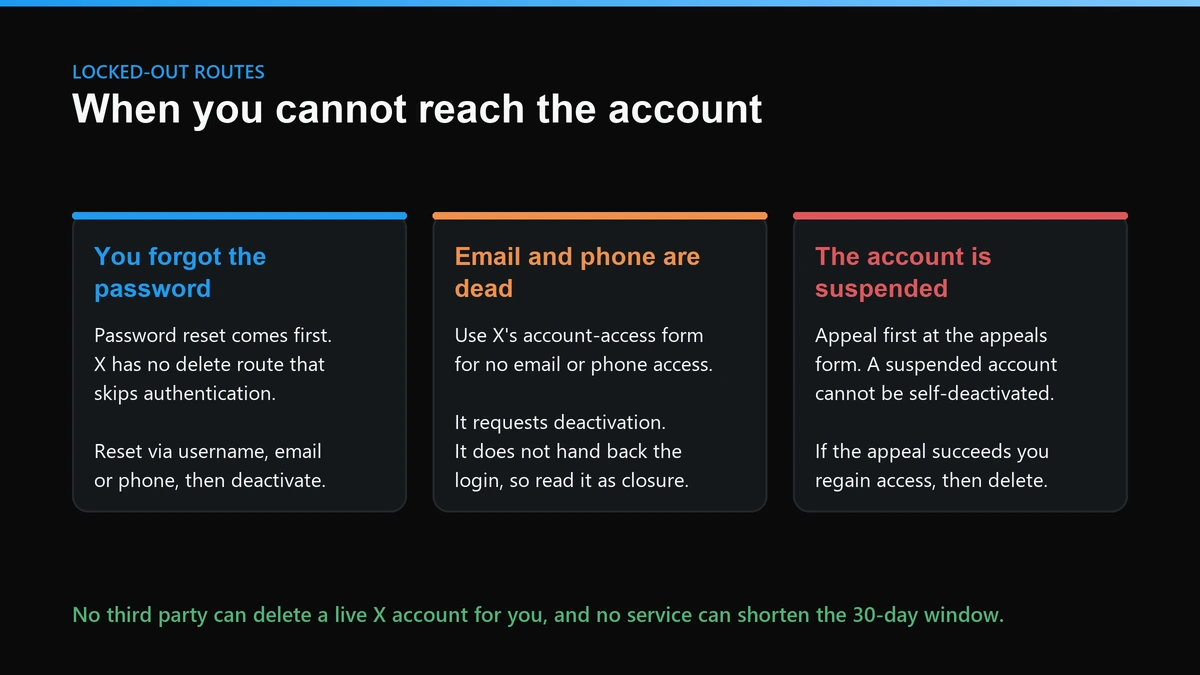
| Password forgotten, email and phone still work | Password reset, then deactivate normally | Full control, then the standard 30-day countdown |
| No access to the email address or phone number | X's deactivate or close my account form, no-access branch | A deactivation request. It is closure, not account recovery |
| The account belongs to someone who died or is incapacitated | The deceased or incapacitated branch of the same form | Deactivation only. X does not hand over access to relatives |
How to delete an X account without a password you can recover
Start by accepting the constraint: authentication comes first, because X will not act on a request from someone it cannot connect to the account. If the email or phone still reaches you, a reset is the whole job. If neither does, the no-access branch of the account-access form is the only door, and it is worth reading what comes back through it carefully. It requests deactivation on your behalf. It does not restore your login, so anything you still want out of the account should be salvaged before you file.
One trap catches a specific group. If you created the account with Sign in with Apple, you never set a password, so the reset flow has nothing to reset until you set one. Do that first from the Apple-linked email, then deactivate in the ordinary way.
The other thing worth naming here is what we turn away. People arrive asking us to delete an account they are locked out of, and the honest answer is that we cannot, because nobody outside X can. Any vendor that says yes is quoting for account access rather than deletion. That distinction is the difference between a support form and a hacked login, and only one of them is legal.
How to delete an X account when suspended
Appeal first. X's suspended-account guidance states the ordering plainly: to deactivate the account you need to file an appeal, and if you have already appealed and still want it gone, you submit a separate request. A suspended account cannot simply be deactivated from Settings, which is why the usual step lists fail people here.
The practical sequence is to log in to the suspended account, open the appeal form in a second tab, and file. If the appeal succeeds you have your account back and the normal four steps apply. If it fails or stalls, the deactivation request is the route out.
Expect company in that queue. X's Global Transparency Report counted 4,191,171 accounts suspended for breaking the X Rules in the second half of 2024, on top of roughly 335 million suspensions aimed at spam and platform manipulation, most of those automated. We spend a lot of time in the same system from the other side, working reports against accounts that break the X Rules. The pattern is consistent: appeals built around one named policy move, and appeals that argue about fairness in general do not.
No route deletes instantly
Searches for how to delete twitter account instantly return confident answers. None of them work. There is no premium tier, no support escalation and no service, ours included, that shortens the 30 days, because the window exists to protect people who deactivate in anger or after a hijack. Treat an instant-deletion offer as a signal to close the tab.
What does deleting your X account actually erase?
Less than the word deletion implies, and X says so itself. Its deactivation page states that deactivating does not remove data from X's systems, and that X may retain some information from a deactivated account to keep the platform and its users safe. That is the honest ceiling on how to delete an X account and all data: the public surface goes, the internal record is a separate question with a separate answer.
How to delete an X account and all data behind it
Where you live changes what you can demand next. Under Article 17 of the GDPR, people in the EU and UK have a right to erasure, and controllers must respond within one month, extendable by two further months for complex requests. California residents get a comparable deletion right under the CCPA, with a 45-day response deadline that can be extended once. Neither right is absolute; both are stronger than a checkbox in Settings, and both are worth using if the internal copy is what you actually care about.
How to remove a Twitter account from Google search after deletion
Search engines are a separate system, and X is candid that it does not control them. X's guidance on Google results explains that old links keep appearing until Google refreshes its index, and that clicking one after deletion lands on X's "That page doesn't exist!" error. X even keeps a dedicated form branch for accounts that are deactivated and still showing in search. The faster lever is Google's own Remove outdated content tool, which anyone can use once the live page has actually changed or gone. Filing it before the account is deleted simply fails, so the order is delete, confirm the error page, then request the refresh. The Internet Archive is a third system again, with its own review process and no obligation to agree.
The half that deletion never reaches
Your account is the only thing your account settings control. Quote posts, replies, screenshots and an impersonator wearing your old avatar all live on other people's accounts, and closing yours does nothing to any of them. This is the gap people discover a week after they leave, and it runs on a different machine entirely: X logged over 181 million user reports in the second half of 2024 and removed or labelled 10,131,247 posts in the same period, a volume that exists because the content people want gone is usually not theirs to delete.
Some of it does come down without a report. Researchers at the universities of Rochester, Illinois and Virginia examined 264,600 posts on X that had received a Community Note and found that posts shown a public note were 32 percent more likely to be deleted by their own author. Correction works. It just works slowly, and only when a note actually publishes.
Report the rest rather than waiting for it to fade, and do it before you lose access if you can, because proving an account is a copy of yours is easier while the original is still live. Impersonation and privacy breaches run through X's dedicated reporting forms, and we have written the specifics up per violation type across this site. If the leftovers are yours to remove, that is a deletion job. If they are somebody else's, it is a reporting job, and the two should never be confused.
Start with the archive request today, then deactivate. That single ordering saves more people than any other line on this page.
Related reading on this site
Deletion sits at one end of a spectrum this site covers end to end. If you own the content, the routes above are the whole story. If you do not, these go deeper: who is allowed to ask X to delete another person's account, the four routes to taking down a Twitter account, and getting a single tweet removed. On reporting mechanics, see the per-violation report guide, whether mass reporting an account changes anything, and what a Twitter mass report bot really is. For the myths, we cover getting someone banned the legitimate way, ban tools versus shadow bans, and brigading and job-scam reports. Specific violation types have their own pages: impersonation, counterfeit reports that get ignored, and claiming an inactive username once a handle is finally released. Cross-platform questions live at Instagram takedowns, Instagram mass reporting, Instagram spam report bots, and mass reporting on TikTok. The homepage, the full solutions index, and our contact page are the shortest routes to a human.
Sources
- How to deactivate your X account – X Help Center
- How to reactivate your X account – X Help Center
- Help on your suspended X account – X Help Center
- Deactivate or close my account – X Help Center forms
- How to download your X archive and posts – X Help Center
- Controlling how your X information appears in Google search
- Remove outdated content from Google Search – Google Search Help
- Article 17 GDPR: right to erasure
- California Consumer Privacy Act – California Attorney General
- Community Notes and author deletion – University of Rochester
FAQ
Does deleting my X account remove my posts from other people's timelines?
Your own posts leave X's live service with the account. Quote posts, replies and screenshots other people published stay theirs, because they sit on their accounts rather than yours. Deletion is a first-party control. It reaches your content and nobody else's, which is why the residue usually needs a separate report.
Can I reactivate a Twitter account after the 30 days have passed?
No. X states that if it has been more than 30 days since you deactivated, you will not be able to reactivate the account. There is no support queue, paid tier or appeal that reopens it, so treat day 30 as the point of no return and read any offer to reverse it as a sales line.
If I log back in on day 25 and deactivate again, does the clock restart?
Yes. Logging in reactivates the account outright. The deactivation ends rather than pauses, and deactivating again opens a fresh 30-day window from that moment. People use this to stay dormant for years. Each return does put the account fully back online for as long as you are signed in.
Will my old @handle be free for someone else to take?
Eventually. X holds the username and the email address for the 30-day window so reactivation still works, and says both become available for use on another account 30 days after deactivation. If protecting the handle matters more than leaving, keep the account and empty it instead.
Do I have to cancel X Premium before I deactivate?
Cancel it first, and cancel it where you bought it. A subscription billed through the App Store or Google Play is managed by Apple or Google, not by X, so deactivating the account does not stop the renewal. Removing the app changes nothing either. Cancel at the billing source, then deactivate.
Can a service delete my X account for me?
No, and we will say so rather than sell you the opposite. Deactivation requires authentication, so anyone offering to delete a live account for you is describing account access, not deletion. The only legitimate outside help is a rule-breaking account that is not yours, reported through X's own channels.