16 October 2026 · Twitter Ban Service · 9 min read
How to block someone on YouTube, and why X handles the same person differently
To block someone on YouTube from your own videos, open the three-dot menu on their comment and choose Hide user from channel. To stop them seeing your comments anywhere, block their channel from a live chat message or a mention. Neither stops them watching your public videos. X's nearest match is a block plus hidden replies.
We run an X takedown service, so most of our cases start on X. A fair number don't stay there. On 16 October 2026 we read YouTube's four help articles on hiding, blocking, comment settings and live chat next to X's articles on blocking, muting and replies. The two platforms use the word "block" for different things, and that mismatch is behind a lot of the confusion we see when someone is harassed in both places at once. A creator who "blocked" a troll on YouTube expects the same effect on X, then finds the account still reading every public post. Someone who blocked on X expects the person not to notice, then learns X shows a notice on the profile. So this page puts each YouTube control next to the X control people assume is its twin, and says plainly where the two part ways.
How to block someone on YouTube: which control does what?
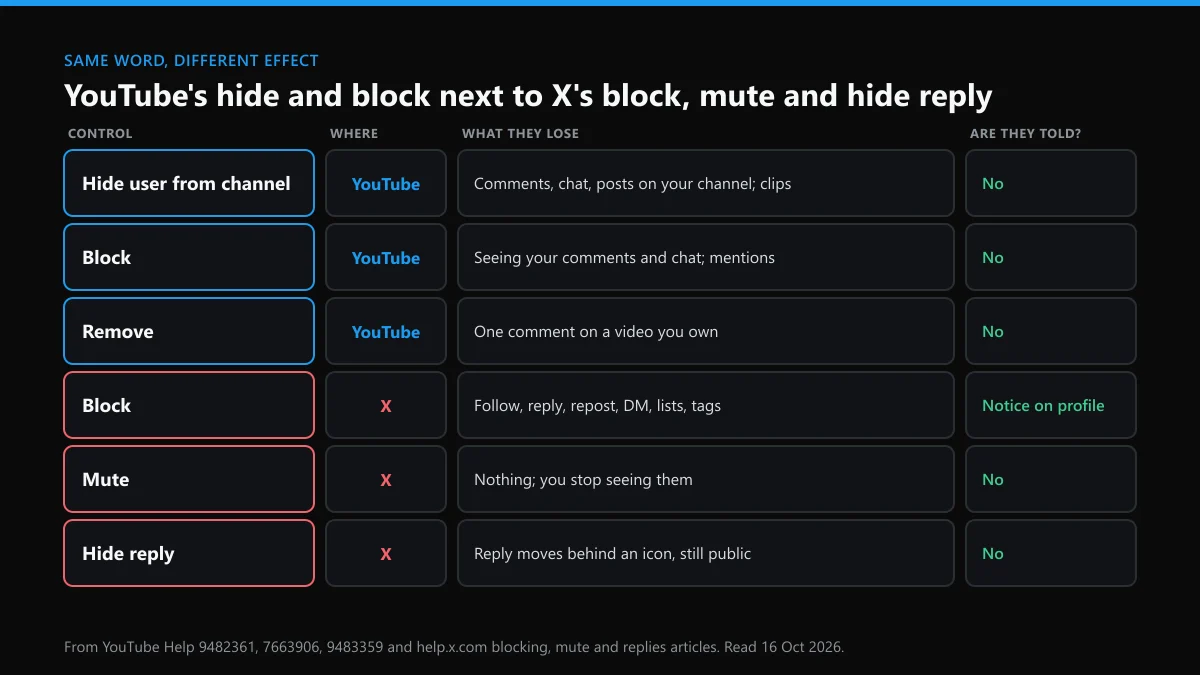
YouTube gives channel owners one set of tools and viewers another. The owner can make a person invisible on their own channel. A viewer can only stop someone reaching them. X has a single block that does a bit of both, plus mute. Here is how they line up:
| Control | Platform | What the other person loses | Are they told? |
|---|---|---|---|
| Hide user from channel | YouTube | Their comments, live chat and posts on your channel stop showing to anyone else; they can't clip your videos | No |
| Block | YouTube | They stop seeing your comments and chat messages and can't mention you, across Google products | No |
| Remove | YouTube | One comment on a video you own | No |
| Block | X | Following you, replying, reposting, liking, DMs, adding you to lists, tagging you | No alert, but a notice if they visit your profile |
| Mute | X | Nothing; you just stop seeing their posts | No |
| Hide reply | X | Their reply moves behind an icon on your post; anyone can still open it | No |
The searches "how to block someone on yt" and "how to block someone's youtube channel" nearly always mean the first row: the person wants a commenter gone from their own videos. That's hiding, not blocking.
Hidden from your channel: what changes for the other person?
If you're asking what does hide user from channel do, the short version is that it silences someone on your channel without telling them. YouTube's article on hidden users says it hides their comments, live chat messages and community posts on your channel, and stops their associated accounts making clips of your videos and streams. They can keep typing. Their own screen looks normal.
Two catches. The current wording says past activity isn't hidden, so remove old comments yourself. And hidden users' comments don't appear on your Studio Comments page, so you can't go back and read them later. If there's any chance you'll need them for a report or a police complaint, screenshot them first.
Where is the hide option on a phone, a PC and in Studio?
For a hide user from channel YouTube setting on someone who has already commented, the comment menu is fastest:
| Where you are | Steps |
|---|---|
| How to block someone on YouTube mobile | In the app, tap the three dots next to their comment on your video and choose to hide the user. In the Studio app: Community, View all, then the comment's menu. |
| How to block someone on YouTube PC | On the watch page, select More (three dots) beside the comment and pick the hide option. |
| YouTube Studio, by channel URL | For someone who hasn't commented yet: copy their channel address, open Settings, Community moderation, User management, paste it into Hidden users and save. |
The YouTube hide user from channel list is also where you undo it: select Remove next to the name and save again.
Blocking a channel as a viewer, and what it stops
This is how to block someone on YouTube channel by channel when you're not the owner of the space you meet them in. According to YouTube's blocking article, a blocked channel no longer sees your comments or live chat messages and can't mention you. The block reaches other Google products too, and you manage it at myaccount.google.com/blocklist.
On a phone, tap their live chat message and choose Block, or open Notifications, then Mentions, tap More on the mention and choose Block this user. If you run a channel, you can still see a blocked person's comments in Studio, which is one reason owners hide rather than block.
Can a block stop replies to your comments, or views of your videos?
Replies, partly. If you want to know how to block someone on YouTube from replying to your comments, a block works because they no longer see what you write, so there's nothing to answer. It doesn't delete replies already posted. On your own videos, hiding them is stronger, since their replies disappear for every viewer.
Views, no. Nothing in YouTube's help shows how to block someone on YouTube from seeing your videos, and public videos open while signed out anyway. You can switch a video to private (only invited accounts), unlisted (only people with the link) or members-only, but each change applies to everyone.
X is the opposite on one point. Its blocking help page says accounts you block can still see your public posts but can't engage with them. Only protected posts keep them out entirely.
One person spoiling your YouTube live stream
The streamer has three moves, listed in YouTube's live chat moderation guide: delete a message, time the person out, or hide the user for the whole channel. On desktop, hold Alt (Option on a Mac) to freeze the chat so you can hover over a message. Deleting is permanent and removes the replies to it. YouTube doesn't say how long a timeout lasts.
As a viewer, how to block someone on YouTube live is simpler: tap their message and choose Block. Owners preparing for a busy stream can turn on slow mode or a subscribers-only chat with a minimum subscription time, so fewer messages need cleaning up.
How to delete someone else's comment on YouTube: whose video is it?
Everything turns on ownership. On a video you own, you can delete any comment. On someone else's video, you can't, whatever a guide promises, and the only route is to report it.
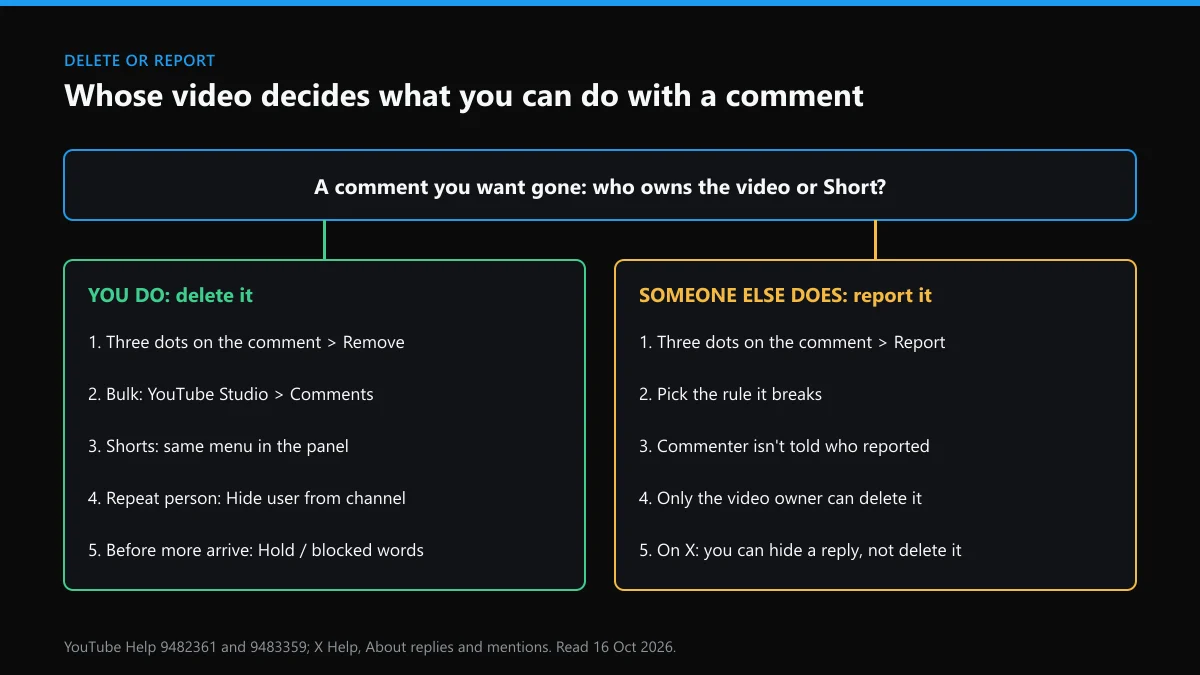
Here is how to delete other people's comments on YouTube when the video is yours:
- Select More next to the comment and choose Remove.
- For many at once, open the Comments page in YouTube Studio and work through the list.
- For how to remove comments on YouTube Shorts, use the same menu in the Shorts comment panel; Shorts comments also sit in Studio with the rest.
That covers how to remove comments on YouTube in general. On another creator's video, choose Report and the reason that fits. In the YouTube section of Google's Transparency Report, 1,551,576,962 comments were removed between April and June 2026, and 2,230,906 of them were flagged by people before any automated system caught them. Most removals are spam caught by machines, so a human report matters most for the comments filters miss.
Removing negative comments on YouTube before anyone reads them
If the question is how to remove negative comments on YouTube without deleting them one at a time, hold them instead. YouTube's comment settings article lists the options:
- Moderation set to Basic, Strict, or Hold all, with held comments kept for up to 60 days.
- A blocked words list that holds comments containing or closely matching your terms.
- A link filter, which catches most scam replies.
- Comments limited to subscribers or members, with a minimum subscription time of 1 hour, 1 day or 1 week.
These filters work across the whole channel, not per video. Deleting honest criticism is your right on your own channel, though regular viewers tend to notice.
Is there a way to ban someone from your YouTube channel for good?
Not with a button called Ban. How to ban someone from your YouTube channel comes down to hiding them and then making a new account harder to use. Put the words and spellings they reuse in blocked words, set moderation to Strict for a few weeks, and require a week's subscription before commenting on the videos they target.
When it turns into threats, impersonation or posting your private details, report the channel itself from its About panel. Hiding protects your space. Only a report can get a channel removed.
Why can't X delete a reply on your post?
Because on X, a reply belongs to the person who wrote it. The X article on replies lets a post's author hide a reply, but says everyone can still reach hidden replies through the icon on the original post, and the replier isn't notified. Only they can delete it.
Mute is the quietest option. X's mute page says muted accounts don't know, can still follow you and can still send DMs. Block goes further but is visible: an X block sends no alert, yet the blocked account sees it on your profile, which a YouTube hide never shows. That difference decides a lot of cases. Someone who'd react badly to finding out is better muted on X and hidden on YouTube.
When the same person turns up on X or Instagram
Each platform takes its own report, and the evidence you saved on YouTube helps with all of them. If they copied your name and photo, start with what to file when someone is impersonating you. If they posted a photo of you, see getting a picture of you removed from Instagram or X. For a whole account that should go, what a non-owner can do about another person's account sets out the limits, and Instagram's legal request routes cover court orders and legal notices.
Getting in touch with X directly works by form, not phone. Which X customer service form to use and the X support email addresses that actually reply cover the two lanes. If reporting a lot in one sitting gets you an error, the rate limit message on X explains the wait, and if your own reach drops afterwards, read how a shadow ban on X lifts.
Some people pick a fresh handle after harassment. Checking whether an X name is free is the first step, and X usernames listed for sale explains why buying one from a stranger breaks X's rules.
FAQ
Does the person know when you hide them from your YouTube channel?
No. YouTube doesn't notify them, and their comments still look normal on their own screen. Other viewers just stop seeing anything they write on your channel.
Can a blocked person still watch my YouTube videos?
Yes. A block stops them seeing your comments and live chat messages and mentioning you, but public videos stay open to anyone, even signed out. Only private, unlisted or members-only settings limit viewing, and those apply to everyone.
How do I delete someone else's comment on YouTube if it isn't my video?
You can't. Only the owner of the video can remove its comments. You can report the comment from its three-dot menu if it breaks YouTube's rules, and the commenter isn't told who reported it.
Can I remove comments on YouTube Shorts the same way?
Yes. The comment panel on a Short has the same three-dot menu with Remove, and Shorts comments also appear on the Comments page in YouTube Studio with your other videos.
Is blocking on YouTube the same as blocking on X?
No. A YouTube block works across Google products and stops comments and mentions reaching you. An X block stops following, replies and DMs, but the blocked account can still read your public posts and sees a notice if it visits your profile.
What does hide user from channel do to comments they already left?
Under YouTube's current wording, nothing: past activity stays visible. Hiding covers what they post from then on, so remove older comments yourself after taking screenshots.
How to block someone on YouTube mobile if they only post in live chat?
Tap their message in the live chat and choose Block. If it's your stream, you can instead hold the message menu and hide the user, which removes them from chat on your whole channel.
Can I delete a reply someone left on my X post?
No. On X you can hide a reply on your own post, but anyone can still open it from the hidden replies icon. Only the person who wrote it can delete it.