14 October 2026 · Twitter Ban Service · 11 min read
Rate limit exceeded on Twitter: which limit you hit and how long it lasts
Rate limit exceeded on Twitter means your account, an app or your connection has used up one of X's time-based allowances: posts, DMs, follows, email changes or API calls. It clears by itself when that window resets, from 15 minutes for most API calls to a day for DMs and follows. "Something went wrong" is a different, vaguer error.
What does rate limit exceeded on Twitter mean?
It means a counter ran out. X counts certain actions per account inside fixed time windows, and when a count passes the allowance, the next attempt is refused until the window turns over. Nothing is wrong with your phone, and nothing has been decided about your account.
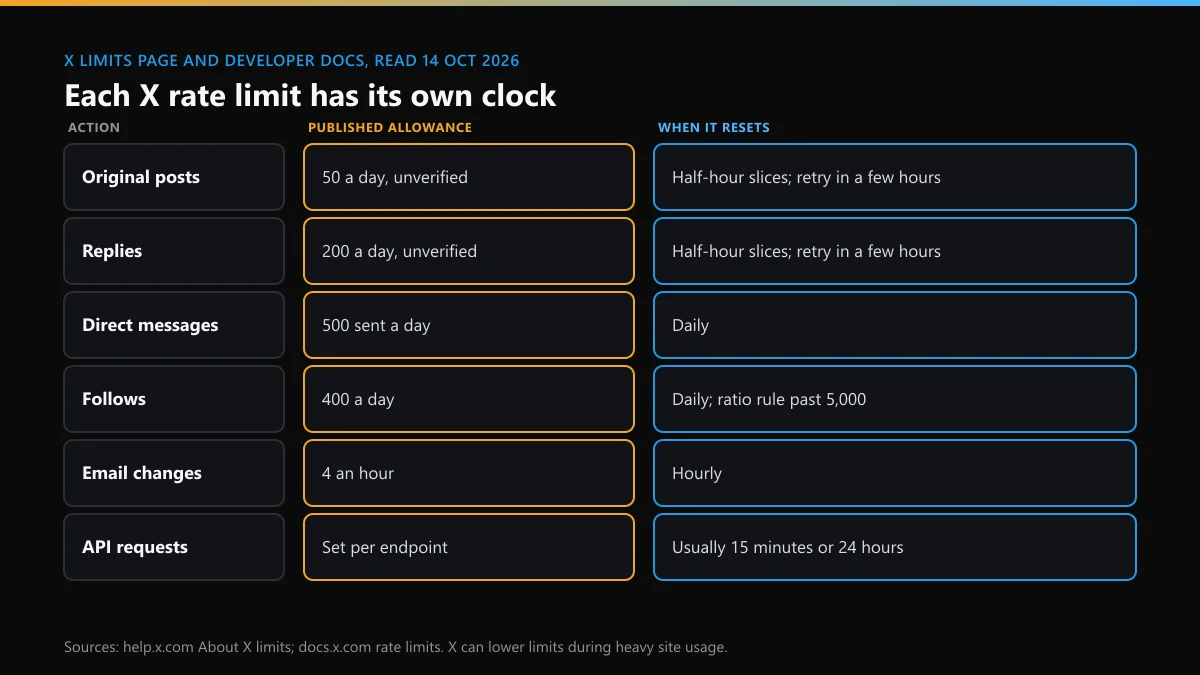
X's own page about limits gives the reason in one line: limits "alleviate some of the strain on the behind-the-scenes part of X and reduce downtime and error pages." The same page promises "an error message telling you which limit you've hit". That promise is the practical difference between the two errors on this page. A Twitter rate limit names itself. "Something went wrong" names nothing, and it needs a different response.
The words reach people in several forms: "Rate limit exceeded" across an empty timeline, "You are over the daily limit for sending posts", or a follow button that quietly stops working. All of them are the same mechanism with a different counter behind it.
Which Twitter rate limit did you hit?
Work it out from the last thing you were doing. X publishes five account limits and one family of API limits, and each sits on a separate counter, so running out of follows doesn't stop you posting. We read the limits page on 14 October 2026, and these are its figures.
| What you were doing | Published allowance | Window |
|---|---|---|
| Posting | 50 original posts a day for unverified accounts | Daily, cut into semi-hourly slices |
| Replying | 200 replies a day for unverified accounts | Daily, cut into semi-hourly slices |
| Sending DMs | 500 messages a day | Daily |
| Following | 400 a day, then account-specific ratios once you follow 5,000 | Daily |
| Changing your email | 4 an hour | Hourly |
| Using third-party apps | An hourly API limit shared by every app on the account | Hourly |
One oddity is worth knowing. The page states the 50 and 200 figures, and three paragraphs later it still mentions "the post limit of 2,400 updates per day", the older number. Spread over 48 half-hour slices, 2,400 works out to 50 per slice, so the two figures may describe the same rule at different scales. X doesn't say. For an unverified account, plan around the smaller one.
Scrolling isn't on the list at all. The limit on reading that made "rate limit exceeded" famous has its own history, covered further down.
How long does a Twitter rate limit last?
As long as the window it belongs to, and X publishes windows, not countdowns. Email changes reset hourly. DMs and follows are daily. Posts are daily but released in half-hour portions, and for those the limits page says to "try again in a few hours after the limit period has elapsed". No on-screen timer shows the minutes left.
Two details change the wait. The first is that retries can count. Each tap on Retry is another request, and on a counter that tracks requests, tapping keeps you at the ceiling. The second is that X says its limits "may be temporarily reduced during periods of heavy site usage", which means the same habits can hit a wall on a busy night and pass unnoticed the next morning.
So when you're rate limited on Twitter, the honest schedule looks like this: stop the capped action, give it 30 minutes, try once, and if it still fails, leave it for three or four hours. A limit that survives a full day isn't a rate limit any more. Check your email and notifications for a lock or suspension notice instead.
How long does a rate limit last on a Twitter username change or check?
X publishes no figure for either one. The limits page lists email changes and leaves usernames out. On 14 October 2026 we sent a single signed-out request to the availability check that X's own sign-up form uses, and the reply carried an answer ("Available!") and no rate-limit headers, so there is no visible counter to read. If the username box starts throwing errors after a burst of tries, treat it like the API: wait at least 15 minutes, then make one attempt.
Is "Something went wrong. Try reloading." a rate limit?
Usually not. It is X's catch-all for a request that failed, and it gives no cause. A rate limit can sit behind it, but so can an outage, a stale app, a blocked script or a weak connection. Treat it as a connection problem first.
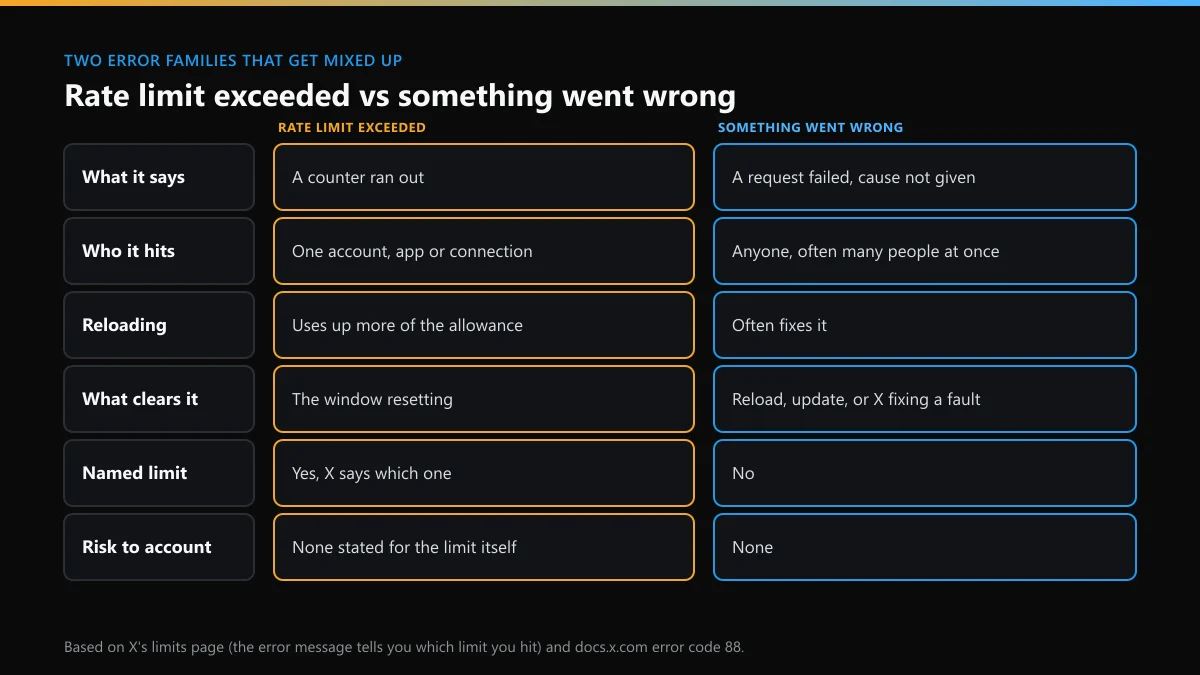
The wording varies by screen, and people search for each version: "Twitter oops something went wrong", "Something went wrong, try reloading", "X something went wrong, try again", and on sign-in pages "Something went wrong, please try again" with Twitter's later added. They belong to one family.
| Where you see it | Most likely cause | First move |
|---|---|---|
| Timeline or a single post, with a Retry button | A failed request or a brief fault at X | Reload once |
| Whole page, signed out | A blocked script, an extension or a stale cache | Open a private window |
| Login or password reset | Too many attempts, cookies off, wrong device clock | Wait 15 minutes, then one try |
| Sending a DM, a follow or a post | A limit, or a restriction on the account | Check which action fails |
| Everyone you ask sees it too | An outage | Wait; nothing on your side helps |
A quick test separates the two. Open X in a private browser window without signing in, or ask someone on another network. If their Twitter says something went wrong at the same minute, the fault is X's. If only your account fails, and only on one action, you're looking at a limit.
Twitter something went wrong, try again: what to do, in order
Go from the cheapest check to the most disruptive, and stop as soon as one works. The order matters because the early steps cost nothing, while the later ones sign you out or wipe saved data.
- Reload once, then wait a minute. A second and third reload in quick succession add requests without adding information.
- Check whether it's only you. Try a private window, mobile data instead of Wi-Fi, or a friend's account.
- Turn off the VPN and extensions. Ad blockers and privacy extensions block scripts X needs, and a crowded VPN address shares its request count with strangers.
- Update the app or clear the site's cache. An old build can call endpoints X has changed.
- Review connected apps. In Settings and privacy, open Security and account access, then Apps and sessions, and revoke anything you don't use. Each one draws on your API allowance.
- Sign out and back in. Do this last, and only once. Repeated logins are counted as well.
If the error names a limit at any point, stop the list there and wait for the window instead.
Why are you X rate limited when you barely used the app?
Because the count covers more than your thumbs. The limits page says limits "include actions from all devices, including web, mobile, phone, API, etc.", and that "API requests from all third-party applications are tracked against the hourly API limit". Its own conclusion is that people who connect several third-party apps "will therefore reach the API limit more quickly".
That explains most surprise limits. A scheduling tool, an analytics dashboard and an old giveaway app you authorised in 2021 all spend from one hourly pool, whether or not you opened X today. Browser extensions that refresh your feed in the background do the same on the website. A hijacked account is the worse version: if posts, follows or DMs you didn't send are eating the allowance, change the password and revoke sessions before you worry about the limit.
Shared connections are the remaining cause. Offices, campuses and VPN exits put many users behind one address, and limits that apply to signed-out traffic are shared across it. That is why "X rate limit exceeded" sometimes shows up on a profile you opened from a search result before you even logged in.
The weekend that put "rate limit exceeded" on everyone's screen
Most people met the phrase on 1 July 2023. That Saturday, timelines stopped loading worldwide, and Elon Musk announced temporary reading limits to counter what he called extreme levels of data scraping: 6,000 posts a day for verified accounts, 600 for unverified ones and 300 for new unverified accounts.
The numbers moved twice within hours. Coverage from that weekend records a first rise to 8,000, 800 and 400, and a second to 10,000, 1,000 and 500. X never added a reading cap to its limits page, and the page we read in October 2026 doesn't mention one. What survived is the habit of blaming every empty timeline on that cap. Today an empty timeline with "rate limit exceeded on X" is more often a signed-out or shared-connection limit, or a plain outage.
The episode also left a rule of thumb that still holds: when rate limits on Twitter hit everyone at once, the cause is a decision or a fault at X, and no setting on your side shortens it.
Rate limit exceeded on X for developers: error 88 and HTTP 429
For anything built on the API, the message is exact. X's developer documentation on rate limits says an over-limit call gets a 429 response whose body carries code 88 and the message "Rate limit exceeded". Windows are "usually 15 minutes or 24 hours", and limits are listed per 15 minutes unless an endpoint says otherwise.
Three response headers tell you where you stand: x-rate-limit-limit for the ceiling, x-rate-limit-remaining for what is left, and x-rate-limit-reset, a Unix timestamp for the moment the window reopens. The documented recovery is short. Read the reset header, wait until that time, and back off exponentially if calls keep failing. Limits are counted per user when a user token signs the request and per app with a bearer token, so one busy customer can exhaust a shared app limit for everybody else.
This is the only place where "how long" has a precise answer, down to the second. If you run a bot or a dashboard and users report "X rate limited" errors, log that header before changing anything else.
Does being rate limited on Twitter put your account at risk?
Not by itself. The limits page describes an error message and a wait, with no penalty attached. The same page also warns that the 400-follow figure is "a technical account limit only, and there are additional rules prohibiting aggressive following behavior", so staying under a ceiling doesn't make a pattern acceptable.
Three states get confused here. A limit blocks one action and ends by the clock. A lock asks you to confirm a phone number, an email address or a puzzle, and ends when you do. A suspension is a decision about the account, and it ends only through an appeal. If you hit the same limit every day, the count itself is telling you something about an app or a habit worth changing, and people who try to dodge limits with scripts or spare accounts move from the first state towards the third.
Rate limits while you hunt for a username
Handle searches are where ordinary users trip limits fastest, because one person can type forty candidates in five minutes. Sites that test names in bulk hit the same wall on their side, which is why a bulk Twitter handle checker can report a taken name as free when its lookups start failing.
Slower methods are more accurate anyway. Our Twitter username check walkthrough uses X's own form, and the guide on how to check Twitter name availability explains what each answer means. When the form refuses a name that looks free, the page on why a Twitter username is unavailable lists the reasons, and there's a tested list of available Twitter usernames and the tweaks that produced them.
A limit can also strike in the middle of a login loop, usually after too many guesses at your own handle. If that's you, the steps for a forgotten Twitter username avoid the guessing. For a name someone else holds, start with whether X deletes inactive accounts, then read how to get an inactive Twitter username and what's realistic when you want to get a taken Twitter username. X's own lanes are described in claiming a Twitter handle.
Money is the last route, and the riskiest. We've looked at what it means to buy a Twitter handle, how a Twitter handle marketplace operates, and what sits behind a Twitter username for sale listing.
When the errors start because someone is targeting you
A limit can be a symptom. An account under a reply flood, an impersonation wave or a doxxing thread generates frantic activity from its owner: blocking, reporting, messaging friends. That owner is often the one who ends up capped. Report in batches, with evidence, and let the counters breathe.
On X, threats and exposed personal details go through the routes in our guide to Twitter blackmail and doxxing. Campaigns rarely stay on one platform, so the same week often means filing on Instagram too. These pages set the two side by side: reporting harassment on Instagram and X, what to do when someone is impersonating you on Instagram or X, the options after someone posted a picture of you without permission, who is eligible to file an Instagram trademark report, and whether you can delete someone else's Instagram account.
For Instagram alone, begin with how to report someone on Instagram, or report a single Instagram post when one item is the problem. Whole profiles are covered in reporting an Instagram account or page, and the status of each web form is in our Instagram report forms list. People worry about being named, so we answered whether they'll know you reported them, and a mistaken report has its own page on un-reporting an Instagram post.
Harder cases have dedicated routes: reporting an Instagram scammer, an Instagram blackmail or sextortion report, who can file an Instagram DMCA takedown, the legal request routes at Instagram, and what separates removing an account, a post or a Reel.
The rest of our X reporting and recovery guides sit on the solutions page, and the Twitter Ban Service home page explains how we take cases. If an account that breaks the rules is behind your trouble, send us the links and screenshots and we'll say plainly whether X is likely to act.
FAQ
Can I pay to remove a Twitter rate limit?
A Premium subscription raises some ceilings, because the 50-post and 200-reply figures on X's limits page are written for unverified accounts. It doesn't remove limits, and nobody outside X can reset a counter for you. Anyone selling a rate limit bypass is selling a script, which is what X's automation rules forbid.
Does a VPN fix rate limit exceeded on X?
Only when the limit sits on the connection, as it can on a shared office, campus or VPN address that many people use at once. Account limits follow the account onto every network and device, so switching servers changes nothing there.
Why does Twitter say oops, something went wrong, please try again when I log in?
A login error usually comes from a blocked cookie, an old app build, a wrong device clock or too many attempts in a short time. Wait a quarter of an hour before trying again, since repeated attempts are counted too, then use one clean browser window without extensions.
Is X rate limited for everyone today?
Sometimes. X's limits page says limits may be temporarily reduced during periods of heavy site usage. If friends on other accounts and networks see the same message at the same minute, the cause is on X's side and waiting is the only fix.
Will my posts still be visible while I'm rate limited?
Yes. A limit stops the capped action for a while, such as posting, messaging or following. Your profile and existing posts stay public, and people can still reply to you and message you.
How many times can I change my Twitter username before I'm rate limited?
X publishes no number. The limits page lists email changes at 4 an hour and says nothing about usernames. If a change fails after several tries in a row, stop for an hour before the next one.