8 October 2026 · Twitter Ban Service · 11 min read
Instagram report forms: which one fits, which still open, and where your report number is
Instagram report forms handle what the in-app Report button can't: impersonation, privacy, copyright, trademark, counterfeits, under-age users, defamation and IP retractions. When we opened them on 8 October 2026, most loaded without an Instagram login. Intellectual property reports send you an automated email with a unique report number; ordinary in-app reports show a status in Support requests instead.
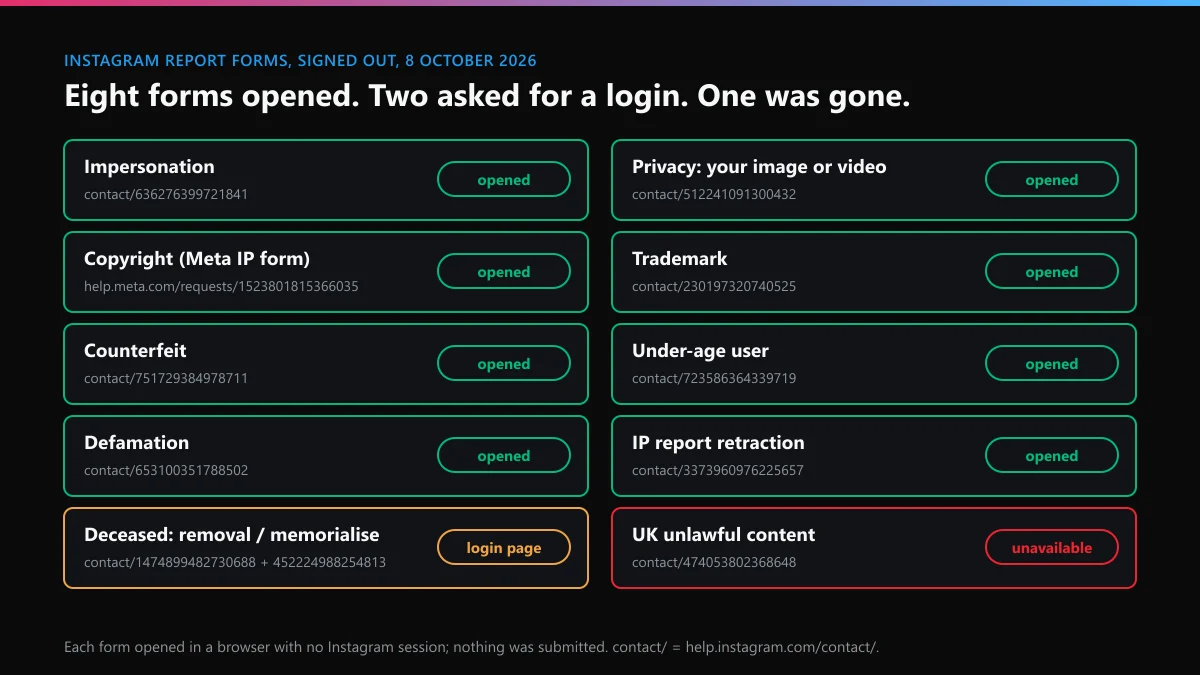
Which Instagram report form fits your problem?
The one written for the harm you can prove, and there are fewer than people think. Most trouble on Instagram, such as spam, scams, bullying, nudity or hate, has no web form at all and goes through the Report button. The forms exist for cases where the reporter may not have an account, or where Instagram needs a legal declaration. On 8 October 2026 we opened every form we could find links to in a browser with no Instagram session, read the first screen, and submitted nothing. Here's what came back.
| Your problem | The form | What we saw on 8 Oct 2026 |
|---|---|---|
| An account pretending to be you, a friend, or someone you represent such as your child | Impersonation form | Loaded with no login. Three situations to pick from; the third, "I can't log into my old account", is a recovery route, not a report |
| A photo or video of you posted without your consent | Privacy violation form (contact/512241091300432) | Loaded. It says the channel is reserved for privacy problems with your own image or video |
| Your photo, video, music or writing copied | Meta Intellectual Property Reporting Form | Loaded. A "Log in" link sits in the corner but isn't required |
| Your registered brand name or logo used | Trademark Report Form (contact/230197320740525) | Loaded, opening with a pitch for Brand Rights Protection |
| Fake goods sold under your mark | Counterfeit Report Form (contact/751729384978711) | Loaded, same pitch first |
| A user younger than 13 | Under-age form (contact/723586364339719) | Loaded. It asks only for the username |
| False statements damaging your reputation | Defamation Reporting Form (contact/653100351788502) | Loaded. The first question is which country's law you rely on |
| An intellectual property report you filed by mistake | IP Retraction Form (contact/3373960976225657) | Loaded. It needs your original report number |
| A deceased person's account | Removal (contact/1474899482730688) and memorialisation (contact/452224988254813) | Both sent us to the Instagram login page |
| Content unlawful under UK law | UK form (contact/474053802368648) | Redirected to a Meta request page that said "Sorry, this content isn't available right now" |
Two notes on reading it. "Loaded" means the first screen appeared, not that every branch works signed out. And the redirects may depend on where you connect from; we checked from one connection only, so treat the last two rows as a warning to check yourself rather than a verdict.
How do you report to Instagram when no form fits?
From inside the app, on the thing itself. If you're wondering how to report to Instagram something like a scam DM, a cruel comment or a spam account, the route is the three dots next to it, then Report, then the reason. Instagram's help page on reporting a post or profile walks through it, and comments and messages follow the same pattern.
- Open the post, comment, chat or profile you want to report. Search the username yourself rather than following a link you were sent.
- Tap the three dots, or press and hold a message or comment.
- Choose Report, and Report account if the whole profile is the problem.
- Pick the reason you can show, then answer the follow-up questions.
- Screenshot what you reported and note the time. The account can rename itself tomorrow.
An in-app report goes to the same reviewers whether you tap it once or ten friends tap it ten times. Instagram's guidance on how it decides what to remove says the number of reports doesn't decide the outcome, so spend the effort on picking the right reason.
Can you report an Instagram account online, without the app?
Yes, two ways, and which one depends on whether you have an account. Searches like "report instagram account online" and "report instagram account form" tend to mix them up.
Signed in on a computer, go to instagram.com, open the profile, click the three dots next to the Follow and Message buttons, then Report. It's the same menu as the app, with the same reasons.
With no account, or locked out of yours, only the web forms work, and only for what they cover. For a fake profile using your face or name, the impersonation form is the one people mean by an Instagram account report form. For harassment or a scam there's no signed-out route; a friend with an account has to report it from the profile.
If the account copying you also blocked you, the form is the better path anyway. It asks for the username and your proof of identity, and it never needs you to open the profile.
What does the Instagram intellectual property report form ask for?
Proof that you own the right, and enough of your identity for Meta to pass on. The Instagram intellectual property report form is now Meta's shared form, and its first screen asks two things: "Where are you asserting rights?" and "Are you the rights owner?", with three answers. Yes, authorised to represent the owner, or No. Choose No and the form stops, because reports must come from the owner or someone acting for them.
As the Instagram copyright infringement report form it then wants your full name, postal address and phone number, the URLs of the copied posts, a description of your original work, and a signed statement that the report is accurate. Meta's intellectual property transparency page says valid reports are typically actioned "within a day or less".
- Copyright covers creative work such as photos, video, music and text. Trademark is for a registered brand name or logo, and that form wants the registration number.
- Instagram's copyright help says whoever takes a photo is likely to own it, and appearing in a photo doesn't make you the owner. A photo of you that someone else took goes to the privacy form.
- Mind which email you give. The poster usually gets the rights owner's name and that address, so a work account keeps your personal inbox out of it.
The volume is real. In Meta's Instagram DSA report for January to June 2026, 94,759 of the 388,783 notices EU users filed were about intellectual property, close to one in four.
Where is the copyright report form in the Instagram Help Center?
Behind Meta's shared form, not on an Instagram page any more. Anyone looking for the copyright report form in the Instagram Help Center will still find the copyright articles there, but the form itself now lives on help.meta.com. The old address many guides still print, help.instagram.com/contact/552695131608132, was redirecting to that Meta form when we checked on 8 October, so an old bookmark works for now.
There's one alternative: Instagram's designated DMCA agent takes copyright notices by email at [email protected] or by post to Meta in Menlo Park. It covers copyright only, not trademarks, and the notice must be complete, which in practice means the same details the form asks for. The form is easier to get right, and its confirmation email carries your report number.
What is an Instagram report number, and how do you find it?
It's the reference Meta gives an intellectual property report. Instagram's help page on what happens after a trademark report says anyone who files by form or email receives "an automated email that contains information about your report, including a unique report number", and tells you to save it. If you're wondering how to find report number Instagram issued, it isn't in the app. It's in that email.
- Search the inbox of the address you typed into the form, spam folder included, for Instagram or Meta mail from the day you filed.
- Check the reply thread. If Meta later asks for more detail, answer that same email so the number stays attached.
- Got a "copyright report" email you didn't expect, with a number attached? Open Accounts Center, then Password and security, then Recent emails. Instagram lists there the emails it sent you in the last 14 days, so a notice missing from that list deserves suspicion.
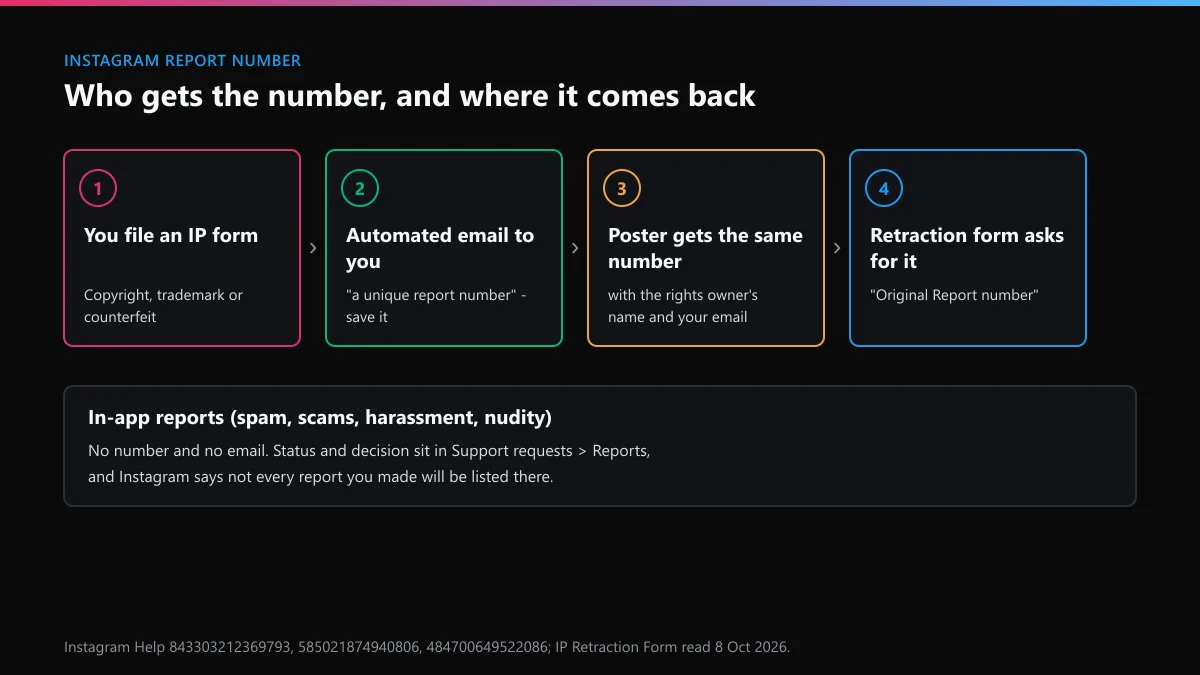
The same Instagram report number goes to the person whose post was removed, with the rights owner's name, your email and their appeal instructions. And it's the key to undoing a report. When we read the IP Retraction Form on 8 October, the field was labelled "Original Report number", explained as "the case number you received when you submitted your report". Everyday in-app reports don't send that email. Their status sits under Settings, Help, Support requests, Reports, and Instagram warns that not every report you made will be listed there.
Why can't you report an Instagram account?
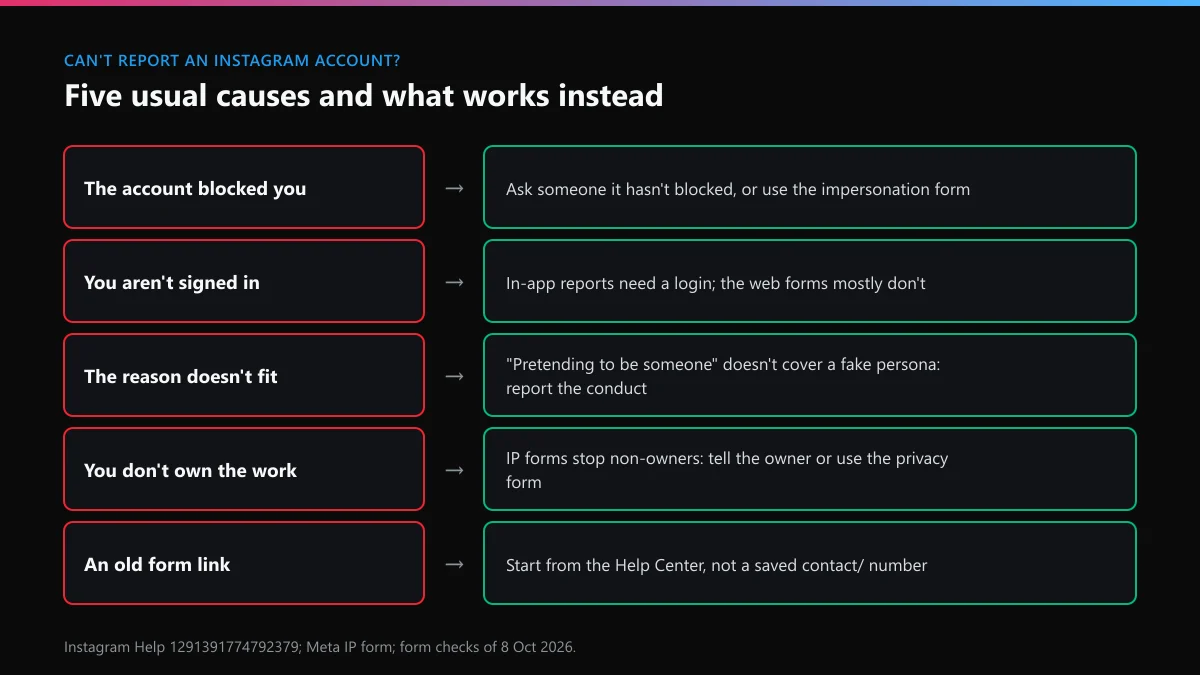
Usually for one of five reasons, and each has a workaround. When people search "can't report instagram account", the button is rarely broken.
- It blocked you. You can't open the profile, so you can't reach its menu. Ask someone it hasn't blocked to report it, or use the impersonation form if it's copying you.
- You're signed out. In-app reports need a login. Most web forms don't, but on 8 October the two deceased-account forms sent us straight to the login page.
- The reason doesn't fit. Impersonation reports, per Instagram's own help article, cover an account copying a real person, "but not for misrepresenting itself". A fake persona that copies nobody gets reported for what it does: spam, scam messages, harassment.
- You don't own the work. The IP forms stop at "No". Tell the owner, or if it's a photo of you, use the privacy form.
- The link is dead. Old contact numbers get retired. The UK form we tried led to an unavailable page, so start from the Help Center rather than a link saved in an old guide.
And sometimes there's nothing left to report. The under-age form says it won't confirm a deletion; you simply stop being able to see the account. A profile that vanished after your report may already have been dealt with.
Which X routes match the Instagram forms?
Someone who builds a fake or a harassment account on Instagram often has one on X as well, and X sorts the same problems differently. These are the closest matches:
| Instagram route | What changes on X | Our guide |
|---|---|---|
| Privacy form for your image | X takes private information and intimate media reports, including threats to post them | blackmail and doxxing reports on X |
| In-app spam report | Bot swarms are reported account by account as spam or platform manipulation | removing bots from your X replies |
| Trademark form for a username | X can release a handle that infringes a registered mark | recovering an X username someone else holds |
| Impersonation form | An impersonator may already hold your name, so secure what's left | claiming a handle on X |
Before you claim anything, test the name. Checking whether an X name is free takes a minute, and our X handle checker runs the variants. A username check on X returns a reason, and an X username marked unavailable isn't always taken. Our list of X usernames that were still free shows which tweaks tend to land.
If an old, dead account holds the name, read whether X clears inactive accounts and how to get an inactive X username. Be careful with money. We've written about paying for an X handle, the markets where X handles change hands, and X usernames advertised for sale; X's rules ban selling usernames, and a bought one can be pulled.
What if the account you reported reports you back?
It happens often enough to plan for. Wrongful removals aren't rare either. In the same Meta DSA report, Instagram users in the EU filed 7,816,585 complaints about account suspensions or terminations in the first half of 2026, and 2,838,533 of them, about 36%, ended with the decision reversed. On Instagram, your Account Status page shows what was removed and lets you ask for a review.
On X, start with getting a suspended X account back; a ban labelled permanent has its own route in our permanent suspension appeal guide, and the unban options for X cover the rest. If the account still works but nobody sees your posts, file a shadow ban appeal on X, then work through removing an X shadow ban, and keep to the habits that avoid an X ban while you report a lot.
Locked out instead? See unlocking an X account, our Twitter account recovery walkthrough, or the recovery path that matches your case. Missing details have fixes too: recovery with no username, finding a forgotten X username, and the options for an X account deleted over 30 days ago.
FAQ
Is there one Instagram form for reporting everything?
No. The web forms cover impersonation, privacy, intellectual property, under-age users, defamation and a few legal cases. Spam, scams, bullying, hate and nudity are reported with the Report button on the post, message or profile, which needs an Instagram login.
Does Instagram email you after you report someone in the app?
Not with a report number. In-app reports show up under Support requests, where you can follow the status and the decision. The emailed confirmation with a unique number comes from intellectual property reports filed by form or email.
How fast does the Instagram copyright infringement report form get results?
Usually fast once the report is complete: Meta's transparency page puts the typical turnaround for a valid one at a day or less. In the EU, Meta's January to June 2026 report gave a median of 28.89 hours from notice to action, counting only the notices it acted on.
Can I file an Instagram report form for someone else?
Sometimes. The impersonation form has a branch for someone you represent, such as your child. The intellectual property forms accept an authorised representative of the rights owner. A fan or a stranger can't file a copyright or trademark report for someone else.
Will the person I report on a form see my name?
Only on intellectual property reports. Meta usually passes the rights owner's name, your email, the report details and the report number to the person whose post was removed. Other reports don't reveal who filed them.
Can I cancel an Instagram report after sending it?
Only an intellectual property report. The IP Retraction Form asks for the original report number and the email used on the report, and the content can then be restored. Ordinary in-app reports can't be withdrawn.