1 October 2026 · Twitter Ban Service · 14 min read
Twitter account recovery without username: find the one channel X can still reach
Twitter account recovery without username is the easy case: X's Forgot password? page takes the account's email address or phone number in place of the @handle. The hard case is losing both of those. Without a mailbox or a verified phone, X stops troubleshooting, so the fix starts at your email provider or phone carrier.
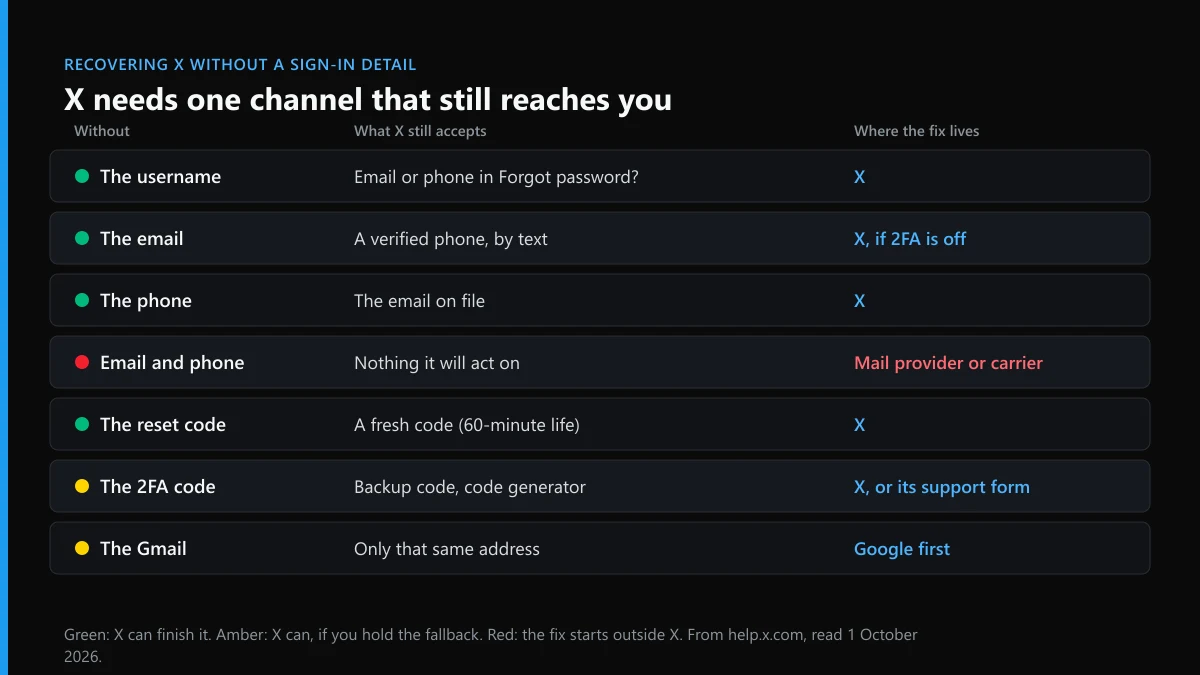
Which channel is missing, and which one does X still reach?
X recovers accounts through two channels only: the email address and the verified phone number. Everything else, the handle included, is a way of pointing at them.
So the useful question is not what you have forgotten but what still reaches you. X's password reset page says a reset needs access to the phone number or email tied to the account, and that without either you may need a new account. Each row below names one missing piece and the limit that usually trips people up.
| You are without | What X still accepts | Where the fix lives | The limit to know |
|---|---|---|---|
| The username | The email or phone, typed into Forgot password? | X | A number shared by two X accounts cannot start a reset |
| The email mailbox | A verified phone, by text | X | No text resets once login verification is on |
| The phone number | The email on file | X | A dropped number may now belong to a stranger |
| Email and phone together | Nothing it will act on | Your mail provider or carrier | X will not close the account or free the handle |
| The reset code | A fresh code | X | Each code lasts 60 minutes |
| The two-factor code | A backup code or the app's code generator | X, then its support form | Backup codes must be used in order |
| The Gmail behind a Google sign-in | That same Gmail address only | Picking another Google account opens a new X account | |
| An address from years ago | The same address, if its provider kept it | The old provider | Gmail and Outlook close after two idle years, Yahoo after 18 months |
Read it as a chain. Every row that ends at X is an afternoon's work. The rows that end somewhere else are longer, because X will wait for you to come back with a working mailbox or number, and it will not shortcut that step for anyone.
Can you recover a Twitter account without the username?
Yes, and you lose nothing by skipping it. The @handle is a public label; X checks ownership through the email and phone behind it.
To recover a Twitter account without the username, open the sign-in page on x.com, mobile.x.com or the app, tap Forgot password?, and type the email address or phone number instead. X then asks where the code should go and sends one that stays valid for 60 minutes. There is one exception on the reset page: if more than one X account uses your phone number, that number cannot be used at this step, so fall back to the email.
The username only adds one thing. Enter a valid handle and X asks you for the email tied to it, which turns it into a way to test which of your addresses is the right one. If you are trying to dig up the handle itself, finding a username that has slipped your mind lists where it is usually still written down. The handle also stays with the old account whatever happens next; X's position on releasing dormant usernames explains why nobody, you included, can claim it back from a stranded profile.
Twitter account recovery without email: will the phone carry you?
Only if the number was verified on the account and login verification is off. In that case X texts the reset code instead of emailing it.
X's page on email address access is direct: if your mobile number is on the account, enter it on the reset page and you will be offered a reset by SMS. The screen then shows "Text a code to my phone ending in" followed by two digits. Treat those digits as a test. If they are not the end of a number you hold today, the text is going to an old line, and possibly to whoever has it now.
Two things block the text route. X turns off SMS resets for accounts enrolled in login verification, leaving email as the only reset channel for them, and the shared-number rule above still applies. When the code does arrive, change the email before anything else: Settings and privacy, then Your account, then Account information. X lets one address sit on only one account, so pick an address no other X profile of yours uses.
If you suspect someone else changed the email, that is a hijack rather than a lost mailbox, and the full set of X recovery routes handles it separately.
Twitter account recovery without phone number: when is the email enough?
For the password reset, always. The email route works on every account, including those with two-factor authentication. The phone only returns as a problem at the second step, when X asks for a login code.
That second step changed shape a while ago. X's two-factor help page notes that from 20 March 2023 it stopped supporting text-message 2FA for anyone without a Premium subscription. An account without Premium that still has 2FA switched on therefore leans on an authenticator app or a backup code, not on the phone number at all.
The bigger risk is a number you gave up. The FCC's 2017 order on reassigned numbers put the scale plainly: "Approximately 35 million telephone numbers are disconnected and aged each year" in the United States (FCC 17-90). Federal rules let a residential number go to a new customer after an aging period of 45 to 90 days (47 CFR 52.15). Princeton researchers who studied recycled numbers in 2021 watched 200 of them for a week and found 19 still receiving security or passcode messages meant for someone else.
So if the old number sits on your account, delete it the moment you are back in. If the number is still yours and only the handset or SIM is gone, ask the carrier for a replacement SIM or an eSIM transfer first; the channel is the number, not the phone.
How to recover a Twitter account without email and phone number
Through X alone, you cannot. X states that without the account's email address or verified mobile number it is unable to continue troubleshooting, and that it will not deactivate the account or free up the username on your behalf.
The same page adds two lines people tend to miss. The account may be removed later under X's inactivity policy, and you are free to sign up for a new one. It also explains why its support form asks you to verify a phone: if the number you enter was previously associated with the account, X may review the request and re-add it, which opens the text route again. Re-adding a number resets one setting to default, so others can find the account by that number until you switch discoverability off.
The rest of X's advice points outside X. Its page lists contact links for common email providers and says to regain the mailbox first, then request a new password. When we read that list on 1 October 2026 we counted it: twelve lines, from aol.com and att.net down to yahoo.co.uk. It has plainly not been touched in years. Myspace.com and inbox.com are there; outlook.com, icloud.com and Proton are not. If your address ends in one of the missing domains, go straight to that provider's own recovery page; the gap in X's list says nothing about your chances.
Recovering a Twitter account without email or phone number is really recovering one of those two. Work in this order:
- Keep any signed-in session alive. A password reset logs out every session, while an open app lets you change the email under Account information without the old one.
- Pin down the exact address. Search every mailbox you still use for mail from x.com or twitter.com, and check Google's linked apps page and Apple's Sign in with Apple list, both covered below.
- Recover that mailbox at its provider. Use Google's account recovery page, the Microsoft account recovery form or Yahoo's Sign-in Helper, from a device and place you have signed in from before.
- If the mailbox is gone for good, try every number you have owned. Enter each one on the Forgot password? page, and get a replacement SIM first for a number that is still yours.
- Reset from the channel you revived. Enter X's code within 60 minutes, and request a fresh one rather than retrying an expired code.
- Add a second channel before you do anything else. Put on a current phone and an email you read, and store a backup code offline.
Who else claims they can get you back in without the email?
Nobody outside X and your mail provider can reach the account. A stranger offering a recovery for a fee wants your money, your remaining logins, or both.
These offers cluster under any post that says "locked out of my Twitter". The pitch is the same one behind report bots sold as a fix for X problems and so-called X ban tools: pay first, trust a promise nobody outside X can keep. The same sellers relabel it as Instagram spam-report bots, mass-reporting packages for Instagram or the TikTok version of the same promise. Our check of paid mass-report sellers turned up "proof" screenshots with nothing actually removed, and a recovery pitch leans on the same kind of evidence. X says it never asks for your password by email, Direct Message or reply, and the signs that a profile is running a scam apply to recovery sellers too.
Some people think about taking X to court over a stranded account. Before paying a lawyer, read who a lawsuit over X would actually name, which covers X's venue clause and what a subpoena to X really yields.
How to recover a Twitter account without Gmail or a Google sign-in
First work out which setup you have. Either a Gmail address is simply the email on file, or you signed in with Google and may never have set an X password at all.
A Gmail address on file. Recover the Gmail before you touch X. Google's recovery tips ask you to use a device and a location where you usually sign in and to avoid skipping questions. Check the clock too: under Google's inactive account policy, a personal account unused for two years can be deleted, with deletions starting no earlier than 1 December 2023. Google also says usernames are not recycled. A deleted Gmail address can never be registered again, by you or by anyone else, so X's reset mail to it will never land. The phone is then your last channel.
A Google sign-in. X's page on single sign-on warns that choosing a Google account with a different email "will result in creating a new" X account. That is the trap: people locked out tap Sign in with Google with today's Gmail, land in an empty profile and think their posts were wiped. Check which Google account holds the link on Google's linked apps page, under Sign in with Google.
This is also how to recover a Twitter account without username and password when you never had a password. X says single sign-on users who meet a password prompt must create one through Forgot password?, and that code goes to the Gmail. Apple sign-ins add a twist: with Hide My Email, Apple gives X a random privaterelay.appleid.com address that forwards to your inbox. Old X mail shows that relay address in its To line, and typing it into Forgot password? works.
Can you recover access to an old Twitter account you no longer have the email for?
Sometimes. It depends on whether the old mailbox still exists at its provider, and each large provider deletes idle mailboxes on its own clock.
- Gmail: two years without use, as above, and the address is never issued again.
- Outlook, Hotmail and Live: Microsoft's activity policy requires a sign-in at least once in a two-year period to keep the account active.
- Yahoo: a mailbox left alone for 12 months becomes inactive, and after 18 months in total the account is scheduled for deletion. Yahoo adds that deleted IDs are not made available to anyone else.
- Work, school and internet-provider addresses: these usually end with the job, the course or the contract, and the organisation that ran them is the only one who can reopen them.
If you want to recover access to an old Twitter account you no longer have the email for, check first that the account itself is still there. Open x.com/ followed by the handle in a private window. X's inactivity policy asks people to log in at least every 30 days, and an account left for years can be gone on X's side even when the mailbox survived.
If both still exist, recover the mailbox and reset. If the mailbox was deleted and no phone number is left, the account stays where it is. An estate executor or someone with power of attorney is the narrow exception, as who apart from the owner can close an X account explains. And if you do get back in only to leave, clearing years of old posts first and then deactivating the account the right way keeps the exit tidy.
How do you recover a Twitter account without the verification code?
Work out which code is missing. Forgot password? sends a reset code, while two-factor authentication asks for a separate login code after the password, and each one has its own fallback.
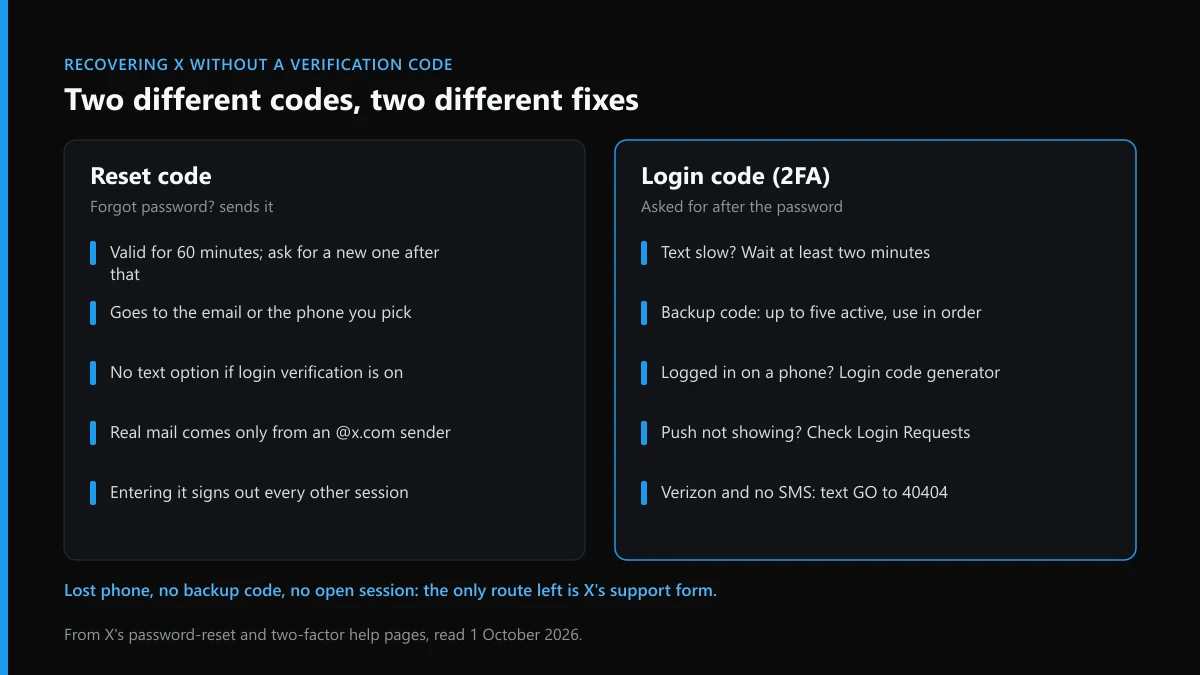
The reset code lives for 60 minutes. After that, request a fresh one instead of retyping the old one, and check the spam folder; X says it sends email only from @x.com. No text arriving on an account with login verification is expected, because text resets are switched off there.
The login code has more fallbacks than people expect. X's two-factor page says a texted code can take time, so wait at least two minutes. A backup code gets you in without the phone; you can hold up to five active codes, and using one out of order "will invalidate all previously generated codes", so try the newest first. If the app is still signed in on a phone, Settings and privacy, then Account, then Security, then Login code generator shows a working code. For push approvals, the Login Requests list in the same menu shows pending requests. Verizon customers who get no texts can send GO to the short code 40404. A third-party app needs a temporary password rather than a backup code.
Lost phone, no backup code and no open session is where the fallbacks run out, and X's page sends you to its support team. The complete route for a lost two-factor device covers that request step by step.
What can you report about your account while you are locked out?
Not the lockout itself, which breaks no rule. You can report whoever is using your name, photos or old handle while you cannot answer from the real profile.
Locked accounts attract copies. A fake profile built on your photos and tweets posted in your name by a copycat can both be reported from a new account, and X's impersonation report is the form made for them. For one post, follow the steps for reporting a single tweet; for the whole profile, use the profile-level report inside X, and check the report menu X gives every user to match the violation to the right option. The routes that can take an X account offline, the limits of what a report removes and how long X usually takes to act set expectations before you file.
Stolen material has its own forms: copyright removal on X, a DMCA notice against a copied post, and, for shop listings using your product photos, counterfeit reports X seems to ignore. If the copy is used to go after people, report it as targeted harassment or hateful conduct, and route pile-ons or fake job offers through the brigading and job-scam report. A post aimed at you personally can go through removing a post that targets you.
Resist answering a copy with a crowd. Why a pile of reports against one profile does little comes down to X weighing the violation, not the count, and which behaviour actually ends in an X ban shows what reviewers act on. Instagram works the same way, as Instagram's own takedown rules show. When an impostor is working your followers, send us the copy's profile link. Every X guide we have published is on the hub, and what Twitter Ban Service does and refuses is on the front page.
FAQ
Can X support recover my account if I have no email or phone?
No. X's help page on email access says that without the account's email address or verified mobile number it is unable to continue troubleshooting. It also will not deactivate the account for you or free up the username. Recover the old mailbox or number first.
Can X send the reset code to a new email address?
No. The Forgot password? flow only sends codes to the email address or phone number already on the account. You can add a new address once you are signed in, under Settings and privacy, then Your account, then Account information.
Why does X show only the last two digits of my phone number?
The text-reset screen reads Text a code to my phone ending in, followed by two digits, so the full number stays hidden from whoever typed the username. Use those digits as a check. If they do not match a number you hold, the code will go to someone else.
My old Gmail was deleted. Can I create it again to get the reset email?
No. Google says usernames are not recycled, so a deleted Gmail address cannot be registered again by you or anyone else. X's reset mail to that address will never arrive, which leaves a verified phone number as the only way back.
I signed in with Google and my X account is empty. What happened?
You probably picked a Google account whose email differs from the one on your X account. X's single sign-on page says doing that creates a new X account with that email. Sign out, then choose the Google account that matches your original X email.
How do I recover a Twitter account without username and password?
Start from the email address or phone number on the account, since Forgot password? accepts either one and the username then shows on your profile. If you signed up with Google or Apple and never set a password, the same flow creates one, with the code sent to that sign-in's email.
Can I recover an X account I made with Apple's Hide My Email?
Yes. Hide My Email gives X a random privaterelay.appleid.com address that forwards to your own inbox. Find it in the To line of any old X email, then type that relay address into Forgot password?; the code arrives in your normal mailbox.