28 September 2026 · Twitter Ban Service · 13 min read
How to recover X account access, then the reach you lost
How to recover X account access depends on what you still hold. With the email or a backup code, reset the password, then revoke every app and session a hijacker used. Lost two-factor needs a signed-in device or X Support. Reach problems are fixed by appealing the label on the limited post.
What does "recovering" an X account actually cover?
Three different things, and people searching for twitter x account recovery usually need only one of them.
The first is access: you cannot sign in because the password, email, phone or two-factor device is gone or was changed by someone else. The second is control: you are signed in again, but somebody else still has a working session, an app token or a seat on your X Pro team. The third is reach: the account works, yet replies vanish, search skips you, or photos sit behind a warning nobody clicks. Each layer has its own screen and its own fix, and an access fix does nothing for the other two.
This guide spends most of its time on the second and third layers. For a plain forgotten password or a changed phone number, the route through X's form is laid out in our Twitter account recovery walkthrough of the sign-in form. If the screen says "suspended", start with why X suspended your account instead, because none of the steps below lift a suspension.
| What you notice | Layer | First move |
|---|---|---|
| Password rejected, reset prompt appears | Access | Forgot password, then the support form |
| Posts or DMs you never sent | Control | New password, then revoke apps and sessions |
| 2FA code never arrives | Access | Oldest backup code or the in-app code generator |
| A post shows a "limited visibility" label | Reach | Appeal the label on that post |
| You cannot open sensitive media | Reach | Birth date, then age check where required |
| Your own photos appear behind a warning | Reach | Check how your media is marked, then appeal |
How do you recover a hacked X account when the intruder is still inside?
Change the password first, and assume the intruder still has a way in until you have closed every door on the list below.
X's page on compromised accounts treats a hacked account as one you can still reach, and its checklist runs in a fixed order. The detail most owners miss is in its first step. A new password "does not automatically log the account out" of the iPhone and Android apps, so an attacker holding a phone session keeps posting after your reset. You have to sign in on the web, open Apps and sessions, and revoke each one yourself.
- Change the password from the Password tab, or use Forgot password if you are already locked out. Pick one you have never used anywhere else.
- Check the email on the account. If verify@x.com wrote to say it changed and you did not change it, the link in that email reverses it.
- Open Apps and sessions, revoke every app you do not recognise, and log out all other sessions.
- If you use X Pro teams, remove any member you did not add.
- Update the password inside apps you do trust, or failed sign-ins from them can lock you out again.
- If you still cannot get in, file X's support request from the email tied to the account, with your username and the date you last had access.
That last detail matters more than it looks. X sends further instructions to the address it already holds, so a request filed from a new inbox goes nowhere.
What can a hijacker leave behind after you take the account back?
More than posts. A recover hacked x account job is half finished at the moment the password works again.
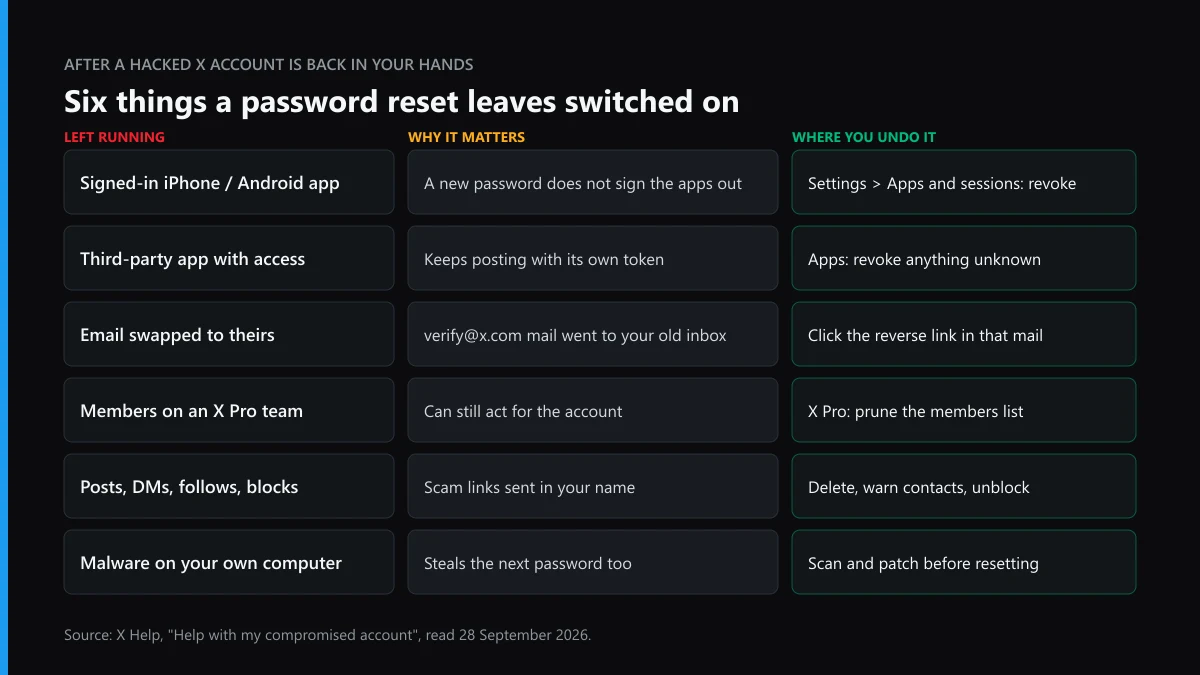
Takeovers of X accounts tend to follow one script: the attacker posts a crypto giveaway or a fake mint, sends the same link by DM to your followers, and follows a batch of accounts that boost it. Some also block you from your own replies so you miss the warnings. Clean up in that order. Delete the scam posts, then warn the people who got a DM, because a follower who clicked is now the next target. If there are hundreds of posts, read what bulk-deleting every tweet costs and where the limits bite before you pay a tool that wants your password.
Then check the profile itself. Intruders swap the name, bio and header to match a brand they impersonate. If any of those posts crossed into hateful conduct posted under your handle, delete them before X's enforcement reaches the account, because enforcement does not know who was typing.
Why did the attacker get past two-factor, or was it ever on?
Often it was switched off, or it relied on text messages to a number that could be moved.
The best-documented case is the U.S. Securities and Exchange Commission's own account. On 9 January 2024 someone took over @SECGov and posted a false bitcoin ETF approval. The SEC's statement on the incident gave two causes: the phone number on the account had been moved to another device in a SIM swap, and staff had disabled multi-factor authentication in July 2023 after an access problem and never turned it back on. For six months, a regulator's account was protected by a password and a phone number. The Justice Department later charged a man from Alabama in the case.
Text-message codes have been a paid feature since 20 March 2023, when X ended SMS two-factor for accounts without Premium. If yours still uses SMS, an authenticator app or a security key removes the SIM-swap path entirely.
How to recover your Twitter account after losing two-factor authentication
With a backup code you type it at the two-factor prompt and you are in. Without one, the answer depends on which devices still hold an open session.
X's two-factor help page lists more exits than most owners know about, and several of them work without any code:
- Phone still signed in: Settings and privacy, then Account, Security, Login code generator. The app shows a working code even in flight mode.
- The phone that enrolled 2FA: signing out of X on that device turns two-factor off, after which a username and password are enough.
- A browser still signed in on x.com: you can unenroll from two-factor there, or with SMS as the only method, click Delete my phone.
- A new iPhone restored from backup: X warns that iCloud backups alone usually do not keep the app key; an encrypted backup does.
When none of those exist and there is no backup code either, X's instruction is to contact its support team. That is the case where recovery really stalls, since the whole point of two-factor is that X cannot tell you from someone who only knows the password.
The backup code rule that locks people out twice
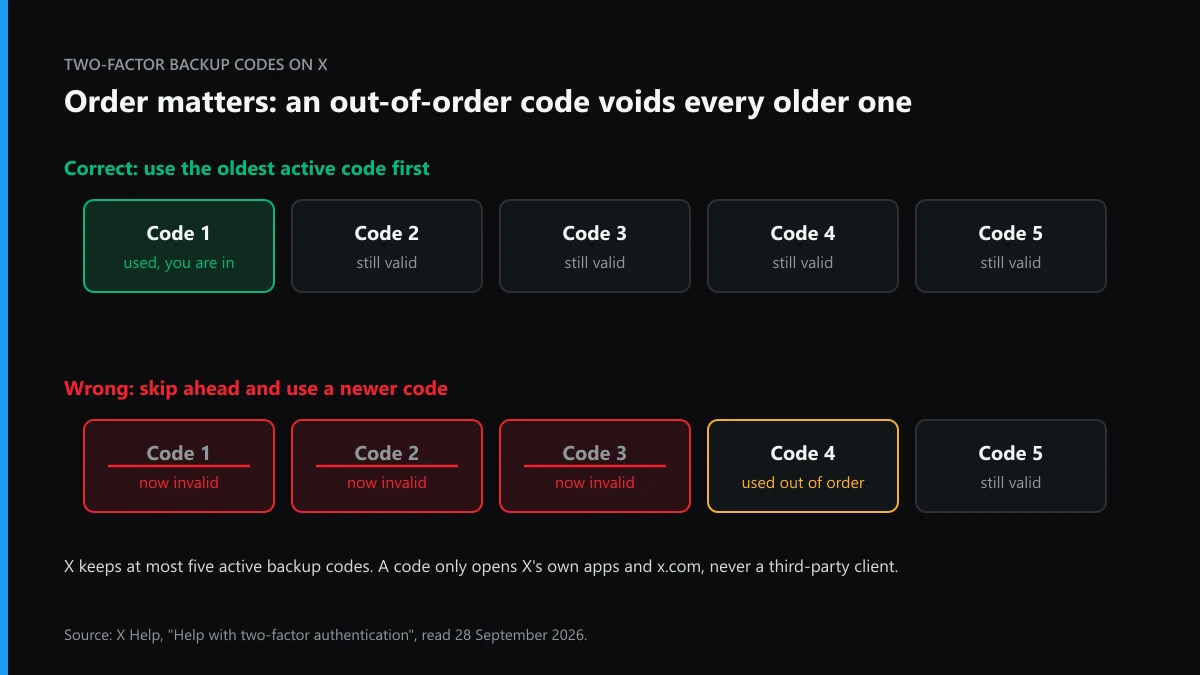
When we went through X's help pages for this guide on 28 September 2026, this was the line we had not seen spelled out before. X keeps up to five active backup codes and says to use them in the order you generated them, because "using a code out of order will invalidate all previously generated codes." Someone who saved the newest code in a password manager and the oldest on paper can burn both by typing the wrong one first. Two smaller rules follow from the same page: a backup code works only on x.com and X's own apps, never in a third-party client, and it is not the same thing as a temporary password.
How to appeal a shadowban on Twitter when X never uses the word
You appeal the label, not the shadowban. X restricts reach one post at a time and marks the posts it has limited.
X's page on enforcement options lists what "limiting post visibility" can mean: out of search, trends and recommended notifications, out of the For You and Following timelines, visible only on your profile, pushed down in replies, and with likes, reposts or replies switched off. Since April 2023, X says, those posts carry labels that tell both the author and viewers that visibility was limited, and "authors will be able to submit an appeal on the label." That appeal button on the labelled post is the documented route.
An account-wide status screen is a different story. In September 2023 X designer Andrea Conway previewed shadowban alerts in the notifications tab, after Elon Musk had promised owners would see their "true account status." The enforcement page we read documents labels on posts, not an account-level reach page, so treat any third-party "shadowban checker" as a guess about search results.
Before you appeal, rule out the ordinary causes
Most sudden drops we hear about have a mechanical cause. A locked account waiting on a phone or email check is removed from follower counts, reposts and likes until the check is done, which looks exactly like a shadowban from outside. A burst of identical replies or follows can trip spam limits. Links posted from an account that was hijacked last week may still be flagged as the scam they were. Fix those first, then appeal only the posts that carry a label.
Did a report campaign cut your reach?
Sometimes, yes, but reports trigger review, and the X Rules decide what happens next. We have looked at what mass reporting a Twitter account really does, at how a Twitter mass report bot is built, and at the mass-report sellers we checked one by one. The pattern is the same on other apps, from mass reporting on Instagram and Instagram spam report bots to whether mass reporting works on TikTok at all. Coordinated false reporting breaks X's own rules, so if you can date it, one factual sentence about it belongs in your label appeal. Paid Twitter report tools and so-called Twitter ban tools cannot restore reach for you either; the appeal is yours to file.
How do you unlock Twitter sensitive content on your own feed?
Tick one box in settings, then make sure X knows you are an adult. The box does nothing until the second part is true.
X's sensitive media help page puts the switch under Privacy and safety, in the Content you see section: check Display media that may contain sensitive content, and the setting saves itself. The catch sits in X's Adult Content policy, dated May 2024: users under 18, and viewers with no birth date on their profile, "cannot click to view marked content." So step one of how to unlock twitter sensitive content is often adding a birth date.
In some countries that still is not enough. X's age assurance page says the UK Online Safety Act, Ireland's Online Safety Code, the EU Digital Services Act and Australia's Online Safety Act require it to estimate or verify age. It checks existing signals first, including a completed ID verification, a legacy verified badge, or an account created in 2012 or earlier. After that it tries estimates from your email and phone number, and only then asks for a live selfie or a government ID. Until your age is settled, you "may not be able to access sensitive media." If X decided you are under 18 and you are not, the challenge goes to X Support through the app or website.
When the warning is on your own posts
This is the other half of the question. If every photo you post shows up behind a content warning, X has either applied a label to those posts or changed your account's media setting. The Adult Content policy says that accounts which keep posting unmarked adult material will have their settings adjusted "for you." If you post adult content, marking it yourself is the rule, and nothing here gets around that. If you do not, and your media is being warned anyway, appeal through the policy's appeal link and say plainly what your account posts.
When the recovered account still has a double out there
A takeover often leaves a copy behind: a lookalike account the attacker set up to catch followers who noticed something was wrong.
Treat that clone separately from your recovery. First, collect proof that it is a fake Twitter account built on your name. That means screenshots with URLs and dates, plus the DMs it sent. Impersonation removal on X has its own form, separate from the in-app report, and getting individual impersonating tweets removed follows a different path again. If the clone lifted your photos or videos, a DMCA report on the copied post or broader copyright removal on Twitter is often faster than an impersonation claim. For trademarked goods, see what to do when a counterfeit report is ignored.
Warn your followers with the signs of a Twitter scammer, especially the fake support accounts that reply to "I was hacked" posts. If the copy is part of a wider scheme, brigading and fake job-offer networks are reported as a group, not one handle at a time.
Which reports help, and which only feel like help?
One accurate report beats fifty angry ones, because X reviews against its rules, not against volume.
If you only need one post gone, how to report a single tweet on X is the right starting point. It is also worth knowing what a Twitter report can and cannot remove before you expect a whole account to vanish. For the account behind the attack, reporting an X account as a whole and taking down a Twitter account that broke the rules cover the evidence X actually weighs. Our page on how long X takes from report to ban sets expectations. If the clone keeps sending abuse to you or your followers, targeted harassment on Twitter is a separate policy with its own report reason.
Some people ask what it takes to get someone banned from Twitter after a hack, or who can delete someone else's X account. Only X can, and only for a rule or legal violation. Where the losses were real money, who you would actually sue over a Twitter hack is usually the person, not the platform.
When is it better to stop and start clean?
When X has no email or phone for you and no device holds a session, its own help pages say a new account may be the only option.
That is for a locked account whose contact details are gone, not a suspended one; opening a replacement for a suspended account is ban evasion. If you move on, the old handle may free up later through X's inactive-account rules. Our guide to claiming an inactive X username explains how that works. If you get the old account back but no longer want it, deleting a Twitter account permanently takes a 30-day deactivation window, and scam posts you could not clear yourself can go through a post removal service for X that files only where a rule was broken.
The same hygiene applies on your other apps. A password reused on Instagram is the next door a hijacker tries, and if a clone appears there, an Instagram account takedown follows Meta's own forms. Browse all of our X and Twitter solution guides, return to Twitter Ban Service's main page, or send us the handles and dates of the copycat if one is still live.
FAQ
Does changing my X password log the hacker out?
Not from the phone apps. X says a new password does not automatically sign the account out of X for iPhone or Android, so an intruder's app session keeps working. Sign in on the web, open Apps and sessions, revoke what you do not recognise and log out all other sessions.
How long does X take to answer a hacked-account support request?
X publishes no reply time for it. The compromised-account page says X sends further instructions to the email already tied to the account, so file from that address, include your username and the date you last had access, and watch that inbox and its spam folder.
Can I get SMS two-factor back without X Premium?
No. Since 20 March 2023 X has not supported text-message two-factor for accounts without Premium, and even with Premium it varies by country and carrier. An authenticator app or a security key works on free accounts and cannot be moved by a SIM swap.
Is there a way to check if my X account is shadowbanned?
X documents reach limits per post, not per account. A limited post carries a label telling you its visibility was restricted, and that label has an appeal. Third-party checkers only test whether your posts show up in search from a logged-out view.
Why can I still not see sensitive content after turning the setting on?
The setting only works for adults X can confirm. Without a birth date on your profile, marked media stays locked, and in the UK, Ireland, the EU and Australia X may also need to estimate or verify your age by selfie or ID first.
Should I pay someone who says they can recover my X account?
No. X sends recovery instructions only to the email on the account, so an outsider cannot file anything you could not. Accounts offering recovery in replies to hacked posts are a known scam, and the ones asking for your password or a code are trying a second takeover.