28 September 2026 · Twitter Ban Service · 14 min read
How to recover a Twitter account when X shuts you out: what you still hold decides the door
How to recover a Twitter account depends on what you still control. With the email or phone on file, X's Forgot password? link sends a code that works for 60 minutes. A lost 2FA phone needs a backup code, a hijacked login needs X's hacked-account form, and with neither contact left, X stops troubleshooting.
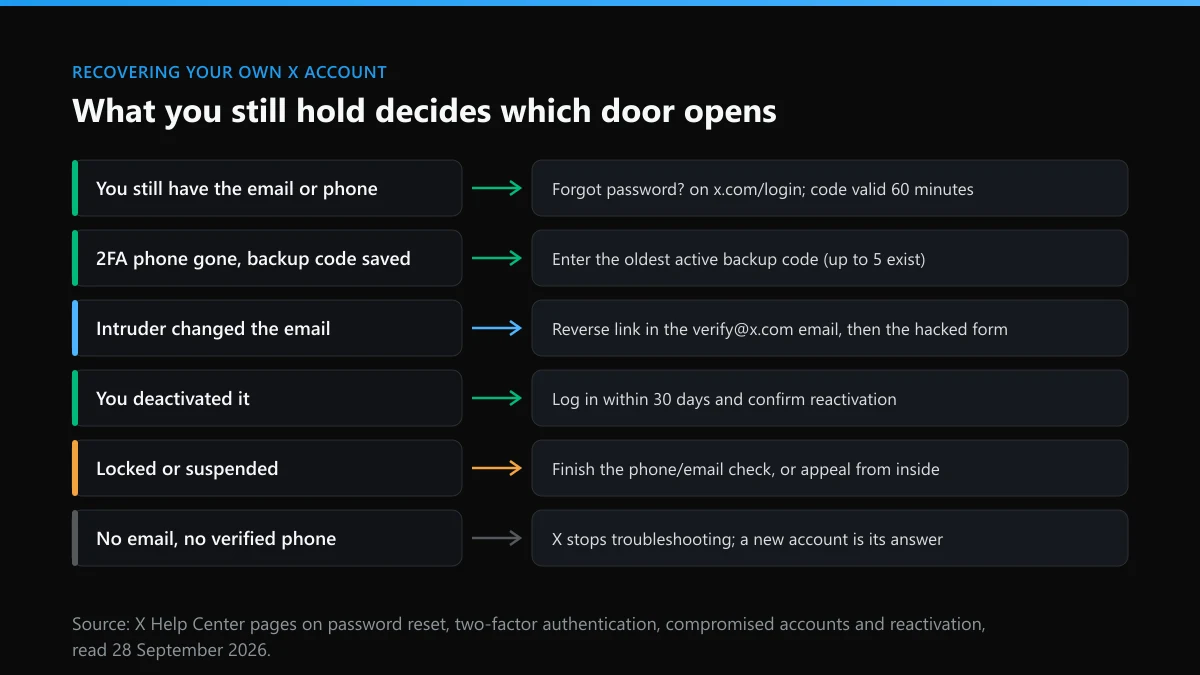
Which Twitter account recovery route fits what you still have?
Start from what is still in your hands, not from what went wrong. X verifies identity through the email address and phone number on the account, and every route below is a different way of proving you control one of them.
People lose access in six broad ways, and each has its own door. The table is the short version; the sections after it go through each row.
| Your situation | What X checks | Where you start | Published clock |
|---|---|---|---|
| Forgot the password, email or phone still yours | A code sent to that email or phone | Forgot password? on the sign-in screen | Code valid 60 minutes |
| 2FA phone lost or replaced | A saved backup code | The backup-code link on the 2FA prompt | None; up to five codes can be active |
| Hacked, and the email was changed | The original address, via X's change notice | The reverse link in the verify@x.com email, then the hacked-account form | None published |
| Too many wrong passwords | Nothing; you wait | x.com/login after the lock clears | About an hour |
| You deactivated it yourself | Your normal login | Sign in and confirm reactivation | 30 days |
| Locked or suspended by X | A phone or email challenge, or a review | The prompt on screen, or the appeal branch of the support form | None published outside the EU |
One row is missing on purpose: no email you can open and no verified phone. X's page on losing access to the account's email is blunt about it. Without one of the two, X says it is unable to continue troubleshooting, will not deactivate the account for you and will not release the username. That makes the old mailbox the first thing to rescue, through Gmail, Outlook or whichever provider holds it, before any form at X.
How does the Twitter account recovery process work when the email or phone is still yours?
It is a code-and-reset loop that takes a few minutes, and it signs every other session out, which is exactly what you want if a stranger was in.
X's password reset page sets out the steps, which are the same on x.com, mobile.x.com and the iOS and Android apps. This is the Twitter login account recovery flow most people need, and it runs entirely from the sign-in screen.
- Tap Forgot password? on the sign-in screen. It sits under the password box on the web and in both apps.
- Enter your username, email or phone number. The username is the safest start. A phone number shared by several X accounts cannot be used at this step at all.
- Choose where the code goes. X lists the email addresses and, if one is saved, the phone ending digits. Pick the one you can open now.
- Enter the code within 60 minutes. X's page gives every reset code, by email or text, a 60-minute life. After that, request a fresh one.
- Set a new password you have never used anywhere. The reset logs you out of every active X session, which cuts off anyone else who was signed in.
Two details trip people up. Text-message resets are switched off for any account enrolled in login verification, so a 2FA user resets by email only. And if you cannot remember which address you used, X suggests working backwards from the username: once you enter it, X asks for the email on the account, and the right guess unlocks the reset choices. Try every address you have ever owned, then every old phone number. That username-first search is also how X handles a login with no memory of the contact details.
A reset that works but still will not let you in usually means a security lock, the subject of the next rows.
What is the Twitter account recovery phone number, and is there one to call?
There is no number to call. The only phone number that matters in X recovery is the one saved on your account, because that is where codes go.
X runs support through web forms and email. Its help pages for password resets, hacked accounts and 2FA problems all end at a form, and none lists a support line. Treat any "Twitter support hotline" in a search ad, a reply or a DM as a third party, whatever logo it uses; the usual script asks for the code X just texted you, and that code is the account. The signals that give a scam account away apply to fake support staff too.
The saved phone does three jobs. It receives reset codes when the account has no 2FA. It can receive 2FA codes, though since 20 March 2023 text-message two-factor authentication has been limited to Premium subscribers, and X notes availability still varies by country and carrier. And it can rescue a ticket: when the support form asks you to verify a phone by text, X says a number previously tied to the account may be re-added so you can get back in. Re-adding it resets a privacy setting, making the account findable by that number again, so check discoverability once you are inside.
If a code is slow, X's 2FA page asks you to wait at least two minutes before trying again, and to check signal, flight mode and whether the X short code is blocked on your phone.
Lost the phone that gets your login codes: can backup codes still get you in?
Yes, if you saved one. A backup code replaces the second factor once, from any device, and X lets up to five be active at a time.
X generates a backup code automatically when you turn on two-factor authentication in the app, and more can be made under Settings and privacy, then Account, then Security, then Backup code. At the 2FA prompt, choose the backup-code link and enter one. Order matters: X's two-factor help page warns that using a code out of the order you generated them invalidates every earlier code, so start with the oldest one you wrote down.
With no backup code and no session still signed in anywhere, the two-factor branch of X's support form is what remains, and the fields it asks for are listed further down. The other ways past a lost second factor, and the order rule for codes in more detail, are in our guide to getting a hijacked X account fully working again. A code written on paper today saves that ticket later.
How do you restore a Twitter account after someone hacked it and changed the email?
Undo the email change first, reset the password second, and use X's hacked-account form only if both fail. Speed matters more here than anywhere else on this page.
When the email on an account changes, X sends a notice from verify@x.com to the old address, and its compromised-account guide says the link in that message reverses the change. Search your inbox and spam folder for it before anything else. With the address back, the reset loop above works again.
If the reverse link has expired or never arrived, and the reset codes now go to the intruder's address, the account can only come back through X's hacked-account form, covered in the next section. Recovery instructions arrive from X by email to the address on the account, never by DM.
The damage an intruder does can be public. In the July 2020 breach, attackers targeted 130 accounts and posted a bitcoin scam from dozens of famous profiles, as the incident record sets out. Smaller hijackings follow the same pattern, so warn followers from another channel and keep screenshots of what went out under your name.
What does the Twitter account recovery form ask for?
A handful of facts only the owner should know: the username, the email on the account, when you last got in, and where you are now. Have them ready before you open it.
When we opened X's account-access form on 28 September 2026, we found its first menu offered four branches: regaining access to an account, reactivating one, deactivating or closing one, and appealing a locked or suspended account. Under regaining access sat three more: a forgotten password, a problem with the 2FA method, and a hacked or compromised account. The hacked branch opened with an apology and a split. If you can still log in, it sends you to the password reset; if you cannot, it promises that "a member of our team will be in touch as soon as possible", and in the next line it requires a password reset through the form itself.
The fields behind that branch, as the page loaded them, were the account's username, the email address tied to it, the last time you accessed the account, how X should confirm you, the country you are in now, and a description. Where no email is linked, the form verifies a phone number by text. X's hacked-account guide adds two things to put in the request: your username, and the date you last had access, sent from the email address associated with the account.
Write the description as a timeline: the date and time you were last in, the first odd thing you noticed, any email from X about a changed address, and what the intruder posted. Short, dated and checkable beats long and angry.
What is the Twitter account recovery time for each route?
Minutes when a code can reach you, about an hour after a lockout, and an unpublished wait once a human at X has to review a ticket.
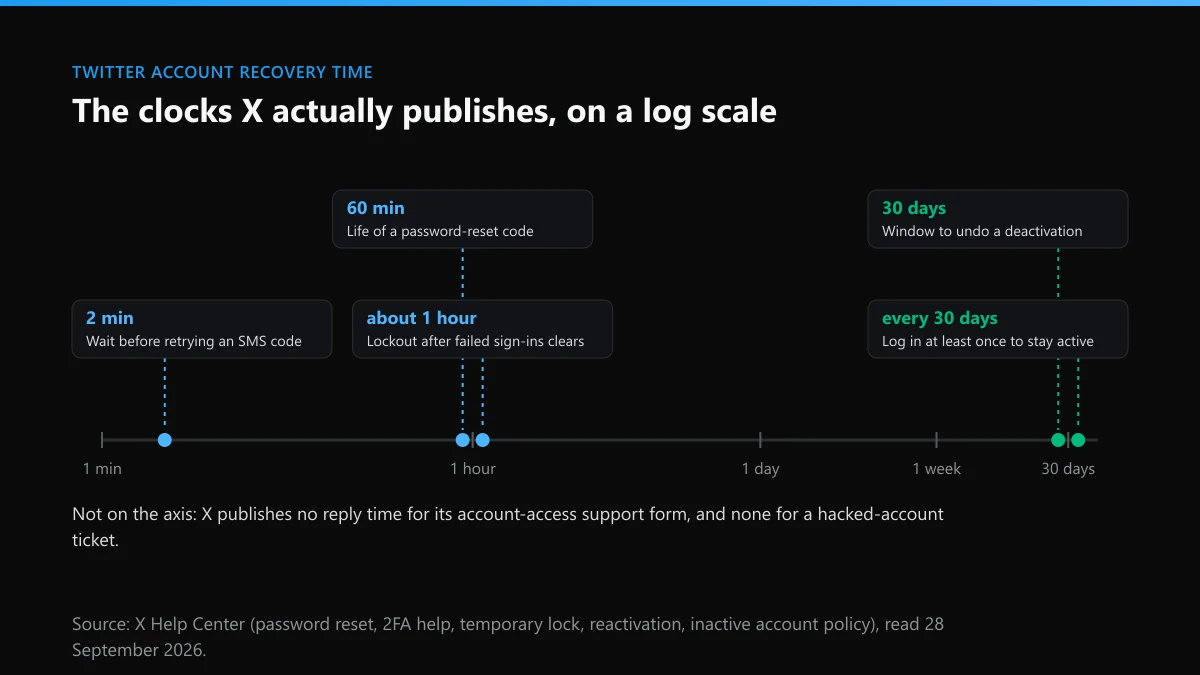
The published clocks are few. A reset code lives 60 minutes. A lock caused by failed sign-ins lasts about an hour and clears on its own; X's temporary lockout page adds that third-party apps such as X Pro or Hootsuite can keep re-triggering it with an old password, so close them and wait. A deactivated account can be brought back for 30 days. And X's inactive account policy asks you to log in at least every 30 days, warning that prolonged inactivity can mean permanent removal, which is why a recovery abandoned for months can end with nothing left to recover.
For hacked-account and 2FA tickets, X gives no timeline at all. For suspension appeals it does, but only for the EU, where medians run to hours rather than days; the timeline of how quickly X acts on reports and the appeal odds on the permanent-suspension page cover those numbers. Refiling the same ticket every day does not buy a place in the queue. One complete request, answered from the account's own email, does.
How to contact Twitter support to restore a suspended account
From inside the account. A lock or suspension is X's decision, not a lost key, so the route is the appeal branch of the Twitter help center appeal process, filed while you are signed in.
Start by logging in and reading the screen. If X asks you to confirm a phone number or email, or to pass a reCAPTCHA, that is a lock rather than a suspension, and finishing the challenge restores the account. Its enforcement page notes that a locked account drops out of follower counts, Reposts and Likes until the owner completes it, which is why numbers dip. If instead you see a suspension notice, note the rule it names, take a screenshot, and open the appeal form in a new tab. Signed out, that form shows no fields at all.
What the notice labels mean, from "inauthentic behavior" to suspensions that arrive with no reason, is decoded in why X suspended your account. If the ban is permanent, the permanent suspension appeal guide covers the EU and UK routes that open after a refusal. And if you think a crowd of reports caused it, read whether a report pile-on can suspend an X account and what a single report can and cannot remove before blaming one in the appeal. A brigade is worth mentioning only with proof, and the ladder in what actually gets an X account banned shows what reviewers weigh instead.
When is an X account beyond recovery, and what is still possible?
When the email and phone are both gone for good, or a deactivation passed day 30. The account is then out of reach, but its name and its content are not entirely out of your hands.
A handle does not come back to you automatically. X's reactivation page says the username and email on a deactivated account become free for other accounts 30 days after deactivation, while its username rules say inactive usernames are not being released, a gap explained in why X will not hand over an inactive handle. A stranded account that you can no longer open cannot be closed by you either; the narrow exceptions, estates and powers of attorney, are in who besides the owner can close an X account. If you do get back in and would rather leave, deleting an X account for good and clearing old posts in bulk first each take an evening.
The stranded account can also be copied. Someone may lift your photo and bio for a fresh profile, trusting your followers not to notice the new handle. That is a reportable impersonation even while you are locked out: X's impersonation form, branch by branch, a report on a fake profile built from yours, or a request to pull tweets posted in your name. Whether a lawsuit adds anything is doubtful; see who a lawsuit over X can actually name first.
What should you report once you are back in, and what should you ignore?
Report what the intruder or a copycat did that breaks the X Rules. Ignore every offer, public or private, to do the recovering for you.
A recovered account often comes back with a trail. Scam posts sent from it, targeted harassment aimed at people it follows, or hateful posts left under your name need deleting by you and, where they came from other accounts, reporting. For one post, how to report a single tweet is the quickest route; for an account, see reporting a whole X account and the routes for taking down an X account. Content the intruder copied elsewhere may need a copyright removal or a DMCA notice for a copied post; stolen product photos reused in fake shops fall under counterfeit complaints X tends to sit on. Coordinated pile-ons and fake job offers have their own path in reporting brigading and job scams, and X's built-in report tools, violation by violation map the rest. For a single post that targets you, there is removing a post aimed at you.
The offers come fast after a public "I got hacked" post. Accounts promising to recover an X account, strip 2FA or lift a ban sit in the same corner of the market as Twitter mass report bots, so-called ban tools, Instagram spam-report bots, Instagram mass-report packages and TikTok mass-reporting claims. When we opened six mass-report listings for our check of those sellers in September 2026, every live seller wanted crypto. A recovery seller wants the same, plus the code X just sent you. Instagram users meet the mirror image of this problem in Instagram account takedowns.
So the order stays simple. Rescue the email or phone, run the reset, use a backup code or the hacked-account form if you must, and appeal from inside only when X itself locked the door. If a clone or a coordinated campaign is part of the story, send us the case details; every X reporting guide on this site is linked from the hub, and the Twitter Ban Service home page sets out what we take on. X makes the final call on every report.
FAQ
Can I recover my Twitter account without the email or phone number?
Only if you can reach one of them again. X's help page on email access says that without the account's email or a verified mobile number it is unable to continue troubleshooting, will not deactivate the account for you and will not free the username. Try recovering the old mailbox through its provider first, then run the username-first search on the reset page with every address and number you have ever used.
Is there a Twitter support phone number I can call?
No. X's help pages route every account problem to web forms and email, and none of them lists a line to call. Numbers advertised as Twitter or X support in search ads, replies and DMs belong to third parties, and the usual next step is a request for your login code or a fee.
Why do I keep getting X password reset emails I never asked for?
Someone is typing your username, email or phone into the Forgot password? page. The emails alone do not let them in, since the code goes to you. X suggests turning on password reset protection, which makes a reset start only after the email or phone on the account is entered, and adding two-factor authentication.
Can I restore a Twitter account I deleted more than 30 days ago?
No. Deactivation holds the account for 30 days, and logging in during that window with a confirmation brings it back. After day 30 the username and email are released for use on other accounts, and X offers no route to recover what was on the old profile.
Will my followers come back after I recover the account?
Usually, but not always at once. X says posts, followers and likes may take a while to fully restore after a reactivation. A locked account is also dropped from follower counts, Reposts and Likes until its owner completes the challenge, so numbers can dip and return.
Is the Twitter help center appeal the same thing as account recovery?
They share one support form but lead to different teams. Recovery covers a lost password, a lost 2FA method or a hacked login, and it works from outside the account. The appeal branch is for accounts X itself locked or suspended, and it expects you to be signed in to that account when you file.
Can someone recover my X account for me if I pay them?
No one outside X can reset a password, strip 2FA or lift a suspension. Every recovery step sends a code to the email or phone on the account, so a paid helper either needs you to forward that code, which hands them the account, or has nothing to sell.