10 October 2026 · Twitter Ban Service · 12 min read
Someone is impersonating me on Instagram: the report that works, why it gets refused, and checking X for the same copy
“Someone is impersonating me on Instagram” has a two-minute first step: open the fake profile, tap the three dots, then Report, and say it's pretending to be you. No Instagram account? Use the impersonation contact form with a photo of your ID. The copier isn't told who reported it, and the same copy often turns up on X.
Is it impersonation, or just a fan page using your photos?
It's impersonation when the account pretends to be you. Instagram's help page on reporting an account for impersonation covers four kinds of target: you, someone you follow, a celebrity or public figure, and a business or organisation. What it doesn't cover is an account that's merely about you. A fan page that says it's a fan page, a parody that labels itself, a critic quoting your posts: none of those is pretending, and a report against them gets turned down.
The tell is the bio and the messages. An impersonating account on Instagram usually copies your display name, your profile photo and a handful of your posts, then adds one small change to the username, an extra underscore or a doubled letter. If it's messaging people as if it were you, that settles it. If it only reposts your photos with credit, look at our guide to reporting a single Instagram post instead, because copyright or privacy may fit better than impersonation.
Someone is impersonating me on Instagram: how do I report it from the app?
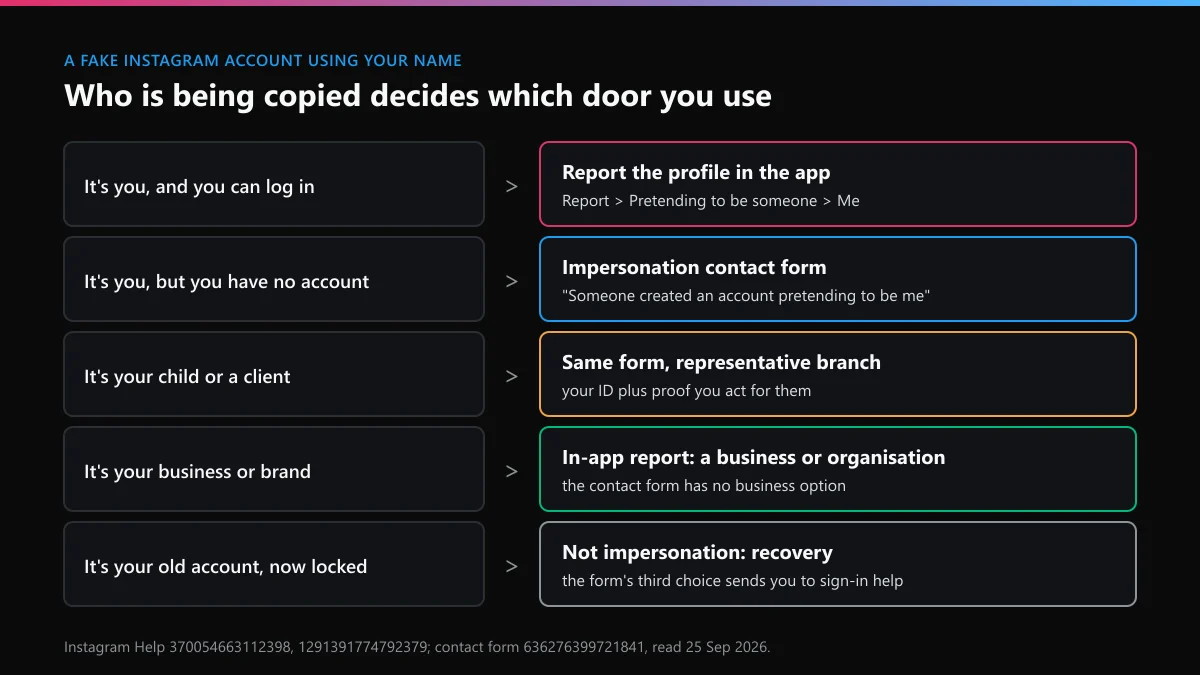
Report the profile, not a post, and say the account is pretending to be you. That's the fastest route when you can log in. Here is how to report someone impersonating you on Instagram from the account itself:
- Open the fake profile. Screenshot it first, with the username, follower count and bio in view, plus any messages it sent your friends.
- Tap the three dots at the top right, then Report.
- Choose Report account, then the option saying it's pretending to be someone.
- Pick Me. Instagram matches the fake against the account you're signed in with.
- Submit, then block the account so it can't see your new posts.
Instagram's page titled report an account that's impersonating you says the in-app route is for people who have an account, and that reports are kept anonymous. The impersonator isn't told who filed. For what the reported person does see, read whether someone finds out you reported them on Instagram.
A friend can report too, choosing "someone I follow". That doesn't add weight to yours, but it helps when you're locked out or don't use Instagram.
What if you don't have an account, or the fake is of your child?
Use Instagram's impersonation contact form; it opens without a login. When we read the form on 25 September 2026, it offered three situations: someone made an account pretending to be me or a friend, someone made one pretending to be a person I represent, such as my child, and I can't log in to my old account. The third isn't impersonation at all. It sends you to sign-in help, which matters if the "fake" is really your own hacked or forgotten account.
The first two branches ask for the fake's username, your full name and email, and a photo of a government-issued ID so a reviewer can compare your face with the profile. For a child or a client, the ID is yours, along with proof that you act for them. Crop out anything the check doesn't need, but don't blur the photo or the name.
Our signed-out test of every Instagram report form we could open lists which ones still load without logging in, and this one did.
Someone is impersonating my business on Instagram: which route works?
Report it from the app as a business or organisation. The contact form has no business option, which surprises people. Its branches are all about individuals. So someone impersonating your business on Instagram is reported through the profile's Report menu by a person on the brand's own account, choosing the business option.
If the fake uses your registered brand name or logo, a trademark report can run alongside it, and that needs your registration number. If it copies your product photos, copyright applies too. The business impersonation report covers the pretence; the other two cover what was taken. Keep each report to its own facts.
A shop clone usually exists to take payments. Check your tagged posts and your followers' comments for people saying they paid "you" and got nothing. Those screenshots are the strongest evidence you have, and they matter if the case goes to the police.
Why is there an Instagram account impersonating me?
Almost always money, occasionally spite. Ask "somebody is impersonating me on Instagram, who would bother?" and the dull answer is usually a stranger. People typing "why is someone impersonating me on Instagram" tend to assume a stalker, but most copies are run by scammers who don't know you at all. They need a face your followers already trust. The common patterns:
- Follower scams. The copy follows your followers and messages them a giveaway, an investment tip or a request for a loan.
- Romance scams. Your photos front a dating profile somewhere else, and the Instagram account is the "proof" it's a real person.
- Selling followers or engagement. A small creator's look gets reused to make a bot account seem human.
- Harassment. Someone who knows you posts things in your name to embarrass you. This is the one case where the copier is personal.
- Grabbing your name. The copier holds the handle you'd want on a new platform.
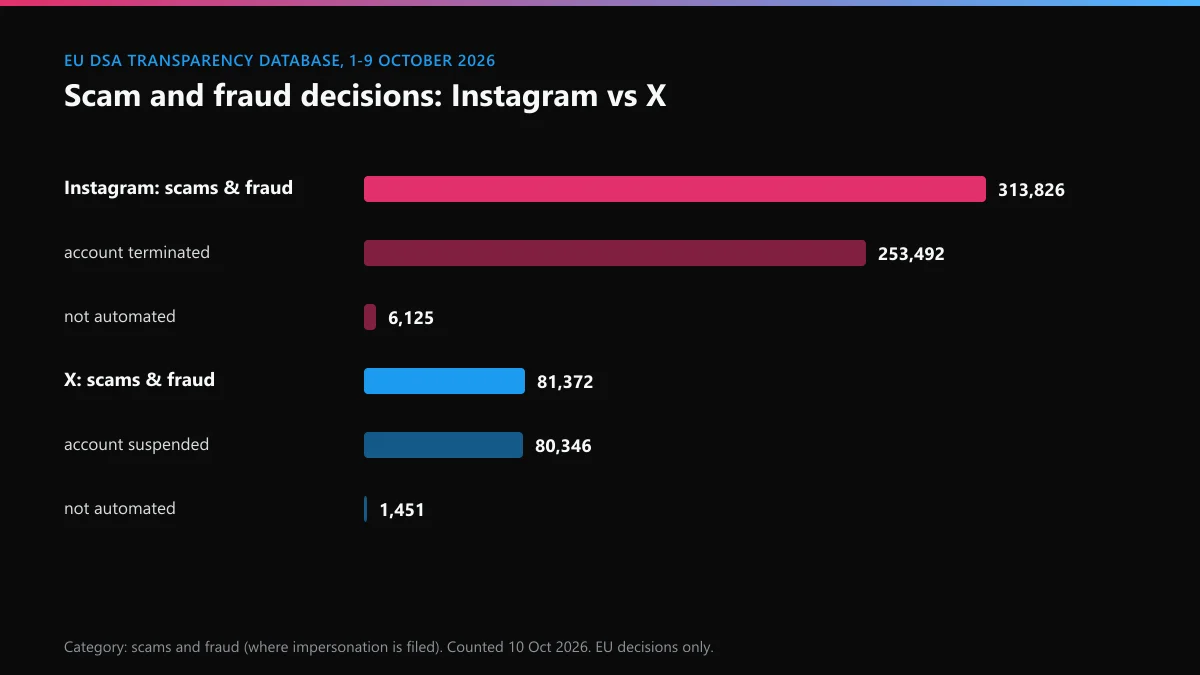
The numbers point the same way. We counted the EU's DSA Transparency Database for 1 to 9 October 2026. Instagram filed 313,826 decisions under scams and fraud, the category where fake-identity cases land. That's 15% of its 2,079,174 decisions, and 253,492 of them ended an account.
Instagram won't take down an account impersonating me: what now?
Refile with what the first report lacked, rather than refiling the same thing. When Instagram won't remove an account impersonating you, it's usually for one of these reasons:
- The fake doesn't look enough like you: it uses your photos but a different name. Then the photos are the issue, so file a copyright report if you took them, or a privacy report if someone else did.
- The reviewer couldn't match you, because your own profile is private or has no face photo. Use the contact form with ID instead of the app.
- It's labelled as a fan or parody page, which is allowed. Report the specific posts that cross a line.
- The report went against a post, not the account, so start over from the profile.
If you reported something by mistake, a friend's real account for example, taking back an Instagram report explains what can and can't be withdrawn. When the fake has been sending scam messages, add a second report for that conduct; reporting a person for what they did walks through choosing the scam reason. And when one account keeps spawning new copies, reporting a whole Instagram profile covers whole-account reports.
Don't expect the public numbers to show how often impersonation reports fail, either. When we filtered the EU database for Instagram's impersonation tag on 10 October, it returned zero, because Meta leaves that field blank on every decision. All a refusal leaves you is the notice in your Support Requests, so screenshot it before you refile.
How do you find out who is impersonating you on Instagram?
Usually you can't, and Instagram won't tell you. There's no reverse lookup, and the report outcome doesn't name the person behind the account. Instagram's page on impersonation accounts and legal requests says US federal law doesn't let private parties get account content. Basic subscriber details are released only where they're indispensable to a case, after notice to the account holder, and only on a valid subpoena served on the right Meta company.
In practice, that means a lawyer and a lawsuit, usually for defamation or fraud. What you can do alone is collect: the fake's username and profile URL, dates, screenshots of messages, and any payment details it gave your followers. Payment details often identify a scammer faster than Instagram ever would, because banks and payment apps answer to the police.
Be careful with anyone offering to "trace" the account for a fee. Unmasking an Instagram user without a court order means hacking or social engineering, and the people selling it are often running a second scam on you.
Can you get in trouble for impersonating someone on Instagram?
Yes, in several places it's a crime once there's intent to harm or defraud. California's Penal Code 528.5 makes credible online impersonation meant to harm, intimidate, threaten or defraud a misdemeanour, with up to a year in county jail and a fine of up to $1,000. Texas goes further. Its Penal Code 33.07 treats creating a social media page in someone's name without consent, with intent to harm, defraud, intimidate or threaten, as a third-degree felony.
In the UK there's no single impersonation offence, but a fake account used to take money is fraud by false representation under the Fraud Act 2006, and one used to harass can fall under harassment law. Elsewhere it depends on the country.
Impersonating someone on Instagram as an obvious joke usually isn't criminal anywhere, but it still breaks Instagram's rules and gets removed. A copy built to scam your followers is a police matter. Report it to Instagram first, then to the police with your screenshots and the payment details.
Is the same impersonator on X as well?
Check, because copies rarely stay on one platform. The scammer who built your Instagram twin often opens an X account with the same photo, and the two reports work differently. X's impersonation form starts with a government ID check and a live selfie through Persona, and someone who isn't the target gets no form at all, only the report button on the profile. Instagram lets a friend report from the app.
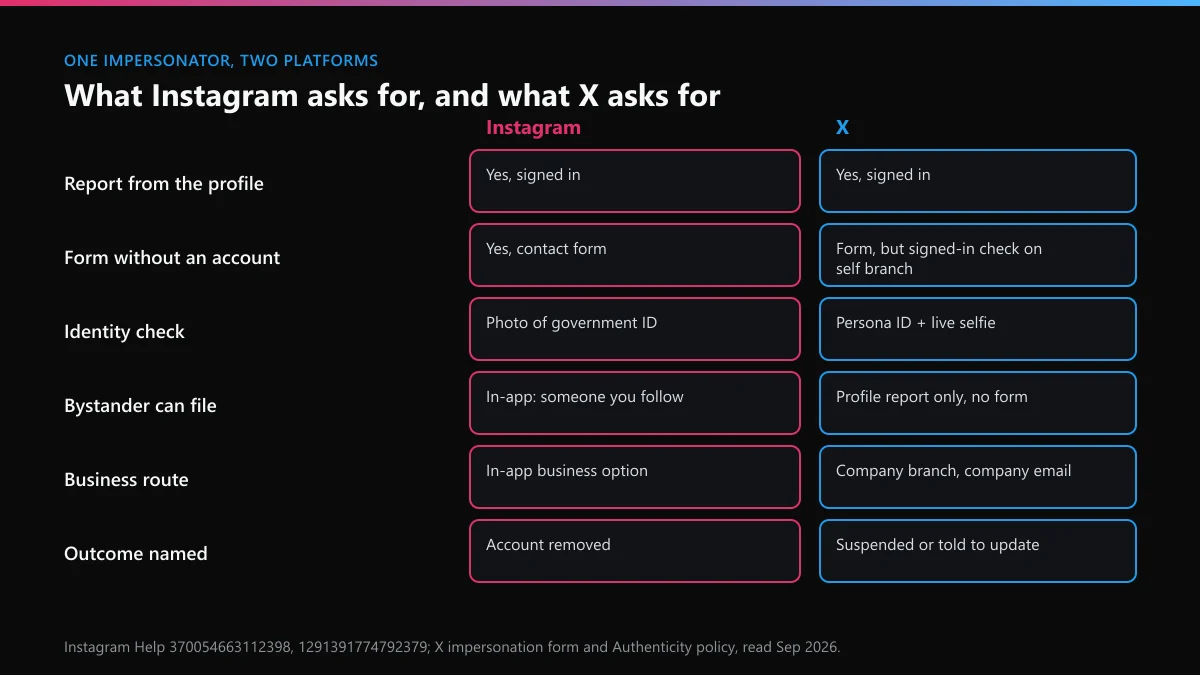
| Same fake, same week | On Instagram | On X |
|---|---|---|
| Who can report it | You, or a friend choosing "someone I follow" | You through the form; others only from the profile |
| Identity check | Photo of government ID on the form | ID plus live selfie through Persona, about five minutes |
| Business copy | In-app business option; form has none | Company branch, asks for a company email |
| Scam and fraud decisions, EU, 1–9 Oct 2026 | 313,826 (253,492 accounts ended) | 81,372 (80,346 suspensions) |
| Share of those reviewed by a person | 6,125, about 2% | 1,451, about 2% |
Those last rows come from the same EU database count. On X, scams and fraud made up 77% of all 105,175 decisions in those nine days, against 15% on Instagram. Neither platform tags which of those were impersonation, so read them as the scale of the queue your report joins, not a count of fakes.
On the X side, the copier may also go after your own account. Threats to leak your details belong under reporting blackmail and doxxing on X, and a flood of junk replies is often a bot swarm in your X replies. If false reports get you suspended, why X suspends accounts and getting a suspended X account back are the starting points. A permanent ban needs an appeal against permanent suspension, while the ways an X ban gets lifted covers the rest. Reach that drops while the account stays up calls for appealing an X shadow ban and then clearing a shadow ban on X. Avoiding an X ban is worth reading while someone is looking for a reason to report you.
If the copier got into your X account instead of copying it, see a locked X account or recovering an X account in general. Recovery is also possible without knowing the username, when you've forgotten the handle, or for an account deleted more than 30 days ago.
Once the fake is gone, how do you keep new copies from appearing?
If you're wondering how to stop someone impersonating you on Instagram for good, the honest answer is that you can't stop new copies entirely, but you can make them less useful. Post a Story or a pinned post telling followers your exact username and that you'll never ask for money in DMs. Keep a clear face photo on your profile so reviewers can match you quickly. Turn on two-factor authentication so the copier can't take the real account. Instagram's help page notes that Meta Verified subscribers get an impersonation protection benefit, which is worth a look if copies keep returning.
Then take your name on the other platforms before a copier does. Start with checking a username on X, run the X handle checker for spelling variants, and confirm whether the name is free on X. A "this username is unavailable" message doesn't always mean a live account holds it, and handles we found still open show which near-misses work.
If an abandoned account sits on your name, read whether X clears inactive accounts and how inactive usernames get released. Against an active holder, your options for a taken username and claiming a handle on X are the legitimate paths. Don't buy your way out. Buying an X handle, handle marketplaces and usernames listed for sale all break X's rules, and a seller holding your name is often the impersonator.
A last word on forum advice. If you got here after searching "someone is impersonating me on Instagram reddit", check the date on any thread you follow. Menu labels and form branches have changed more than once, and the steps above were checked in September and October 2026.
FAQ
How do I report someone impersonating me on Instagram if I'm locked out?
Use Instagram's impersonation contact form, which opens without logging in. Choose the option saying someone made an account pretending to be you, then add the fake's username, your name and email, and a photo of your government ID. A friend who follows you can also report the profile from the app.
Will Instagram tell the fake account who reported it?
No. Instagram says impersonation reports are kept anonymous, so the account isn't told who filed. Copyright reports are the exception, because the rights owner's name goes to the uploader.
What should I do if someone is impersonating my business on Instagram?
Report the profile from the app while signed in to the business account and choose the business or organisation option. The contact form has no business branch. Add a trademark report if the fake uses your registered name or logo.
Why won't Instagram take down an account impersonating me?
Usually because the reviewer couldn't match the fake to you, the account is labelled as a fan or parody page, or the report was filed against a post instead of the profile. Refile through the contact form with your ID, from the profile itself.
Can I find out who is behind an account impersonating me on Instagram?
Not through Instagram directly. Meta releases basic subscriber details only on a valid legal request served on the right Meta company, which in practice needs a lawyer. Payment details the scammer gave your followers often lead police to them faster.
How can I stop someone impersonating me on Instagram again?
Tell followers your exact username and that you never ask for money in messages, keep a clear face photo on your profile, turn on two-factor authentication, and take your name on other platforms such as X before a copier does.