8 October 2026 · Twitter Ban Service · 12 min read
How to report someone on Instagram: start from what they did
Here is how to report someone on Instagram: report what they did. Tap and hold the message or comment, or tap the three dots on the post, Story or profile, then Report and the reason that fits. Use Report account only when the whole account is the problem. Instagram doesn't tell them who reported it.
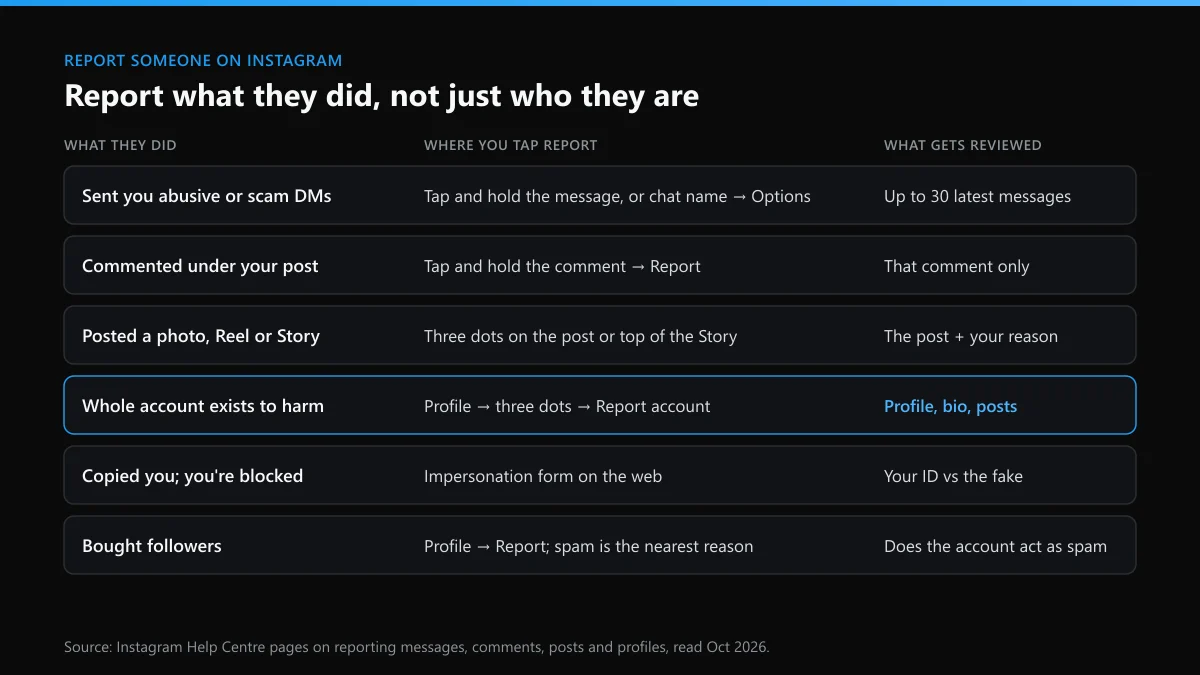
Where did they reach you: in your DMs, under your posts, or on their own profile?
Start with that, because on Instagram the Report button sits on the thing the person did, and the reviewer looks at that thing first. A rude comment is reported from the comment. A threatening message is reported from the chat. The whole account is reported from the profile only when the account itself is the problem: it exists to scam people, or to pass as you.
| What they did | Where you tap Report | What the reviewer looks at |
|---|---|---|
| Sent you abusive, sexual or scam messages | Tap and hold the message, or tap their name at the top of the chat, then Options | Up to 30 of the latest messages in that chat |
| Left a comment under your post | Tap and hold the comment | That comment, not the rest of their account |
| Posted a photo, Reel or Story about you | The three dots on the post, or at the top of the Story | The post and the reason you picked |
| Runs an account made to harass, scam or copy someone | The three dots on their profile, then Report account | The profile, its bio and what it posts |
| Copied you, and you're blocked or have no account | Instagram's impersonation form on the web | Your ID set against the fake profile |
| Bought followers to look bigger than they are | The three dots on their profile; spam is the nearest reason | Whether the account itself behaves like spam |
That table is most of the answer to how to report something on Instagram. People ask it as "how do i report someone on instagram", "how can you report someone on instagram" or just "report someone on insta", and the routes don't change with the wording. What does change the outcome is reporting the item versus the person. Instagram's comment help page warns that after you report a comment "you'll no longer see it, but this doesn't mean that the comment was removed". Hiding it from you and removing it are two separate results.
How do you report someone on Instagram when the whole account is the problem?
From their profile, with Report account. This is the route for an account that only exists to cause harm: a scam storefront, a burner made to harass you, a profile using your photos. Before you tap anything, take the screenshot. Usernames change in seconds and blocked profiles disappear from view, so the image you take now may be the only record you have.
- Screenshot the profile with the username visible, and write down today's date.
- Tap the three dots in the top right of their profile. On a computer, click Options next to the username.
- Tap Report, then Report account.
- Choose the reason that matches what you can show. If you say they're posting things that break the rules, Instagram asks you to point at the content, so have it in mind.
- Submit, then decide whether to block. Blocking only hides them from you; it doesn't add anything to the report.
That's how to report an Instagram account in five taps. Report first and block second, because once you've blocked them you can't reopen the profile to report it. Picking between impersonation, scam and the rest is where most account reports go wrong, and our walkthrough on reporting an Instagram account under a reason you can prove goes through each one.
Is it any different for one post, a Story or a message?
Only in where the button lives. The reason list that follows is close to the one on the profile, and the account you report is never shown your name. Here is where to find it for each kind of content:
- Post or Reel. Instagram's wording is "Tap Options above the post", then Report. That's how to report a post on Instagram from the app; on a computer, the Options button sits in the top right of the post. Our page on reporting a single Instagram post covers the copyright form, which is separate.
- Story. Tap the three-dot icon at the top while the Story is playing. A Story is gone after 24 hours unless it's saved to a highlight, so screenshot it before you report.
- Comment. Tap and hold the comment, then Report. On a computer, hover over it and click Options below the comment.
- Message. Tap and hold the message, choose Report, pick a reason and tap Submit report. To report the whole conversation, tap their name at the top of the chat, then Options, then Report.
The chat route matters more than people think. Instagram's help page on reporting messages says it "reviews up to 30 of the most recent messages sent in reported conversations". It can also take in messages that were deleted, unsent or edited, as long as you report the whole chat or a message next to them. When harassment is spread over weeks of messages, report the conversation rather than picking out one line.
How do you report someone on Instagram that blocked you?
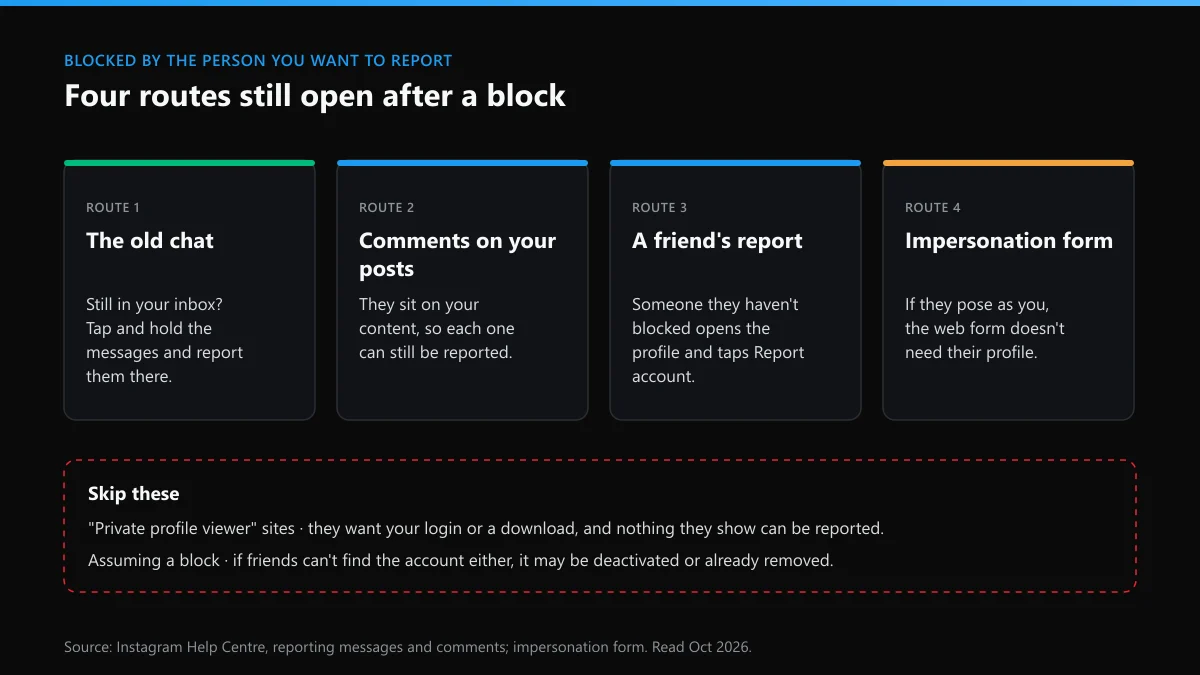
Through whatever of theirs you can still reach, or through someone else. A block stops you opening their profile from your login, so the usual Report account route is closed. These still work:
- The old chat. If the conversation is still in your inbox, open it and report the messages from there. That is often the strongest evidence you have, and it's already on Instagram's servers.
- Their comments and tags on your posts. Those sit on your content, not theirs, so you can tap and hold each comment and report it.
- A friend. Someone the account hasn't blocked can open the profile and report it. Reports don't have to come from the person who was targeted, although an impersonation report is strongest from the person being copied.
- The impersonation form. If the account is pretending to be you, Instagram's web form for impersonation doesn't need you to open the profile at all.
Two things to skip. Sites that promise to show you a private or blocking profile want your login or a download, and nothing they display can be reported anyway. And check it really is a block: if your friends can't find the account either, it may have been deactivated or already removed.
Can you report someone on Instagram for buying followers?
Yes, but there's no "bought followers" option, and the usual result is that the fake followers get cleared out while the account stays up. Instagram's Community Guidelines ask users to "stay spam-free by not artificially collecting likes, followers or shares". Because that rule sits under spam, spam is the reason to choose when you report the account. Adding a note of what you saw helps: thousands of followers arriving overnight, follower accounts with no posts, comments that don't match the photo.
So that's how to report someone on Instagram for buying followers. Whether it's worth doing depends on who they are. A friend who paid for 500 followers to feel better about their profile isn't hurting you. A business or influencer using bought numbers to win your money is a different matter, and in the US it can be illegal. Since 21 October 2024, the FTC's rule on fake reviews and testimonials has banned buying or selling fake indicators of social media influence. It applies where the buyer knew or should have known they were fake and used them to look more important for a commercial purpose. If a brand deal or a product pitch rested on bought numbers, report the account to Instagram and file at ReportFraud.ftc.gov too.
What happens if I report someone on Instagram?
For them, usually nothing that points back to you. When you report someone on Instagram, the report goes into a review queue and shows under Settings, then Support requests, where you can follow its status. A reviewer, or an automated check for clear cases such as known spam, tests the content against the reason you chose. If it broke a rule, the content comes down and the account may get a strike, or be disabled if the breach is serious or repeated. The owner is told which rule, not who reported it. If nothing breaks a rule, nothing happens to them, and you can ask for a review of the decision.
The one exception is intellectual property: a copyright or trademark report can pass your name to the person reported so they can respond. If you report someone on Instagram and worry they'll work out it was you anyway, our page on whether people find out who reported them covers the cases where they can guess.
Can you report someone on Instagram and get them deleted?
Only if the account breaks a rule badly enough or often enough, and the number of reports isn't what decides it. Instagram's page on how Instagram decides what to remove says "The number of times that something is reported doesn't determine whether or not it's removed". Severity and history do. Meta's strike rules let it disable an account after a single occurrence for the worst harms, such as child sexual exploitation, while most other breaches build up strikes that expire after a year.
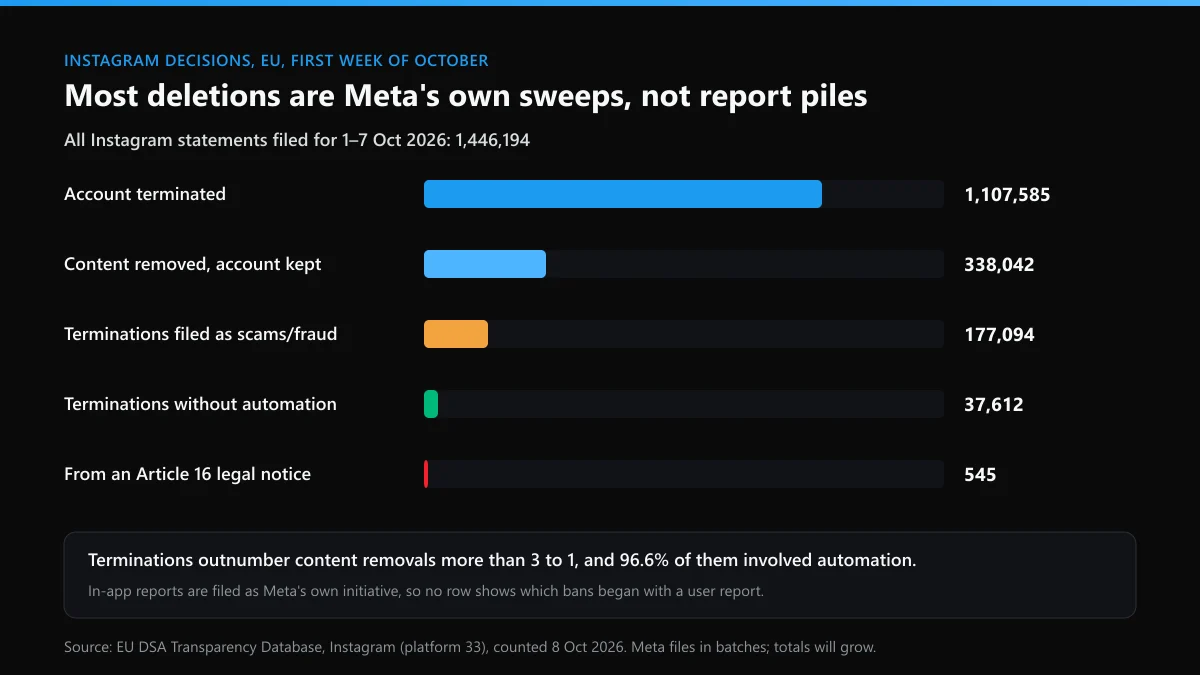
To see how often Instagram ends accounts at all, we queried the EU's DSA Transparency Database on 8 October 2026 for every Instagram decision Meta had filed for 1 to 7 October. Meta files in batches, so that week will keep growing as late statements arrive. When we ran the first query that morning, the database answered in seconds; on 7 October it had returned a server error on every search we tried, so check the date on any count you read.
| Instagram decisions filed for 1–7 Oct 2026 | Count | Share |
|---|---|---|
| All statements of reasons | 1,446,194 | 100% |
| Account terminated | 1,107,585 | 76.6% |
| Content removed, account kept | 338,042 | 23.4% |
| Terminations filed as scams and fraud | 177,094 | 16.0% of terminations |
| Terminations decided without automation | 37,612 | 3.4% of terminations |
| Started from a formal illegal-content notice (Article 16) | 545 | 0.04% |
| Article 16 notices that ended an account | 130 | – |
Account terminations outnumbered content removals more than three to one, and almost all of them ran through automated systems. That's the signature of Meta sweeping out fake and spam accounts on its own, not of users reporting each other off the app. Meta files ordinary in-app reports as its own initiative too, so the database can't say how many of those 1.1 million began with someone tapping Report. It does show how rare the formal legal route is: 545 notices in a week.
So if you're looking up how to report an Instagram account and get it deleted, or how to report someone on Instagram and get them deleted, the honest method is narrow. Report the violation they really commit, under the matching reason, with screenshots. If they come back on a new account after a ban, report that too and name the old username, because Meta's account integrity rules cover accounts "created or repurposed to evade a previous account or entity removal". There's no trick for how to report an Instagram account to get it deleted beyond that. Getting friends or a paid panel to pile on reports doesn't work, and Meta's inauthentic behaviour policy lists misusing its reporting systems "to harass, intimidate or silence others" as a violation of its own.
Is the same person bothering you on X as well?
Quite often, and X handles it through its own reports and forms. The two platforms split the same problems differently:
| The problem | On Instagram | On X |
|---|---|---|
| Threatening to leak your photos, address or messages | Report the messages; go to the police if it's sextortion | A private-information or intimate-media report; see X's routes for blackmail and doxxing |
| Fake followers and bot replies | Report the account as spam; the FTC if they sell on it | Spam and platform-manipulation reports, account by account; see removing bot followers and reply bots on X |
| Posing as you | Impersonation, in the app or on the web form | X's impersonation form, which asks for ID |
If they copied you on Instagram, is your X handle next?
It can be. Someone who built a fake of you on one app already has your photos and bio, and a free version of your name on X is the obvious next step. Claiming it first costs nothing. Work through it in this order:
- Find out what's free. Start with checking whether a name is free on X, put your variants through a checker that reads X's own responses, and see what X's username check actually returns.
- Read the message properly. Why X says a username is unavailable isn't the same as taken, and the list of usernames we found still open shows which small changes tend to get through.
- Take it while it's free. Here's how to claim an X handle step by step.
- If a dead account is sitting on your name, read up on X's policy on inactive accounts, the steps for requesting an inactive username, and the routes to a username someone else holds.
- Don't pay a stranger for it. Before you send money, read what paying for an X handle really involves, the risks of handle marketplaces, and what's behind "username for sale" listings. X's rules ban selling usernames, so a bought handle can be taken back.
What if they report your accounts back?
It happens, especially after you report a scammer or an impersonator. False reports shouldn't remove an account that follows the rules, but enforcement makes mistakes, so know the way back before you need it. On Instagram, check Account Status under Settings, where removed content is listed with a review button. On X, start from what you're seeing:
| What happened to your X account | Start here | Then |
|---|---|---|
| Suspended after a wave of reports | getting a suspended X account back | every route to an X unban |
| The suspension says permanent | an appeal against a permanent X suspension | habits that keep an X account clear of bans |
| Posts stopped reaching anyone | appealing an X shadow ban | fixes that lift a shadow ban on X |
| Locked out after a security check | unlocking a locked X account | the complete X recovery guide |
| Taken over, email or phone changed | which X recovery route fits | recovery when you don't know the username |
| Deleted, or you can't remember the name | finding a forgotten X username | options once 30 days have passed |
Fix your own account first, then go back to the report you started. A real violation doesn't stop being one because the person behind it hit back.
FAQ
Can you report someone on Instagram without them knowing?
Yes, for reports made in the app. Instagram's help pages say the account you reported won't see who reported them. The exception is a copyright or trademark report, where your name and contact details can be passed on so the other side can respond.
Should I block someone before or after reporting them on Instagram?
After. Screenshot the profile and the messages, file the report, then block. Once you've blocked an account you can't open its profile to report it, though the chat and any comments on your own posts stay reportable.
Can I report someone on Instagram from a computer?
Yes. On instagram.com, open their profile and click Options next to the username, or click Options in the top right of a post, then Report. Comments have an Options button underneath when you hover over them.
What if the person I reported comes back on a new account?
Report the new account as well and say in the report that it belongs to someone Instagram already removed. Meta's account integrity rules cover accounts created to get around an earlier removal, so coming back is a violation in itself.
Does reporting someone for buying followers get them banned?
Rarely on its own. Bought followers fall under Instagram's spam rule, and the report leads to a review of the account, not an automatic ban. In the US, a business selling on bought numbers can also be reported to the FTC, whose fake-indicator rule has applied since 21 October 2024.
Can I report someone on Instagram for something they posted on another app?
No. Instagram only reviews what's on Instagram. Report it on the app where it was posted, and if the same person is also targeting you on Instagram, report that separately with its own screenshots.