7 October 2026 · Twitter Ban Service · 14 min read
Instagram page report: report the account under the reason you can prove
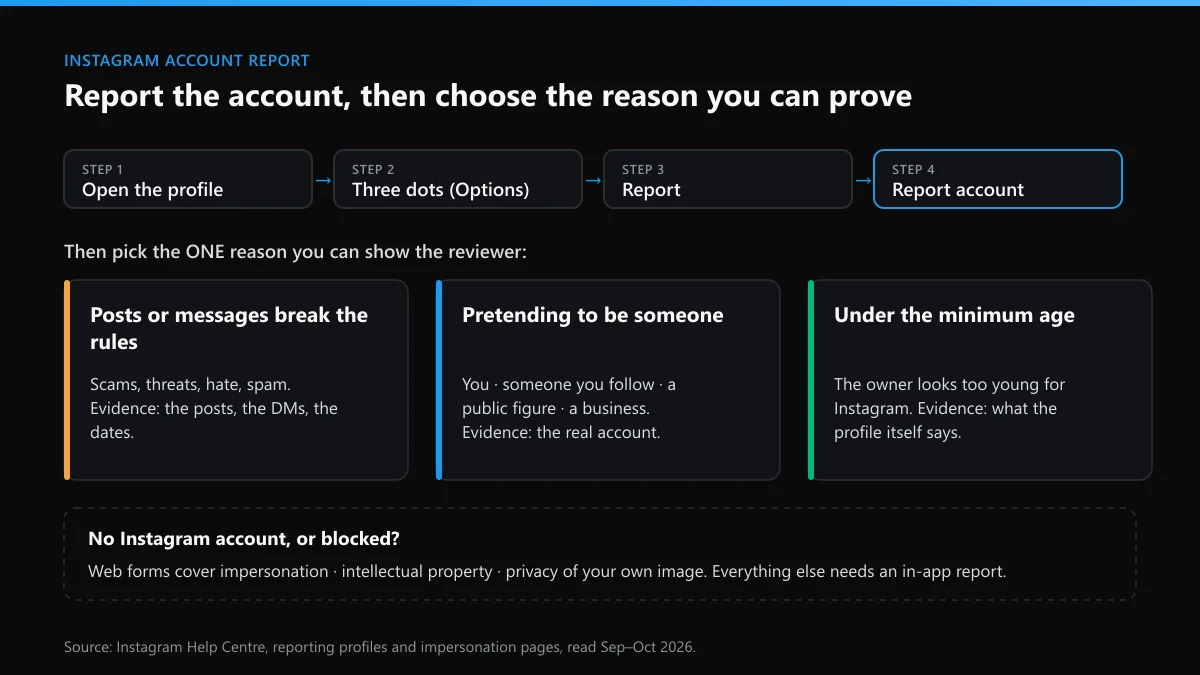
An Instagram page report is really an account report: brand, fan and creator pages are ordinary accounts. On the profile, tap the three dots, choose Report, then Report account, and select the reason you can back with evidence, such as impersonation or scam messages. Reviewers judge that reason, and the number of reports doesn't decide removal.
How do you report an Instagram account from the app or a browser?
From the profile itself. Every Instagram account carries the same report entry, public or private, personal or business, and you don't have to follow it to use it. Instagram's help page on reporting posts and profiles gives two versions of the first tap. In the app, tap Options in the top right of the profile. On a computer, click Options next to the username. After that both run the same way.
- Open the profile. Search the exact username rather than tapping a link someone sent you, so you land on the right account and not a look-alike.
- Tap the three dots (Options), then Report.
- Choose Report account when the problem is the whole account: who it claims to be, what it exists for, or who runs it. A single bad post is a post report instead.
- Pick the reason and answer the follow-up questions. If you say the account is pretending to be someone, Instagram asks who, and that answer decides which check the reviewer runs.
- Submit, then screenshot the profile and note the reason you picked. Usernames change. Your screenshot is the record if the account renames itself or vanishes.
People type the question every way, from "how do you report instagram account" to "report a instagram account", and the steps don't change. They also cover how to report any Instagram account that has blocked you, with one twist: you can't open its profile from your own login, so someone it hasn't blocked has to file the report, or you use a web form if one fits your case.
Is an Instagram page report different from an account report?
No. Instagram has no pages in the Facebook sense. A brand page, a fan page, a meme page and a creator profile are all accounts, some of them switched to a business or creator setting, so an Instagram page report goes through Report account like any other Instagram account report. What changes is the reason you'll most likely need.
- A page selling knock-offs is reported as a scam, and the brand owner can add Meta's trademark form.
- A fan page passing itself off as the star is impersonation.
- A repost page living off your photos or videos is an intellectual property case, filed on a separate form, not from the profile menu.
If what you actually want gone is a Facebook Page linked to an Instagram account, report it on Facebook. A report on the Instagram side won't touch the Facebook Page, and it works the same in reverse.
Which reason should you pick when reporting an Instagram account?
The one you can show. The reviewer doesn't rule on whether the account is unpleasant. They test the reason you chose against the profile and its posts or messages, and nothing else. Pick "pretending to be someone" for a spam bot that copies nobody and the answer comes back that it doesn't go against Instagram's guidelines, however annoying the bot is. Two questions sort most cases before you tap anything:
- Does it claim to be a specific, real person or brand? Then it's impersonation. The follow-up asks whether that's you, someone you follow, a celebrity or public figure, or a business or organisation.
- Does it claim to be nobody in particular? Then it's a fake account in the everyday sense, such as a bot, a spam persona or a scam front. Report the conduct you can point to, like the scam messages or spam comments, not impersonation.
An account that lies about itself without copying anyone, say a "giveaway" page with invented credentials, still isn't impersonation. Instagram's impersonation help page says that report is for accounts pretending to be someone, "but not for misrepresenting itself". That single line explains why so many reports of fakes come back unactioned.
How do you report a fake Instagram account that copies you or a friend?
Report it as impersonation from the fake profile and answer the follow-up honestly. If it copies you, choose Me. If it copies someone you follow, choose that option and point Instagram at the real account. A reviewer can only compare the two if they can see which one is genuine, so the real profile should stay findable while the case is open.
That's the short answer to how to report a fake Instagram account, and it holds whether you search "how do i report a fake instagram account" or "how to report a fake account on instagram". A friend can report a fake Instagram account on your behalf. The strongest report still comes from the person being copied, because only they can prove who they are. When a creator has five fakes, each username is its own case; there's no bulk instagram fake accounts report.
Keep three things before you report. The fake's username, the date you found it, and a screenshot of its profile next to the real one. If it messaged your followers asking for money or "verification fees", screenshot those too. That turns an impersonation case into a scam case as well, and scam reports move.
How does the Instagram impersonation report form work if you have no account?
The Instagram impersonation report form is the way in for people who aren't on Instagram, or who were locked out of their own account by whoever built the fake. When we went through it on 25 September 2026, it offered three situations:
- Someone created an account pretending to be me or a friend.
- Someone created an account pretending to be someone I represent, such as my child.
- I can't log in to my old account.
The third isn't an impersonation instagram report at all. It sends you to account recovery. The first two ask whether the account is impersonating you or a friend, then ask for the fake's username, your details and proof of who you are. There was no branch for a business on that form. A copied brand reports from inside the app under "A business or organisation", or through Meta's trademark form when its name or logo is being used to sell.
Two cautions from reading the form closely. Don't use the old-account branch to report a fake, because it never reaches the impersonation queue. And if the fake has your photos but uses a different name, say so in the details; the reviewer compares faces and bios, not just names.
What happens when you report an Instagram account?
Less, at first, than most people expect. Your report joins a queue and nothing visible happens to the account until someone decides. Instagram's help pages say the account you reported won't see who reported it, and that holds for every report made in the app. The exception is an intellectual property report, where the rights owner's name and contact can be passed to the person reported so they can respond. Here's the order things happen in:
- The report is logged and usually shows under Settings, then Support requests, where you can watch its status. Instagram warns that not every report appears there.
- A reviewer, or an automated system for clear-cut cases such as known spam, checks the account against the reason you gave.
- You get a decision. If something was removed, the reported Instagram account is told what came down and which rule it broke, not who complained.
- If nothing was removed, ask for the decision to be reviewed from the same Support requests entry.
- After two reviews, some decisions can go to the Oversight Board, which gives you 15 days. EU users can also take a decision to a certified dispute body such as Appeals Centre Europe, which charges users no fee.
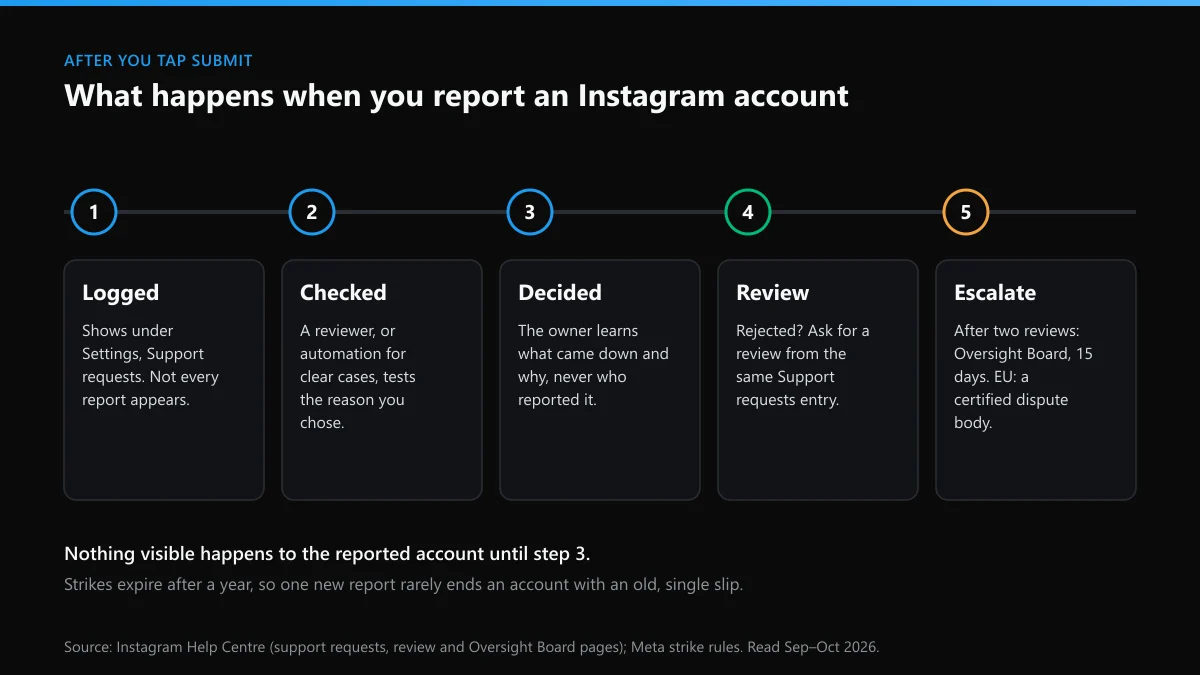
What the account owner sees depends on the outcome. Nothing at all if the report was rejected. A warning and a strike if a post or the profile broke a rule. A disabled-account screen if the violation was severe or kept repeating. Strikes expire after a year under Meta's rules, so an account that slipped once in 2025 won't fall over because of one fresh report in 2026.
Can you get an Instagram account deleted by reporting it?
Only if it breaks a rule badly enough or often enough, and the number of reports is not what decides it. Instagram's page on how Instagram decides what to remove says the number of times something is reported doesn't determine whether it comes down. Severity and history do. Meta's strike rules let an account be disabled after a single occurrence for the gravest harms, child sexual exploitation among them, while most other violations build up strikes first.
So the honest route to an Instagram account being deleted by reporting is narrow. Report the violation it really commits, under the matching reason, with evidence attached. When it impersonates you, file the impersonation report yourself. Scam accounts need the messages reported along with the profile. And an account rebuilt after an earlier ban should be flagged as exactly that, because Meta's account integrity rules cover accounts "created or repurposed to evade" a previous removal.
The other approach, getting friends or a paid panel to hit one account with dozens of reports, doesn't work and can turn round on the reporters. Meta lists misusing its reporting tools "to harass, intimidate or silence others" as inauthentic behaviour. Coordinated false reports can get the reporting accounts looked at instead.
What did Instagram's own ban numbers show for September 2026?
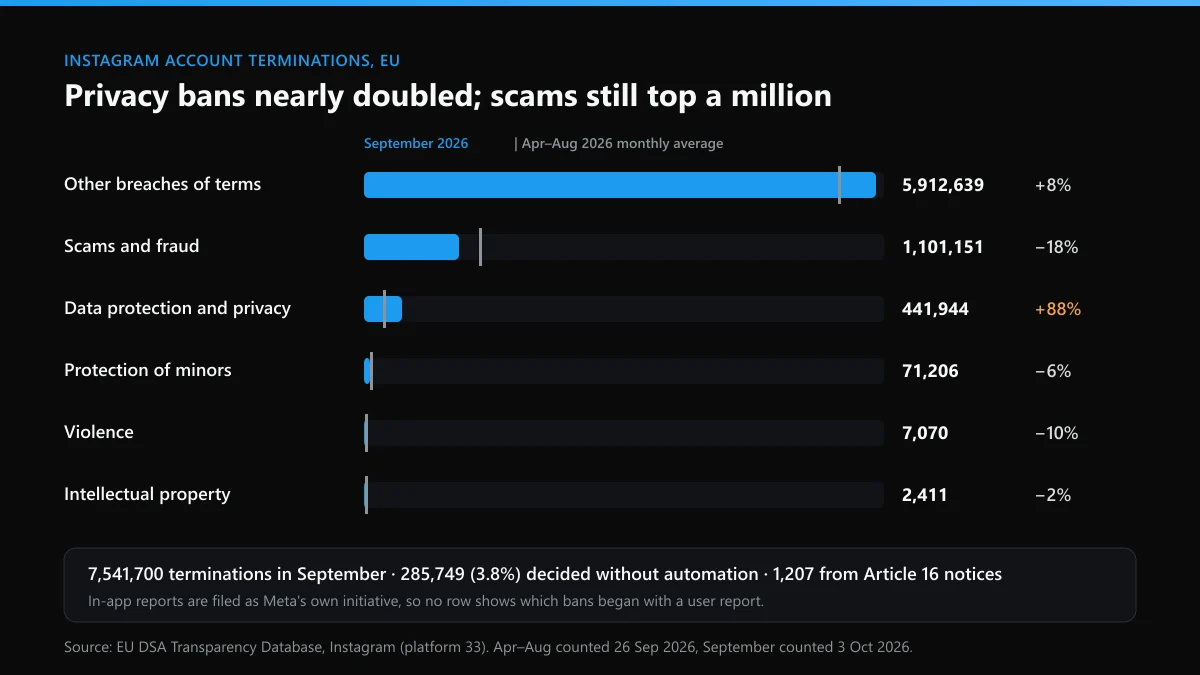
That Instagram ends far more accounts than most people assume, and almost all of it starts on Meta's side, not with a user's report. In early October 2026 we pulled every Instagram account termination filed to the EU's DSA Transparency Database, first for April to August and then for 1–30 September, split by the category Meta gave. When we went back on 7 October to add the per-category automation split, the database was answering every query with a server error, so the table below sticks to the counts we already had.
| Category Meta filed it under | Apr–Aug 2026, per month | September 2026 | Change |
|---|---|---|---|
| Other breaches of Instagram's terms | 5,477,306 | 5,912,639 | +8% |
| Scams and fraud | 1,343,109 | 1,101,151 | −18% |
| Data protection and privacy | 234,542 | 441,944 | +88% |
| Protection of minors | 75,574 | 71,206 | −6% |
| Violence | 7,893 | 7,070 | −10% |
| Intellectual property | 2,467 | 2,411 | −2% |
| All terminations | 7,146,773 | 7,541,700 | +6% |
Three things stand out. Privacy terminations nearly doubled in September against the spring and summer average, the sharpest move in the table. The DSA's scams and fraud category is where its own definitions put inauthentic accounts and impersonation, and it still ran above a million accounts a month. And only 285,749 of September's 7,541,700 terminations, about 3.8%, were filed as decisions taken without automation; the rest were partly automated. Just 1,207 started from a notice of illegal content under Article 16 of the DSA. Everything else, ordinary in-app reports included, Meta files as its own initiative, so these counts can't tell you how many bans began with a user tapping Report.
When should you report an Instagram account to the police?
When the account has done something that is a crime where you live, not just something against Instagram's rules. Reporting an Instagram account to the police makes sense for threats of violence, sextortion, any sexual image of a child, stalking, fraud that cost you money, and an impersonator using your identity to borrow or buy. For rude comments, spam or a fake fan page, the police will send you back to Instagram.
- Someone is in danger right now. Call your emergency number before anything else. Instagram's own guidance says to contact local authorities straight away in that situation.
- A child is involved. In the US, report to NCMEC's CyberTipline, which logged more than 50,000 financial sextortion reports in 2025. In the UK, go to the police or CEOP. Don't pay, and don't delete the chat.
- You lost money. In the US, file with the FBI's IC3 and the FTC. In England, Wales and Northern Ireland, Report Fraud replaced Action Fraud and takes reports on 0300 123 2040. Ring your bank the same day.
- Repeated harassment or stalking. Your local police. In England and Wales, harassment needs a course of conduct, which the law reads as at least two occasions, so keep every dated screenshot.
The police don't delete accounts. They can ask Meta to preserve the account's records, which Meta's law enforcement guidelines say it holds for 90 days while a formal request is prepared. Removal stays Meta's decision. Report the account to Instagram on the same day you report the Instagram account to police, and give the officer the username and profile link, not just a screenshot.
Is the same person running an X account too?
Often, yes. People who build one fake or run one harassment account rarely stop at one platform, and X runs on its own rules and forms. If the account you're reporting on Instagram has a twin on X, these are the routes that fit the usual cases:
| What the X account is doing | What X needs from you | Where we cover it |
|---|---|---|
| Using your name and photos to pass as you | An impersonation report filed by you or your representative, with ID | getting an impersonator removed from X |
| Threatening to post your address, private photos or messages | A private-information or non-consensual media report, plus the threat itself | reporting blackmail and doxxing on X |
| Flooding your replies with bot accounts pushing the same scam | Spam and platform-manipulation reports, account by account | clearing bot accounts out of your X replies |
Should you lock your name on X after an Instagram impersonation?
Yes, and the same day if you can. Whoever copied you on Instagram has your photos and bio already, and on X they'll take any version of your name that's still free. Claiming it first costs nothing. The order we'd follow:
- Run an X name availability check on your usual handle, then put the variants through a handle checker built on X's own answers.
- Read the reply carefully. X's username check answers with a reason code, and "username is unavailable" on X is a different message from "taken".
- If the name is free, claim the X handle before anyone else does. If it's gone, our test of which listed username ideas were still free shows which small changes tend to work.
- If a dead account sits on it, check whether X deletes inactive accounts, then the routes for getting an inactive X username and winning back a taken username.
- Be wary of sellers. Read up on buying an X handle, how the X handle marketplace works, and the risks behind X usernames listed for sale before paying anyone; X's rules forbid selling usernames, and a handle bought from a stranger can be pulled back.
What if your own accounts get reported back?
It happens. Report a scammer or an impersonator and some will answer by mass-reporting your accounts on Instagram, X or both. Coordinated false reports shouldn't remove an account that follows the rules, but enforcement isn't perfect. Meta's own integrity figures put Instagram's enforcement precision at about 92% at the end of the first half of 2026, which means roughly one action in twelve was a mistake. Know the way back before you need it. On X:
- Suspended: start with recovering a suspended X account. For a ban marked permanent, see appealing a permanent X suspension, and for every other route, the ways to unban an X account.
- Still live but invisible: try an X shadow ban appeal first, then the fixes for lifting a shadow ban on X, and the habits behind staying clear of an X ban while you're reporting a lot.
- Locked or taken over: see unlocking a locked X account, the full X account recovery guide, and which recovery route fits your case.
- Missing details: there's a route for recovering an X account without the username, help for a forgotten X username, and the options for an X account deleted more than 30 days ago.
On Instagram, the matching step is your Account Status page, which shows any removed content and lets you ask for a review. Fix that first, then carry on with the report you started. A real violation doesn't stop being one because the account behind it hit back.
FAQ
Can I report an Instagram account without having one?
Only through Instagram's web forms, and only for some problems: impersonation, intellectual property, and privacy complaints about your own image. Harassment, spam and scams need a report from inside the app, so ask a friend with an account to file it from the profile.
Does Instagram tell the owner who reported their account?
No, not for reports made in the app. The owner may learn that something was removed and which rule it broke, but not who reported it. Intellectual property reports are different: the rights owner's name and contact details can be shared so the account can dispute the claim.
Do more reports make Instagram act faster?
No. Instagram says the number of reports doesn't decide whether something is removed, and duplicate reports don't jump the queue. One accurate report under the right reason, with screenshots, does more than a dozen vague ones from friends.
How do I check what happened to my Instagram report?
Open Settings, then Support requests, and look under reports. Most reports show a status there and the decision once it's made, and you can ask for a review from the same screen. Instagram says some reports won't appear, so keep your own screenshot of what you reported and when.
Can I report an Instagram account that blocked me?
Not from your own login, because you can't open the profile. Ask someone the account hasn't blocked to report it, or, if it's impersonating you, use Instagram's impersonation form, which doesn't need you to open the profile.
Why did Instagram reject my report of a fake account?
Usually because the reason didn't match what the reviewer could see. A spam bot reported as impersonation, or an impersonator reported as spam, often comes back rejected. Report it again under the right reason, or request a review and add proof of which account is the real one.
Should I report an Instagram scam to the police or to Instagram?
Both, if you lost money. Instagram can remove the account, but only the police or a fraud agency can investigate the people behind it, and your bank needs to hear from you the same day. Report the account in the app first so it's on record, then file with the police.