7 October 2026 · Twitter Ban Service · 12 min read
If you report someone on Instagram, will they know? What the button, IP notices and report apps reveal
No. If you report someone on Instagram with the in-app report button, they will not know it was you: the Help Centre says the reported account "won't see who reported them." Two exceptions matter. A copyright or trademark report can pass your name and email to them, and any Instagram report app or bot you log into sees what you do.
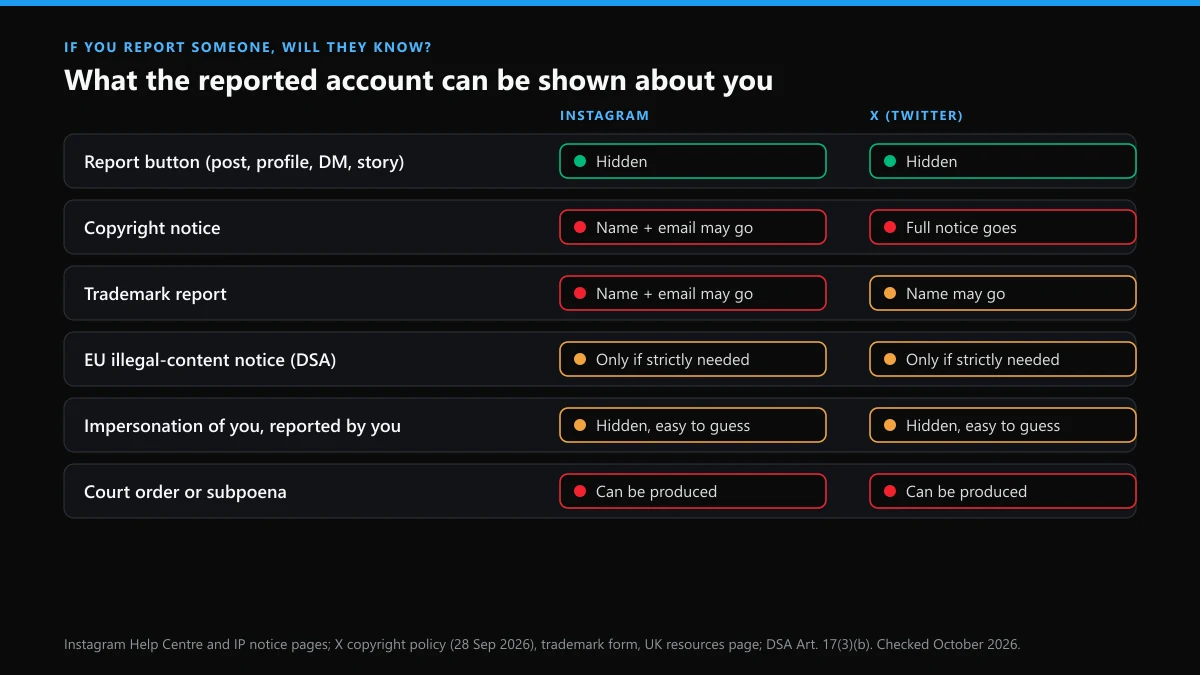
Who can actually see that the report came from you?
Only the platform, in almost every case. Instagram's Help Centre puts it in one line on its report content page: your report is anonymous "except if you're reporting an intellectual property infringement." X works the same way for the report button and releases account details only under valid legal process.
The differences show up once you leave the button. We put the two platforms side by side because X is where this desk works, and people who come to us about Instagram usually assume the rules are identical. They're close. They aren't the same.
| How you reported | X (Twitter) | |
|---|---|---|
| Report button on a post, profile, story or DM | Name hidden from the account | Name hidden from the account |
| Copyright notice | Notice "may include the name and email address of the rights owner" | The whole notice is forwarded, with name, address, phone and email |
| Trademark report | Same IP notice, so name and email may go | The form says your contact details won't be disclosed; the policy says X may share your name |
| EU illegal-content notice under the DSA | Notifier named only "where strictly necessary" | Same Article 17 rule |
| UK Online Safety Act complaint | No statement found | "X does not disclose information about the person who submitted the complaint" |
| Court order or subpoena | Account records can be produced | Released "as required by valid legal process" |
Does Instagram tell you who reported you when something comes down?
No. If someone reports you on Instagram and a post is removed, the notice names the rule it broke and shows the content, not the person who flagged it. Account Status, under Settings, lists the removal and any restriction that followed. It never lists a reporter.
So does Instagram show who reports you? Only through the intellectual-property door. Instagram's page on posts removed for IP infringement warns that the notice "may include the name and email address of the rights owner who made the report." That is deliberate: the law behind copyright takedowns expects the accused side to know who is claiming the work, so it can dispute the claim.
Everything else stays one-way. A harassment report, a nudity report, a spam report against a bot account: the person on the other end sees the outcome and nothing about its origin.
Are Instagram reports anonymous if the person can still guess?
Yes, Instagram reports are anonymous on paper, and people still guess right more often than you'd think. Is reporting on Instagram anonymous enough that nobody could ever work it out? Not when the context gives you away. A DM thread only the two of you were in, a comment aimed at you by name, a story shown to twelve close friends: if any of those disappears, the list of possible reporters is short.
Instagram's own blog has called reporting "always anonymous." The Help Centre's IP exception says otherwise, and the Help Centre is the page that gets updated.
That's why the searches "if u report someone on instagram will they know" and "if i report someone on instagram will they know" keep coming from people in small circles. If the answer worries you, block after you report, not before; Instagram doesn't notify people when you block them. If the person moves to threats or starts posting your private details, treat that as a separate report, the way we handle blackmail and doxxing cases on X.
How do you report an Instagram account anonymously?
You report an Instagram account anonymously by using the in-app report button and leaving no other trace. The report itself never carries your name to them. The trail usually comes from what you do around it.
- Collect evidence before reporting. Screenshot the profile with its @handle visible and the posts or messages that break a rule. Removed content can't be screenshotted later.
- Use the report button, not a comment or DM. Telling them "I'm reporting you" is the most common way reporters identify themselves.
- Pick the most specific reason. A precise category routes the case to the right reviewers and gives Instagram less to guess about.
- Send IP claims through a representative if exposure worries you. A copyright or trademark notice carries the claimant's details. A lawyer or agent can file as the authorised representative, which X's copyright policy also suggests for people concerned about sharing their details.
- Block afterwards if you need distance. Blocking is silent, and Instagram's block can extend to new accounts the person creates.
One limit nobody can route around: Instagram knows who you are. Every report is tied to your logged-in account.
Where do you check report status and your report history on Instagram?
Knowing how to check report status on Instagram comes down to one screen, Support requests. The Help Centre's report status page gives the web route as More, then Settings, then Help, then Support requests, then Reports, and you open the report you want. The app keeps the same Support requests list under Help.
The same list is how to see account report history on Instagram, since the app keeps no other log of what you've filed. The Help Centre adds a catch in plain words: "Every report that you've made may not be viewable in Support requests."
Each entry shows what you reported and, once a reviewer has looked, the outcome. "We didn't remove" is common. If the content plainly breaks a rule, report it again under the most specific reason rather than the same one. Write down the date of anything you report about a person who worries you. If the case later goes to police or a lawyer, that date matters more than the screenshot of the status screen.
How long does an Instagram report take?
An Instagram report has no published deadline, but Meta's EU numbers give a real benchmark. In its DSA transparency report for January to June 2026, Meta put the median time from an EU legal notice to action on Instagram at 28.89 hours, and 3.72 hours for trusted flaggers. Meta says every one of those notices went through manual review.
Two cautions. EU rules let platforms leave notices they didn't act on out of that median, so a rejected report can sit longer without moving the figure. And in-app reports in other countries aren't covered by it at all.
Appeals run slower: the same report gives a median of 60.2 hours for Instagram's internal complaint decisions. On X the gap between a report and a suspension follows its own pattern, which we traced in our X report-to-ban timeline.
How many reports does it take to get banned on IG?
There is no number. Asking how many reports to get banned on IG assumes a counter, and Instagram's page on how it decides what to remove says "the number of times that something is reported doesn't determine whether or not it's removed." One accurate report about a real violation outweighs a hundred about a post that breaks nothing.
What does add up is strikes. Meta adds a strike for most removals, the restrictions grow with the count, and strikes expire after a year. The most severe categories, child sexual exploitation among them, can disable an account after a single occurrence.
So how many reports can delete an Instagram account? Zero, on their own. A deleted account follows confirmed violations, and reports are only the way those violations reach a reviewer.
What are Instagram report apps, and do they know who you reported?
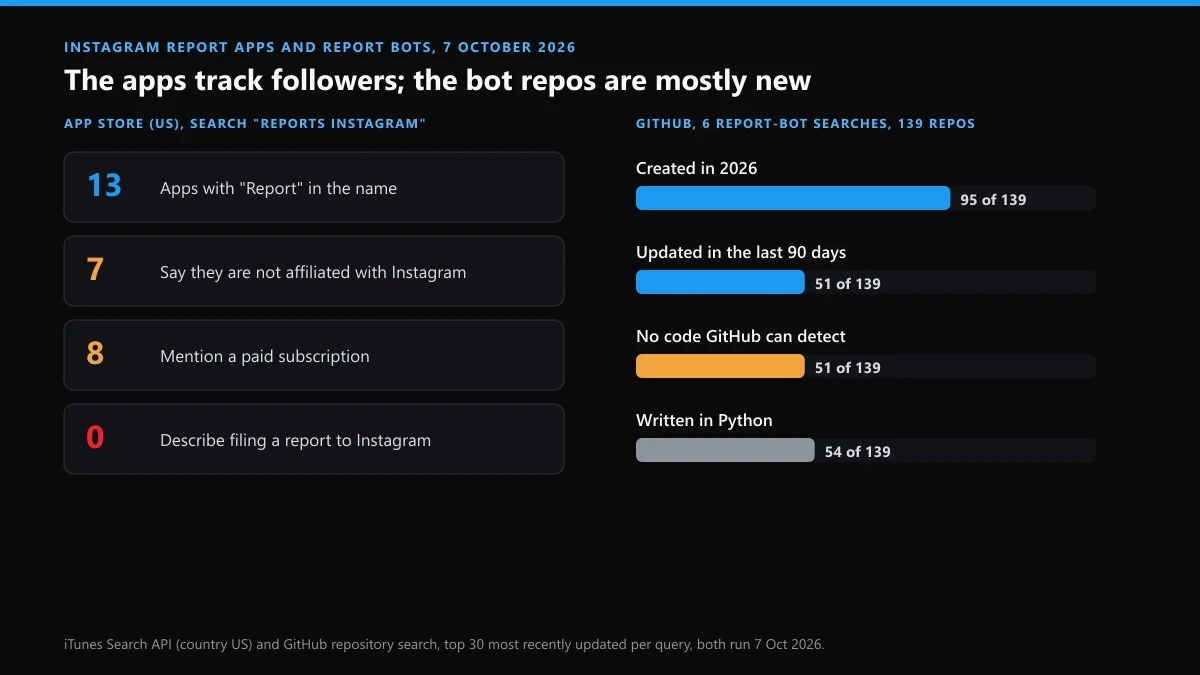
Instagram report apps are mostly follower trackers that use the word "Reports" as a brand name; they don't file reports to Instagram at all. On 7 October 2026 we searched the US App Store through Apple's iTunes Search API for "reports instagram." Thirteen of the results had "Report" in the name, with 831,588 ratings between them, and not one description mentioned sending a report to Instagram.
Three separate developers sell an app called Reports+. The largest, from Deep Vision Labs, had 493,668 ratings. Seven of the thirteen carry a not-affiliated-with-Instagram disclaimer, and eight mention a paid subscription.
Here is where "will they know" flips. The person you look up learns nothing, but an Instagram report app that works by logging into your account sees what that account does. Instagram's help page on third-party apps warns that giving one your login hands it "complete access to your account" and that accounts using such services "may be disabled or terminated."
What do the free report bots on GitHub and Telegram actually offer?
Mostly fresh listings with little behind them. We ran six GitHub searches on 7 October 2026, including "instagram report bot" (100 repositories, up from 99 when we last counted on 23 September) and "instagram mass report" (62, up from 59). Taking the 30 most recently updated per search gave 139 different repositories. Ninety-five were created in 2026. Fifty-one had no programming language GitHub could detect, so no recognisable source code at all. The narrowest search, "instagram report bot python," returned 12, and half of those hadn't been touched since before 2024.
I expected the old repos to be the problem. The new ones were stranger: two created on 4 and 5 October that GitHub labels as shell scripts, and one result under "instagram ban bot" advertised for bypassing bank and PayPal one-time passwords.
| What the listing calls itself | What it is in practice | Who learns what you did |
|---|---|---|
| instagram report bot github, mass report instagram account github, instagram report bot python | A public script that logs into Instagram and repeats the report flow; some are years stale | Instagram, through the account you run it on |
| instagram report bot free, instagram mass report bot free, mass report instagram account free | A download or a Telegram bot, often a teaser for a paid tier | The bot's owner gets the target and often your login |
| instagram account report bot online, instagram auto report bot | A web panel run by someone else; you submit the target | The panel can keep the order, the target and how you paid |
| instagram account ban bot, instagram account ban tool, instagram account report ban bot | A promise of a ban; no tool controls Instagram's decision | The seller, plus any payment processor |
| instagram fake report bot | A tool built to file false reports, which Meta's rules ban outright | Instagram, if the accounts filing are linked to yours |
| instagram account report bot, instagram account report tool, instagram report bot tool, instagram account spam report bot | Generic names for any of the above | Depends on whose login it runs on |
We tested paid sellers on the X side and wrote up what they delivered in our check of Twitter mass-report sellers. If your problem is the opposite, a profile flooded with fake followers, the fix is in clearing bot accounts off an X profile.
Can using a report bot get your own account banned?
Yes, and that risk is written down on both platforms. Meta's Inauthentic Behavior standard lists misusing "Meta reporting systems to harass, intimidate or silence others" as a violation. Instagram's Terms of Use separately bar collecting information or accessing the service in an automated way without its permission, which is what every report script does.
X is just as direct. Its Authenticity policy treats large numbers of duplicate or false reports, coordinated report campaigns, and "using or promoting third-party services" as engagement spam. The habits that keep an X account clear of that are covered in avoiding a ban on X.
None of this touches an ordinary Instagram bot report. Flagging a spam bot that floods your comments is exactly what the report button is for. The trouble starts when a bot is the one doing the reporting.
Will reporting an impersonator hand you their username?
No. On both platforms a successful impersonation report removes the fake account; it doesn't transfer the handle to you. X's current trademark policy lists suspension or a request to clear up the confusion as outcomes; handing the username to the trademark owner isn't one of them. For the report itself on X, start with removing an impersonator on X.
Getting the name is a separate job. Start by running a Twitter username check, or use an X handle checker to test spelling variants side by side. Checking whether a Twitter name is available before you report saves a surprise, because a suspended account's name stays held: the "username is unavailable" message covers held names as well as banned words.
If the name is held by a dead account, read up on whether X deletes inactive accounts and requesting an inactive account's username. If it's held by a live one, the routes are narrower: getting a Twitter username someone else holds, claiming a handle on X, or paying. Before paying, look at how buying a Twitter handle actually works, what handle marketplaces guarantee, and what sellers of usernames listed for sale on Twitter can actually transfer. Or skip the fight and pick from Twitter usernames that are still free.
If someone reports you on X instead, where do you start?
Start from what X did to the account, because each outcome has its own way back. The reporter stays hidden on X too, so the useful question is the result, not the name.
| What happened after the report | Where to begin |
|---|---|
| The account was suspended | Recovering a suspended Twitter account, then getting a banned X account back if the first appeal fails |
| The suspension is marked permanent | Appealing a permanent suspension on X |
| The account is locked and asks for a check | Unlocking a locked X account |
| Posts stopped reaching people | Lifting a shadow ban on X or appealing the visibility limit |
| You deleted the account in a panic | A deleted X account past the 30-day window |
| You can't remember the handle to appeal with | Finding a forgotten Twitter username or recovering an X account without the username |
| Email, phone or password no longer work | Twitter account recovery when the login details are gone, with the step-by-step order in recovering an X account |
The rule that matters on both platforms is the same: the report starts a review, and the review looks at what the account posted. Answer that, not the person you suspect filed it.
FAQ
If I report someone on Instagram and then block them, will they find out?
Not from Instagram. The report is anonymous and Instagram doesn't send a notice when you block someone. They may notice they can no longer see your profile, though, and if the reported content disappears around the same time, they can put the two together.
Does Instagram tell someone who reported their comment or story?
No. A removal notice shows the content that broke the rules and the rule involved, never the reporter. The catch is the content itself: if the comment was aimed at you by name, the notice reminds them exactly who it was aimed at.
Will the person know if Instagram rejects my report?
No. If Instagram finds no violation, nothing changes on their account, so there's nothing for them to be told. The result shows up only on your side, in Support requests.
Can an Instagram report app see who I look up or report?
An app that works by logging into your Instagram account can see what that account does, which is why Instagram warns that such apps get complete access. On 7 October 2026 none of the 13 App Store apps with "Report" in the name described filing reports to Instagram; they are follower trackers.
Is a free Instagram mass report bot from GitHub safe to run?
Running one means giving a stranger's script your Instagram login, and filing automated reports breaks Meta's rules on misusing reporting. In June 2025 the security firm Socket found a PyPI package sold as an Instagram growth tool that sent users' credentials to outside bot services.
Does X tell someone who reported their account?
Not for reports made with the report button. X forwards copyright notices in full, including the claimant's contact details, and for UK Online Safety Act complaints it states that it does not disclose who submitted them.