10 October 2026 · Twitter Ban Service · 10 min read
How to report a scammer on Instagram: match the scam type to the right report, then go outside the app
How to report a scammer on Instagram: open the profile, tap the three dots, tap Report and choose Scam, fraud or spam, then report the post or DM the same way. How to report a scam on Instagram depends on its type: sextortion goes under sexual exploitation, and lost money also goes to your bank and police.
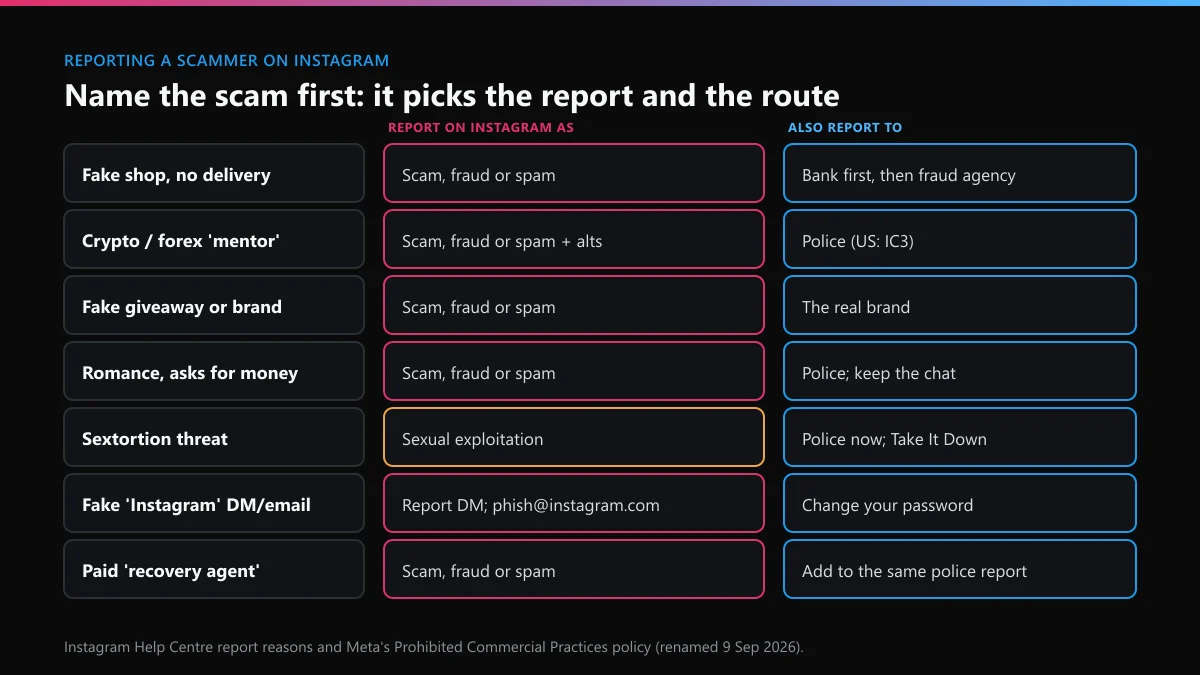
Which kind of scam is it, and what should you report it as?
Name the scam before you tap anything, because the type decides both the report reason and where else to go. Meta renamed its scam policy on 9 September 2026: the old "Fraud, Scams and Deceptive Practices" standard is now called Prohibited Commercial Practices, and phishing sits under a separate cybersecurity policy. In the app, most of these still sit behind the reason "Scam, fraud or spam".
| What happened | Report it on Instagram as | Also report it to |
|---|---|---|
| Paid a shop or seller, nothing arrived | Scam, fraud or spam, on the account | Your bank or card issuer first, then the fraud agency for your country |
| Crypto or forex "mentor" who doubled nothing | Scam, fraud or spam, plus every alt account they use | Police; in the US, IC3 takes investment fraud |
| Fake giveaway or brand pretending to be official | Scam, fraud or spam; the brand can file for impersonation | The real brand, so it can use its own report channel |
| Romance contact asking for money or gift cards | Scam, fraud or spam, from the chat and the profile | Police; keep the chat, don't confront them |
| Threat to share intimate images | The nudity or sexual exploitation reason, not spam | Police immediately; under-18s can use Take It Down |
| Message or email pretending to be Instagram | Report the DM; forward fake emails to [email protected] | Change your password if you clicked |
| "Recovery agent" offering to get your money back for a fee | Scam, fraud or spam | The same police report as the first scam; it's a second one |
Two cases skip the spam reason entirely. Sextortion goes in as sexual exploitation, because Instagram treats it as a safety case rather than a commercial one. Someone using your photos to scam others is impersonation, and only you or someone you authorise can file that; reporting someone on Instagram for what they did sets out who may file which report.
How to report a scammer on Instagram in the app
Report from the place the scam happened, and report the account as well. A single report scam on Instagram tap covers one item; the account report lets the reviewer see the whole profile. If you're wondering how to report scammers on Instagram app by app, the menus are the same on iPhone and Android.
- The account. Open the profile, tap the three dots at the top right, tap Report, choose the account option, then Scam, fraud or spam. This is how to report a fraudulent Instagram account rather than one post.
- A post or reel. Tap the three dots above the post, tap Report, then Scam, fraud or spam. One post rather than a whole account is covered in reporting a single Instagram post.
- A DM. Open the chat, press and hold the message, tap Report. Reporting a message doesn't delete it from your side, so screenshot it first.
- A comment. Tap Comments under the post, press and hold the comment, tap Report.
- Block last. Block after you report, not before. Blocking first can make the profile harder to reach from your account.
Before you file, open the account's About this account page from the profile menu. It shows the date joined and how many times the username has changed. A shop account created three weeks ago with four former usernames tells the reviewer a lot, so mention it in any form that has a free-text box. For a page or an account that should come down entirely, reporting a whole Instagram account or page covers the account-level reasons.
Is there an Instagram fraud reporting email that works?
No inbox takes scam reports. People searching for an Instagram scam report email find two real addresses, and neither does that job.
- [email protected] takes phishing emails that pretend to come from Instagram. Forward the fake email there. It doesn't review accounts or refund anyone.
- [email protected] is Meta's agent for US copyright notices. A scam report sent there isn't a copyright notice and won't be treated as one.
Real security email from Instagram comes from domains such as @mail.instagram.com, @support.instagram.com and @facebookmail.com, and the Accounts Center lists the security emails sent to you in the last 14 days. Instagram's Help Centre also says it will never contact you about account security through Direct messages. A DM from "Instagram Support" asking you to verify, pay or appeal is the scam itself. If you need a written route rather than an app tap, see which Instagram report forms still open signed out.
How many scam reports turn into action on Instagram, compared with X?
Scams are a high-volume category on Instagram and a small one on X. We counted the EU's DSA Transparency Database, where platforms log moderation decisions affecting EU users, for 10 September to 9 October 2026, on 10 October, using the scams and fraud category.
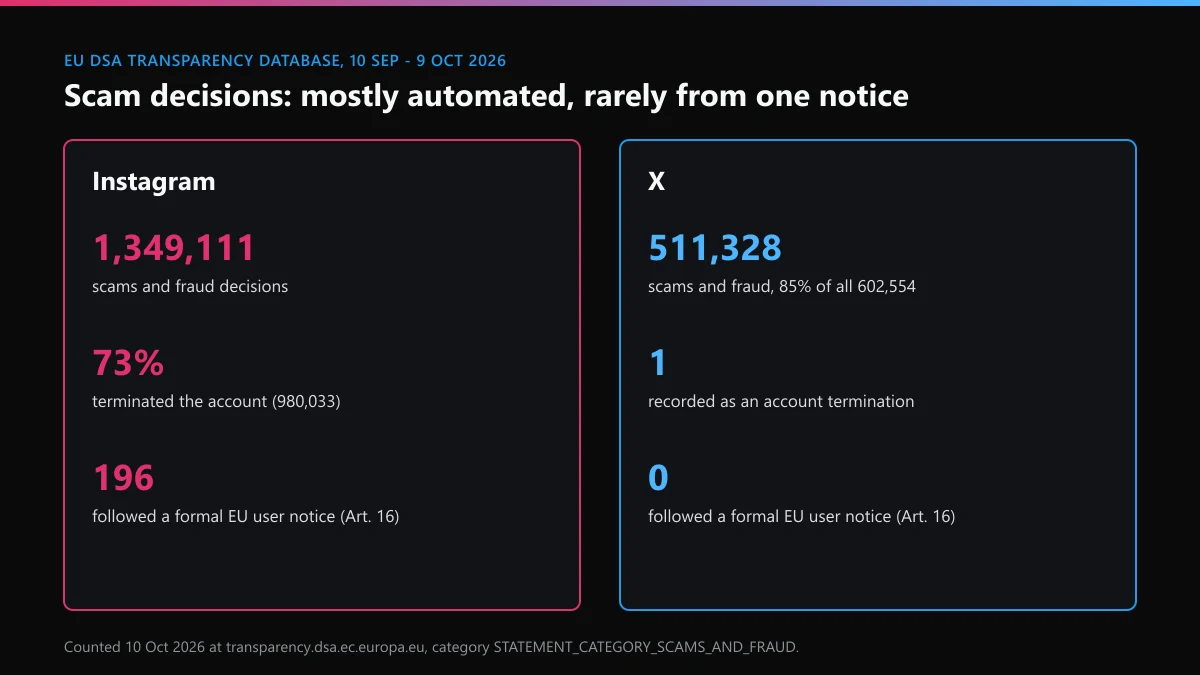
- Instagram logged 1,349,111 decisions in the scams and fraud category. 980,033 of them, about 73%, terminated the account; 368,838 removed content.
- Only 196 of those Instagram scam decisions followed a formal EU user notice under Article 16 of the DSA, about 1 in 6,900. Only 27,762, about 2%, were logged as not automated.
- X logged 511,328 scams and fraud decisions out of 602,554 in total, 85% of everything it filed, a category it appears to use for spam and platform manipulation. Exactly 1 was recorded as an account termination, and none followed an Article 16 notice.
The low share that follows a user notice is the point to take away. Most scam accounts come down because Meta's systems link them to other accounts, not because one person reported them; Meta's own newsroom says "disabling one node leads investigators to connected scammers". That's why the report still matters: it adds your account to the evidence, even when nothing happens on the day.
How do you report an Instagram scammer to police or online?
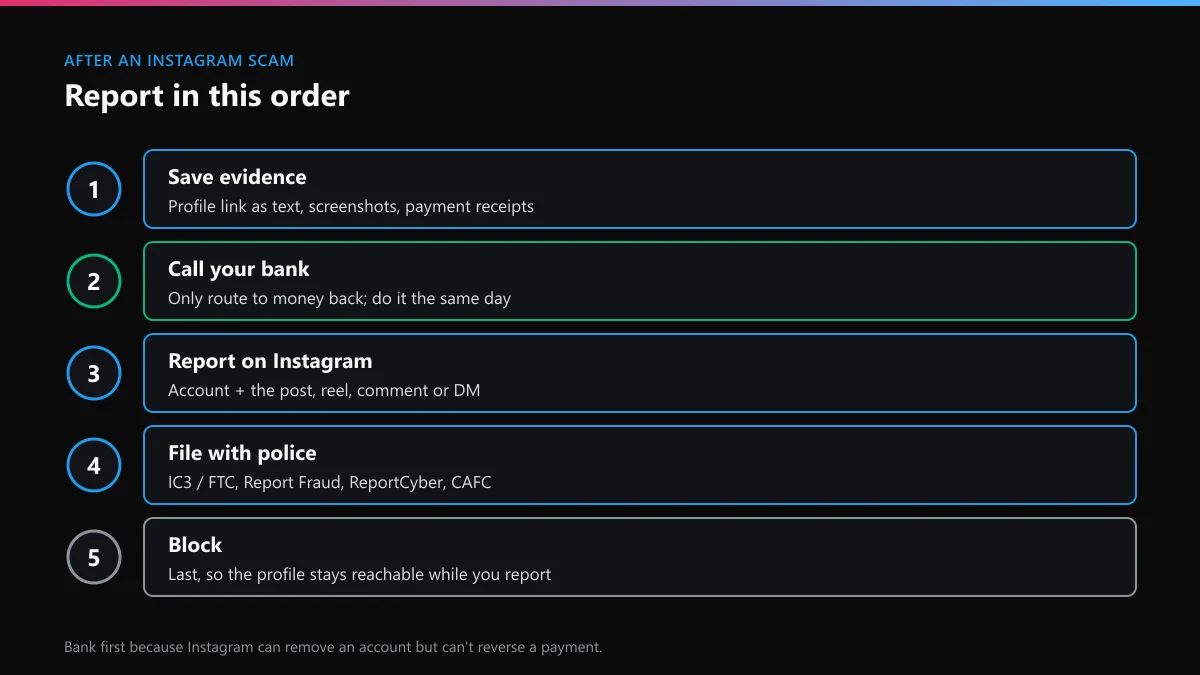
Go to your bank first if money moved, then file with the national fraud service; Instagram can't refund you or force the scammer to. To report an Instagram scammer to police, use the online channel for your country rather than calling an emergency line, unless someone is in danger. Each of these lets you report an Instagram scammer online.
| Where you live | Report to | What to know |
|---|---|---|
| United States | FBI IC3 at ic3.gov, and the FTC at reportfraud.ftc.gov | The FTC shares reports with over 2,000 law enforcers but says it can't resolve individual cases |
| England, Wales, Northern Ireland | Report Fraud at reportfraud.police.uk, which replaced Action Fraud | For a bank transfer, ask your bank about APP reimbursement, capped at £85,000 |
| Scotland | Police Scotland on 101 | Report Fraud doesn't cover Scotland |
| Australia | ReportCyber, and Scamwatch for scam reports | Call your bank first if you paid by card or transfer |
| Canada | The Canadian Anti-Fraud Centre, and local police | Local police take the formal report |
| EU countries | Your national police's online fraud report | Mention the Instagram username and profile link |
Give the police what the FBI asks for: the scammer's name or username, how they contacted you, the amounts, dates and payment details, and the screenshots. Save the profile link as text, not just a screenshot, because usernames change. According to the FTC, people who lost money to a scam that started on social media lost $2.1 billion in 2025, and WhatsApp and Instagram came "a distant second and third" behind Facebook by losses.
What does Reddit say about how to report scammers on Instagram?
Reddit is useful for spotting a scam and useless for punishing one. Ask about how to report scammers on Instagram Reddit-style and the threads repeat the same three lessons.
- No naming and shaming. r/Scams bans posts asking the sub to go after a scammer, under its Rule 7 against "personal army or revenge" requests. Post to check whether something is a scam, not to rally reports.
- Recovery offers are the second scam. Anyone who comments that they can get your money back for a fee is running one. The FBI's IC3 warned in April 2025 that law enforcement won't refer victims to paid recovery companies.
- Mass reporting doesn't speed things up. Twenty friends filing the same report doesn't change the review. One clear report with evidence does as much as many.
Worried the scammer will see your name? On scam and spam reports, Instagram doesn't tell the account who reported it; whether someone learns you reported them on Instagram covers the exceptions. Reported the wrong account? Taking back an Instagram report sent by mistake explains what can and can't be undone.
Is the same scammer working on X?
Often, and the scam that crosses most easily is the handle sale. Scammers advertise "rare" or "OG" X handles on Instagram, take payment, and either disappear or hand over an account that X later takes back. X's rules forbid selling usernames, so a buyer has no route to complain. Before paying someone for an X handle, read how the marketplaces where X handles trade work and the warning signs in X usernames listed for sale.
Most of what sellers charge for, you can check free. Checking if an X name is available takes seconds, an X handle checker runs the variants, and a quick X username check tells you why a name failed. An X username shown as unavailable isn't always held by a live account, and there's a sample of X usernames we found unclaimed. A seller promising a dormant name is selling something you can try yourself: read whether X deletes inactive accounts, prising a name from an inactive X account, getting an X username someone else holds and securing a freed handle on X.
| The Instagram scam | Its form on X | Our guide |
|---|---|---|
| Sextortion in DMs | Threats to publish private material | reporting blackmail and doxxing on X |
| Fake giveaways in comments | Bot replies under popular posts | clearing scam bots out of your X replies |
| Fake "Instagram Support" DMs | Fake "X appeal" or "verification" messages | the X recovery route that fits your case |
What if a scammer took over your X account or got it banned?
Treat the account as compromised and use only X's own forms. Phishing links that steal an Instagram login are often reused on X. If you're locked out, start with unlocking a locked X account; missing details have their own fixes in recovery when you've lost the username and finding a forgotten X username. If the scammer deleted it, see the options for an X account deleted more than 30 days ago.
A hijacked account that posted scams usually gets suspended. Read the reasons X suspends accounts, then getting a suspended X account reinstated or appealing a permanent X suspension; unbanning an X account covers the rest. If the account survived but its reach dropped, lifting a shadow ban on X and a shadow ban appeal on X come next, and habits that keep an X account out of trouble stop it happening again. Never pay a stranger who offers to "unban" you; that's the recovery scam again.
FAQ
How do I report a scam on Instagram?
Report the account from its profile menu with the reason Scam, fraud or spam, then report the post, reel, comment or DM where the scam happened. If you sent money, call your bank and file with your country's fraud service the same day.
How to report a scam on Instagram account when you aren't the victim?
Anyone can report an account for scams; you don't need to have lost money. Report it from the profile and add any post that shows the scam. Impersonation is different: only the person being copied, or someone authorised by them, can file that report.
Is there an Instagram scam report email?
No. [email protected] takes phishing emails that pretend to be Instagram, and [email protected] takes US copyright notices. Scam accounts are reported in the app or through Instagram's Help Centre forms.
Will Instagram refund money lost to a scammer?
No. Instagram can remove the account but can't reverse a payment. Your bank, card issuer or payment app is the only route to getting money back, and the police report helps with that claim.
What happens after an Instagram scam report?
A reviewer or automated system checks the account against the Prohibited Commercial Practices policy. You'll see the outcome in Support Requests in the app. If the account stays up, you can ask for another review from the same screen.
Should I pay someone to report a scammer on Instagram for me?
Not anyone who promises a guaranteed ban or to get your money back. Instagram reviews every report on its rules, and paid recovery offers are a known follow-up scam. Real help means filing the right reports correctly, with no promise about the outcome.