15 October 2026 · Twitter Ban Service · 9 min read
X support email: the one address X publishes, and the form that replaces the rest
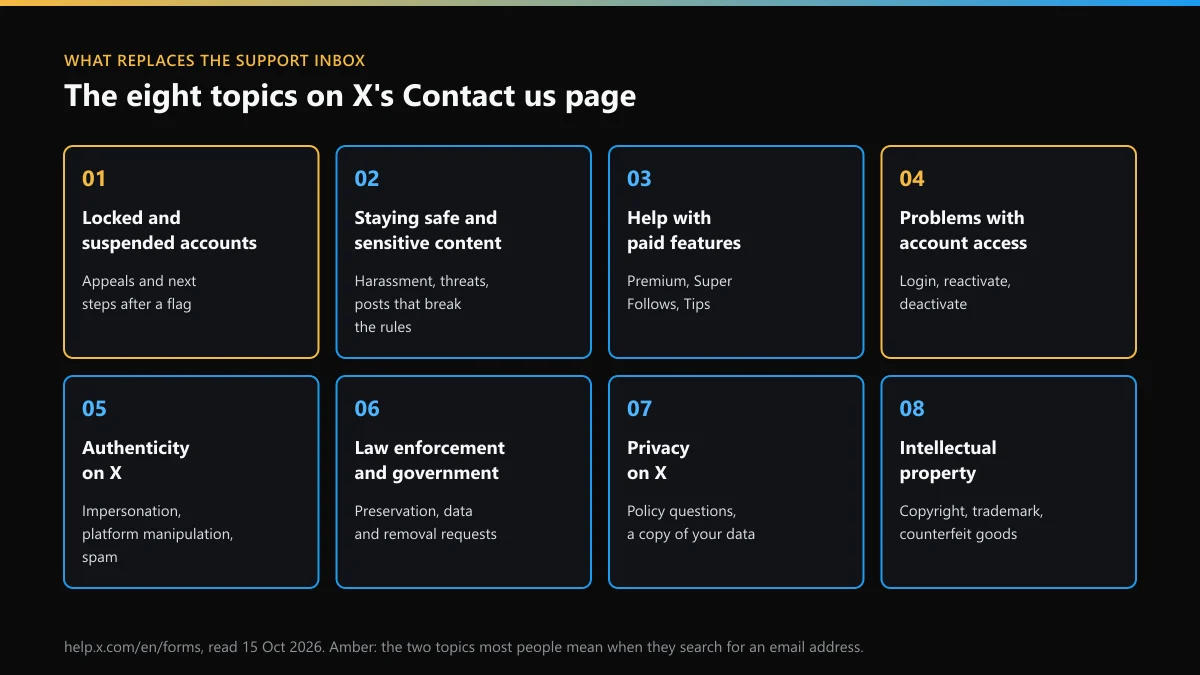
There is no general X support email. The only address in X's Terms is copyright@x.com, and it takes copyright notices alone. Locked accounts, hacks, impersonation, billing and privacy all go through the eight-topic Contact us page at help.x.com/forms. X's replies then arrive by email from an @x.com address.
Is there an X support email address at all?
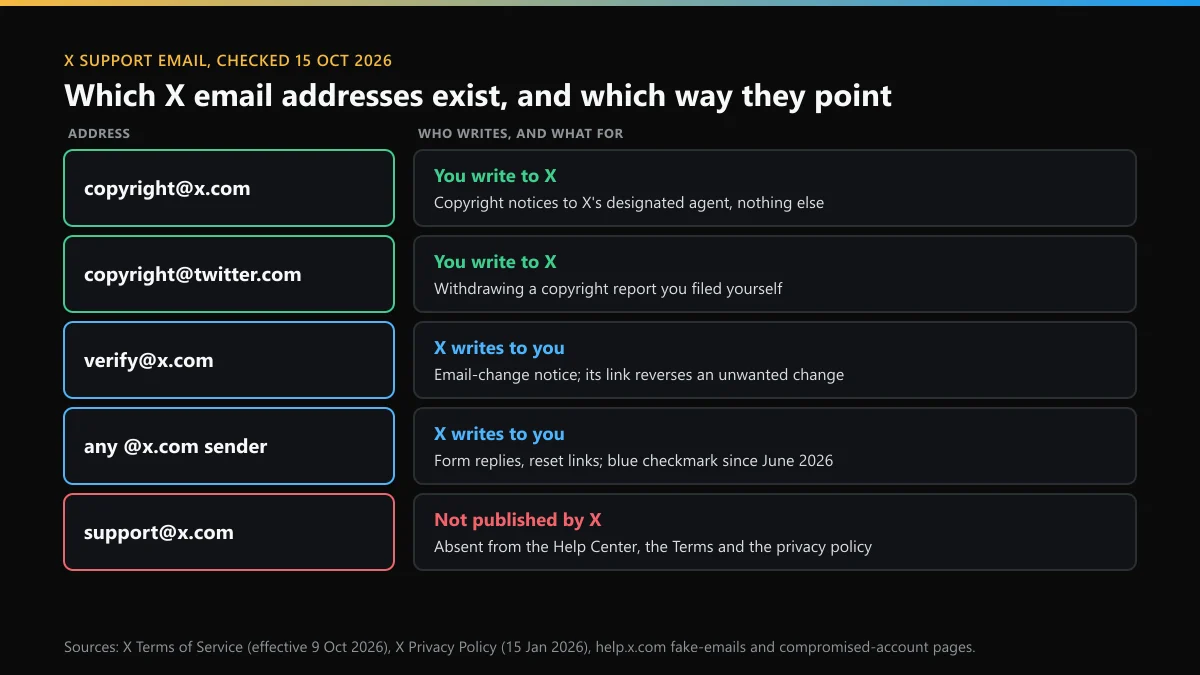
Not one that X stands behind. On 15 October 2026 we opened the three places X would have to list it and searched each for an @ sign. The Contact us page has eight topics and no address. The Terms of Service, effective 9 October 2026, has exactly one: copyright@x.com. The privacy policy, effective 15 January 2026, has none at all. It sends privacy questions to a Privacy Policy Inquiries page or to a postal address.
So an "x support email address" or a "twitter support email address" in a listicle is a guess. support@x.com and the older support@twitter.com may be live mailboxes, but X doesn't publish them, and nothing it has written commits it to reading them. The same goes for the shorter searches, such as "email x support", "email for x support", "support twitter email", "support email twitter", "contact email twitter" and "contact twitter email". They all lead back to the forms.
The Twitter-to-X rename didn't change any of this. twitter.com forwards to x.com, and the help pages, forms and rules are the same ones.
Which email addresses does X actually use?
Four, and only two of them are for you to write to. The table sorts them by direction. A "twitter email address" found in an old article is most likely one of these, or a fake.
| Address | Direction | What it's for | Where X says so |
|---|---|---|---|
| copyright@x.com | You to X | Copyright notices to X's designated agent | Terms of Service, 9 Oct 2026 |
| copyright@twitter.com | You to X | Withdrawing a copyright report you filed | X copyright policy page |
| verify@x.com | X to you | Notice that the account email changed, with a link that reverses it | Compromised-account guide |
| Any @x.com sender | X to you | Form replies, password reset links, notifications | Fake-emails help page |
If you were looking for an "x contact email" for privacy, the policy has none. Its section 10 points to a Privacy Policy Inquiries page and to two postal addresses, X Corp. in Austin and, for the EU, EFTA and UK, X Internet Unlimited Company in Dublin. Both are written out in X's phone and postal contact details, along with why no number appears beside them.
The copyright inbox won't take anything else. A message to copyright@x.com about a locked account or an abusive reply isn't a copyright notice, so it goes nowhere useful. For copyright on Instagram, the rules are different again. Who may file an Instagram copyright takedown covers them.
How to contact X support by email when the inbox is a form
You contact X support via email only in reverse. You file the form, and X answers by email. People who search for how to contact X support by email, or how to contact Twitter support via email, end up with these five steps.
- Open the Contact us page. Go to help.x.com/forms in a browser. It works signed out, though some forms ask you to log in.
- Pick the topic. Choose the one of eight topics that matches the problem, then the narrower option inside it.
- Give an email you can read. Type the email address on the account, or one you check daily. X's answers come back there.
- Describe the case once. Add the username, what happened and when, and links or screenshots. One complete form beats three short ones.
- Watch for an @x.com reply. Replies come from an @x.com address. Check spam and promotions folders, and ignore anything that asks for your password.
What to write in each field is covered in how X customer service works through its forms. Two things decide whether the reply ever reaches you. The address has to be one you can open, and it can't be bouncing (see the deliverability section below). If the account was hacked and the attacker changed the email, look for the verify@x.com notice in the old inbox first. X's compromised-account guide says the link in that message reverses the change.
Which form topic replaces the Twitter support email for your problem?
There is an X customer service email for nothing, but there is a form for almost everything. Match the problem to the topic before you type, because a case filed under the wrong topic may have to be filed again. Anyone looking for a Twitter customer service email about a bill should use the paid-features topic.
| Your problem | Contact us topic | Read first |
|---|---|---|
| Account locked or suspended | Locked and suspended account issues | The notice on your login screen |
| Can't sign in, or the account is deactivated | Problems with account access | Bringing a deactivated X account back |
| Someone is posing as you or your brand | Authenticity on X | Getting a fake X profile removed |
| Threats or a pile-on in your replies | Staying safe on X and sensitive content | Reporting harassment on X and Instagram |
| Premium charge, Super Follows, Tips | Help with paid features | Your App Store or Google Play receipt |
| Your photo, logo or work copied | Help with intellectual property issues | Who can file a trademark report |
| A copy of your data, privacy questions | Privacy on X | The privacy policy, section 10 |
| A police or court request | Requests from Law Enforcement/Other Government Agencies | X's legal request guidelines |
If the issue is your own picture rather than a logo, taking down a photo of you that someone else posted explains the private-media route, which doesn't ask you to own the copyright.
Three problems that no email to X support will fix
Some of what people want to email Twitter support about isn't a support case at all. It's a limit or a ranking change that runs on a timer, and no form shortens it.
- "Rate limit exceeded." A counter that resets on its own. Which X limit you've hit and when it resets lists the clocks.
- Posts that nobody sees. Before you write, run a Twitter shadowban check to see whether search and replies really hide you.
- "Username unavailable". X answers that on screen, not by email. What X's unavailable message means covers names that look free but aren't.
Usernames bring in a lot of these emails, so here is what X allows. You can see what's open with an X username lookup, a handle checker that reads X's own answer, a name availability test or lists of names still free. For a name someone else holds, start with claiming a handle on X, then asking for a dormant username, X's inactivity rule and getting a taken username. No email buys one. Paying breaks X's rules, as buying an X handle, handle marketplaces and usernames advertised for sale explain.
How do you spot a fake "Twitter help email"?
Look at the sender, then at what the message asks for. X's fake-emails page gives the rules. X sends only from @x.com, and it never attaches files or asks for your password by email, Direct Message or reply. Since early June 2026, X has added a Mark Certificate to its emails, and most major mail apps show it as a blue checkmark beside the sender. X's advice is blunt: don't engage with an email that lacks it.
The same goes the other way. Lookup sites and search ads offer an "x help email" or an "x help center email" that promises a human. If writing to one gets you a reply that asks for a login code, a fee or remote access, that isn't X. If X thinks your account was hacked, it may reset the password itself and email you a link. That link always points to https://x.com.
Fake support emails are often the first step in an account takeover. If you already answered one, change the password from inside the app, not from the email's link, and then revoke sessions you don't recognise.
Why isn't X answering my email for Twitter support?
Often X did answer, and the email never landed. X's email delivery page explains the mechanics. When messages to your address bounce, X shows a yellow warning on the account. If they keep bouncing, it stops trying some notifications, and that can include password reset emails.
- Check the spelling of the email in your account settings, then use the "try sending a message again" link in the warning.
- Search spam, junk, promotions and filters for x.com.
- If you once clicked "This isn't my account" in an X email, X stopped delivering to that address. You'll need to add a new one.
- Corporate and ISP mail servers sometimes filter X. X says its mail nearly always reaches gmail.com, yahoo.com and hotmail.com, and that it can't pull bounce logs for single emails.
X publishes no reply time for any form. If a week passes, file again under the same topic with anything new. Don't open a second case on a different topic for the same problem.
Is the @Support account a faster way to reach X?
It's the official one, and it's big. The widget on the Contact us page showed @Support with 6.6 million followers on 15 October 2026. It posts how-tos and known outages, which helps you tell a bug from a problem with your own account. It isn't a case desk. Cases about one account still go through the forms, and calling X doesn't work either, since X lists no support phone line.
Be careful after you complain in public. If an account that calls itself "support" or a "recovery agent" replies and asks for a fee or a login code, it isn't X. X says it never asks for your password by email, Direct Message or reply.
When the email is really about someone else's account
Most messages that people mean to send to an X support inbox are about another account: a copy of their profile, a scammer, someone posting their photos. X takes those through reports, not mail, and only acts when the account breaks a rule. For a fake profile under your name, read what to file when someone impersonates you. If you simply want an account gone, what a non-owner can do about another person's account sets out the limits. Threats tied to intimate images need the blackmail and sextortion report, and fast.
The same account is often on Instagram too, where the routes differ. Start with reporting a person on Instagram or reporting one Instagram post. Then see the Instagram account and page report, what gets an account, post or Reel removed and reporting an Instagram scammer. For the legal side, read Instagram's legal request routes and which Instagram report forms are open. After you report, whether the other person learns it was you and undoing a report sent by mistake answer the usual follow-up questions.
FAQ
Does X have a customer service email?
No general one. X's Contact us page offers eight form topics and no inbox, and the only address in its Terms is copyright@x.com, which takes copyright notices. Billing, login and safety problems all go through the forms.
Can I email support@x.com or support@twitter.com?
You can type the address, but X doesn't publish either one on its Help Center, Terms or privacy policy, so nothing commits X to reading it. Send the same details through the matching form at help.x.com/forms instead.
What email does X send from?
X says it only sends email from @x.com. Since early June 2026 its emails carry a Mark Certificate, which most mail apps show as a blue checkmark next to the sender. X's emails never include attachments or ask for your password.
How do I contact X support if I can't log in?
Use the Problems with account access topic on help.x.com/forms. It is built for people who can't sign in, and it asks for an email address where X can reach you, so use one you can still open.
Is the @Support account on X a way to reach a person?
It's X's official support account, with 6.6 million followers shown on the Contact us page on 15 October 2026. It posts help and known issues. Cases about one account still go through the forms.
Why did X stop sending me emails?
Usually because messages bounced. X shows a yellow warning when it can't deliver, and repeated bounces stop some notifications, password resets included. Clicking "This isn't my account" in an X email also stops delivery to that address.