14 October 2026 · Twitter Ban Service · 9 min read
How to reactivate X account access: one login inside 30 days, and what can stop it
How to reactivate X account access comes down to one login. Go to x.com/login or open the app within 30 days of deactivating, enter your username and password, and confirm the reactivation notice. X then sends you to your Home timeline. Posts, followers and likes can take a while to reappear.
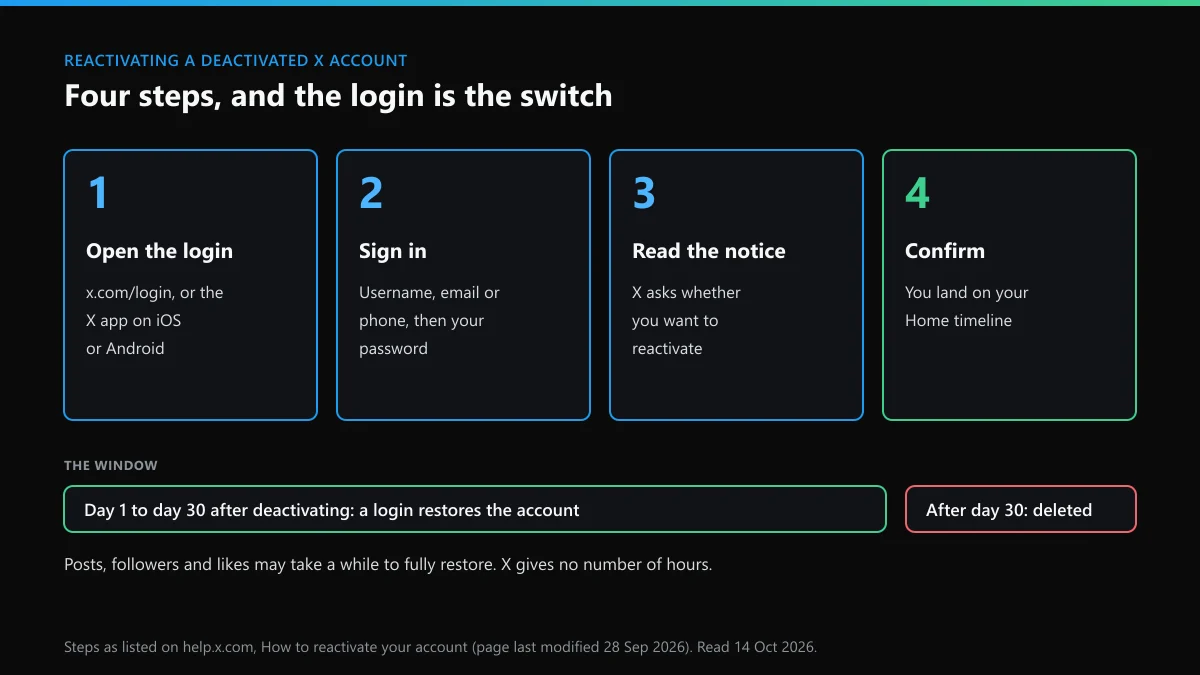
How to reactivate X account: what are the four steps?
X lists four steps on its How to reactivate your account page. We read it on 14 October 2026; its metadata showed a last edit on 28 September 2026. The steps are the same in a browser and in the iOS and Android apps.
- Open the login page. Go to x.com/login in a browser, or open the X app on iOS or Android.
- Enter your login details. Type the username, email or phone number on the account, then the password.
- Read the reactivation notice. Before X signs you in, it shows a notice asking whether you want to reactivate the account.
- Confirm. Choose to reactivate. X sends you to your Home timeline, and the profile is public again.
There is no reactivation form, no button in settings and no email to send. The login does all of it. If you searched "how to reactivate twitter account" instead, the rename changed nothing: twitter.com forwards to x.com and the same four steps apply. The same goes for how to reactivate a Twitter account you opened years ago under the old brand.
How to reactivate X on a phone you no longer own is the same again. The account isn't tied to a device, so any browser or any phone with the app will do.
Can you reactivate a Twitter account after the 30 days?
No. Deactivation lasts 30 days, and X's deactivation page treats a window with no login as your decision to delete. After that the account "is no longer available in our systems", and the page says you can't reactivate it or reach the old posts.
Count from the day you confirmed the deactivation. X doesn't publish the hour the window closes, so don't leave the login to day 30. Some guides mention a 12-month window for paying subscribers. X's current page names only the 30 days, and that is the number to plan around.
If the date has passed, read what is left of an X account once the 30 days are over. A deactivated Twitter profile is also a different thing from a dormant one. An account nobody logs into falls under a separate rule, covered in whether X removes accounts for inactivity.
What comes back after Twitter reactivation, and what takes a while?
X's wording is that posts, followers and likes "may take a while to fully restore". It gives no figure. Expect the counts on your profile to read low at first.
- Posts, followers, likes. Restored, though not all at once.
- Direct messages. Kept for the whole window. They're only deleted when the account is.
- Username and email. Both stay tied to the account for the 30 days, so they come back with it.
- Subscriptions bought in the app. X says these stay active during deactivation, so you may have been billed while away. Check the App Store or Google Play.
- Subscriptions bought on x.com. These cancel when you deactivate. You'd have to subscribe again.
One thing a reactivation won't do is repair the account. X's page says that deactivating and reactivating doesn't resolve missing posts, wrong follower counts or a possible compromise. If you deactivated to fix one of those, the problem will still be there when you log in.
How to reactivate my Twitter account when I've forgotten the password?
Reset the password, then log in. The reset on its own doesn't reactivate anything. X's password reset page sets out the route:
- On the sign-in page, choose "Forgot password?" and enter the email, phone number or username.
- X emails a code. The code is valid for 60 minutes.
- Set a new password. This logs you out of every active session.
- Sign in with the new password and confirm the reactivation notice.
If several accounts share one phone number, X won't accept the number at the first step, so use the email or the username. With no access to the email or the phone, X's reactivation page gives one answer: create a new account. Before you accept that, try to get the mailbox back through your email provider. That is the practical answer to how to recover deactivated Twitter account access, because X checks nothing except the code.
Lost more than the password? X account recovery routes sorted by what you've lost covers the username, the phone and two-factor codes.
Why does a deactivated X account keep reactivating?
Because any login reactivates it, including one you didn't type. X's deactivation FAQ says a connected third-party app may be logging in for you, and that "logging into X automatically reactivates your account".
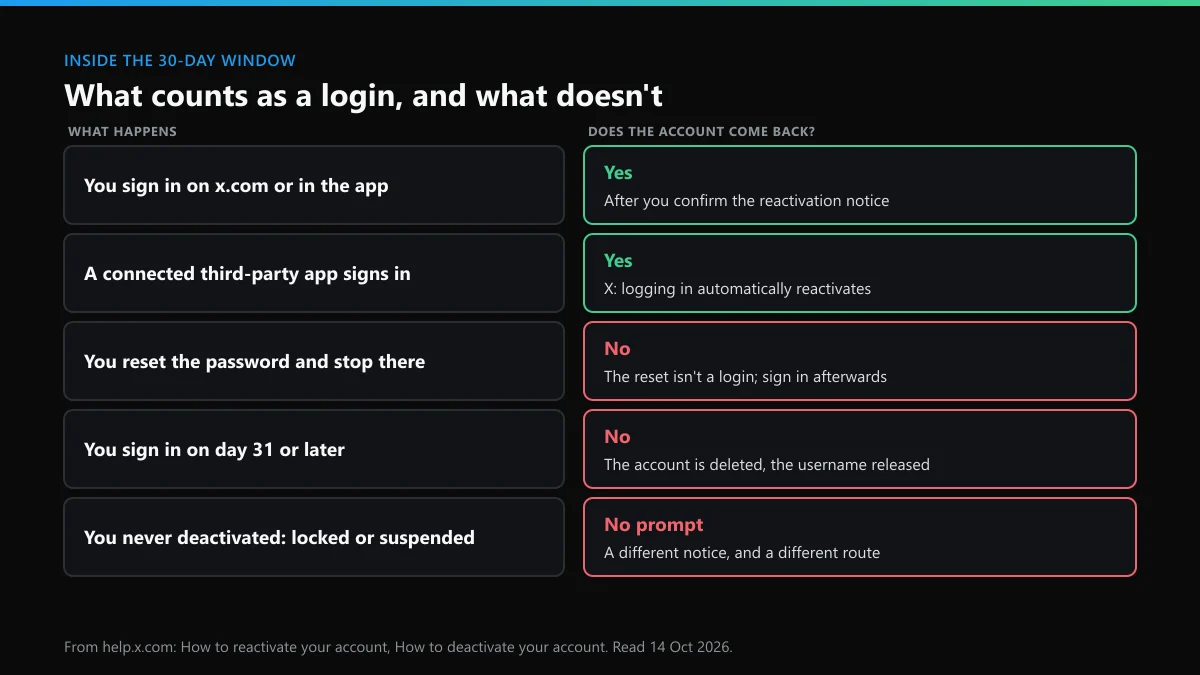
The fix is in the Apps and sessions section of your account settings, where X's third-party apps page says you can review and revoke access. Scheduling tools, cross-posting apps and old "sign in with X" logins are the usual suspects. Revoke them, then deactivate again.
It works the other way too. If you mean to stay gone, don't log in "just to check" during the window, because the check is itself the reactivation. We'd expect a second deactivation to start a new 30 days, since X counts the window from the deactivation. X doesn't spell that out.
"Twitter deactivated my account": did X do it?
Almost never. On X's help pages, deactivation is something the account holder does from settings, with the password. X's own penalties are locks and suspensions, and they show a different notice at login. So if your Twitter account deactivated without you, the likely causes are someone else with your password, or a lock or suspension you've read as a deactivation.
The wording of the search usually gives the case away.
| What you typed | What it usually means | What to do |
|---|---|---|
| "reactivate twitter", "twitter reactivate", "reactivate X" | You deactivated it yourself, under 30 days ago | Log in and confirm the notice |
| "twitter reactivate account", "reactivate account twitter", "x reactivate account" | You're looking for a reactivate button or form | There isn't one. The login is the switch |
| "how to get back deactivated twitter account" | The password or the email is gone | Reset the password first, then log in |
| "twitter deactivated account" you didn't close | Someone else had the password | Reset it, log in inside the 30 days, then revoke apps and sessions |
| "twitter deactivated my account" | A lock or a suspension | Follow the notice on screen; reactivation doesn't apply |
For the last row, the routes are in unlocking a locked X account and appealing an X suspension. A locked or suspended account can't even be deactivated from settings. X takes that request through a form.
What happens to the username on a deactivated Twitter account?
It is held for you. X says the username and email stay tied to a deactivated Twitter account for 30 days, so nobody can register either one, and neither can you on a second account. On day 31 both are free for anyone.
If the handle was the reason you left, you didn't need to deactivate. X lets you change a username from Account information at any time. To see what's open first, use an X username lookup, a handle checker that reads X's own answer or a name availability check for X. Lists of X usernames that are still free show how few short ones are left, and what X's "unavailable" message means explains the names that look free but aren't.
If you came back too late and someone has your old name, the options are narrow. Start with how to claim a handle on X, then asking for a username nobody uses and getting a username another account holds. Paying for it is against X's rules. The risks are set out in buying an X handle, how handle marketplaces operate and X usernames advertised for sale.
What if you reactivate and find an account posing as you?
While you were deactivated, your profile and handle weren't viewable, and mentions of you stopped linking anywhere. That gap is when a copy gets noticed least. After the login, search your display name and your photos.
- A profile pretending to be you. See what to file when someone impersonates you.
- Your photos on someone else's posts. See getting a picture of you taken down.
- Abuse waiting in your replies and messages. See reporting harassment on Instagram and X.
- Your brand name on another account. See who can file a trademark report.
- An account you want gone entirely. What a non-owner can do about someone else's account sets out the limits.
Report only what breaks a rule. An account that shares your name but posts as itself isn't impersonation, and X won't act on it.
Did the same thing follow you to Instagram?
People who take a break from X often step back from Instagram too, and a copycat rarely stops at one app. Instagram's routes are different, so match the page to the problem.
- One post or Reel. Reporting a single Instagram post and what gets an account, post or Reel removed.
- A person or a whole account. Reporting a person on Instagram and reporting an Instagram account or page.
- Fraud or threats. Reporting an Instagram scammer and the blackmail and sextortion report.
- Your own work or a legal claim. Who can file an Instagram DMCA takedown and Instagram's legal request routes.
- The forms and what follows. Which Instagram report forms are open, whether the other person learns you reported them and undoing a report sent by mistake.
FAQ
Can I reactivate my Twitter account after a year?
No. X deletes a deactivated account once 30 days pass without a login, and its help page says a deleted account can't be reactivated. After a year the username may already belong to someone else. You'd need to open a new account.
Can you reactivate your Twitter account without the email address?
Yes, if you still know the password, or if a phone number on the account can receive the reset code. With no password, no email and no phone, X's own advice is to create a new account.
How long does X account reactivation take?
The login is instant: you confirm the notice and land on your Home timeline. X says posts, followers and likes may take a while to fully restore, and it gives no number of hours.
Does Twitter account reactivation bring back followers and posts?
Yes. X's reactivation page names posts, followers and likes as things that are restored, though not all at once. Direct messages are kept through the 30-day window as well.
How to reactivate your Twitter account on an iPhone or Android phone?
Open the X app, sign in with the account's username and password, and confirm the reactivation notice. The steps are the same four that X lists for the website.
If I log in to reactivate my Twitter, can I deactivate it again later?
Yes. The login ends the deactivation. If you deactivate again, X's page describes a 30-day window that starts from that deactivation, so we'd expect a fresh count rather than the old one.
How to reactivate an X account that was suspended?
You can't, because a suspension isn't a deactivation. A suspended account shows a suspension notice at login, not the reactivation prompt, and the way back is an appeal to X.