20 October 2026 · Twitter Ban Service · 10 min read
How to report a YouTube ad, and how to report scam ads on YouTube by what they were after
To report a YouTube ad, tap Sponsored on the ad in the app, or click More or Info on a computer, then choose Report ad and pick a reason. The advertiser never learns who reported it. For an ad that has already gone, Google's ad complaint form takes the link and a short description.
Most advice on this stops at the button. The button is the easy part. What decides whether a report does any good is the reason you pick, and whether the ad already got what it came for. A crypto giveaway that took your deposit needs your bank as well as Google. A "verify your account" ad that took your X password needs X. So this page sorts YouTube ads by what they wanted from you.
How to report a YouTube ad in five steps, on a phone or a PC
To report a YouTube advert, start while the ad is still playing. The menu disappears with it. That is why the first step is a pause, not a tap. YouTube's help page on reporting content lists phone and computer as the only places an ad can be reported.
- Pause the video. Tap the player or press the space bar. Most in-stream ads stop with the video, and the report button only exists while the ad is on screen.
- Note three things. The advertiser name under the ad, the time and what it promised. If the ad has gone, these are what the complaint form needs.
- Open the ad menu. On a phone, tap Sponsored. On a computer, click More or Info on the ad.
- Choose Report ad. Pick the reason closest to what the ad wanted from you, then submit.
- File the second report. If you paid, typed a password or installed something, contact the bank, the account's platform or a fraud service the same day.
How to report a YouTube ad on PC differs only in step three. YouTube's page on ads you see says to click More or Info on the ad, then Report ad. A video ad shows Info in its lower corner while it runs. A display ad beside the video carries the three-dot More button. Chrome, Edge, Firefox and Safari all show the same panel, which opens inside My Ad Center.
What did the ad want from you?
Pick the reason from what the ad asked you to do. A scam ad always asks for something: your money, a login, your details, an install or your belief in a claim. That ask tells you which reason to choose and who else should hear about it. The chart and table below sort the five.
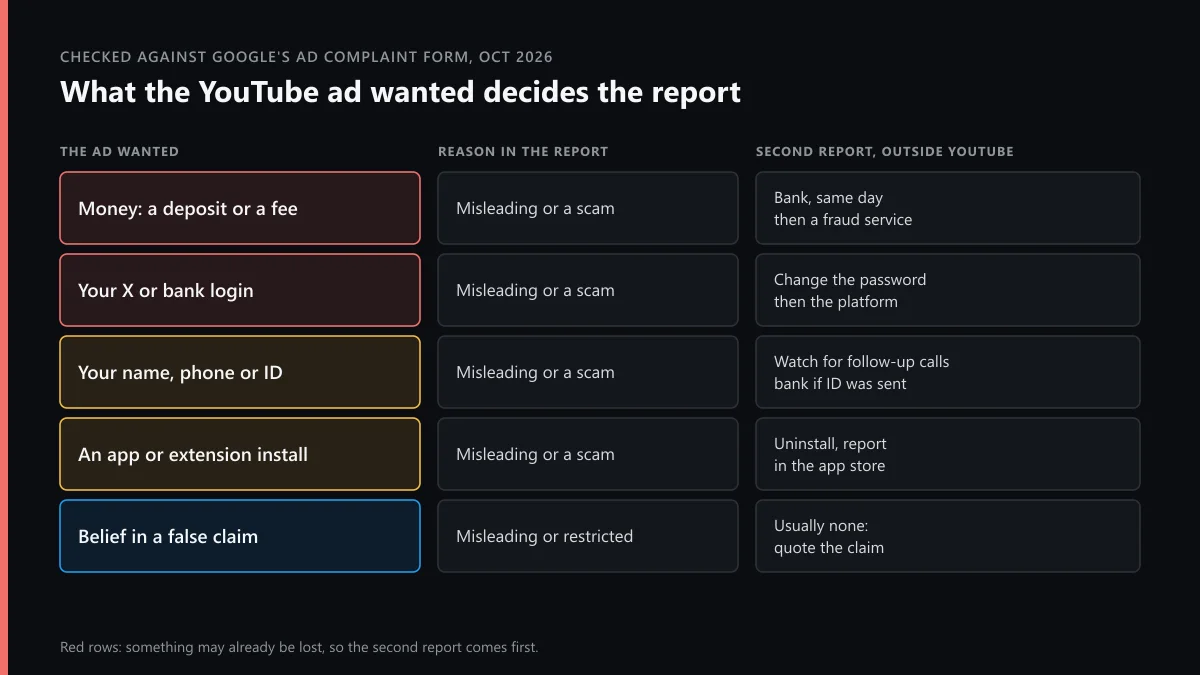
| The ad wanted | Reason to pick | Second report |
|---|---|---|
| A deposit, a "fee" or crypto | Misleading or a scam | Your bank the same day, then a fraud service |
| Your X, Google or bank login | Misleading or a scam (phishing) | Change the password, then the platform's security route |
| Your name, phone or ID photo | Misleading or a scam | Watch for follow-up calls; tell your bank if ID was sent |
| An app or browser extension install | Misleading or a scam | Uninstall it and report the app in its store |
| Your belief in a false claim | Misleading, or restricted product | Usually none; quote the claim in the comments |
On Google's ad complaint form, the first option reads "It's misleading or a scam", and Google lists false claims, impersonation, phishing, clickbait and inaccurate pricing under it. That one option covers how to report scam YouTube ads, how to report YouTube ads scams and almost everything else people mean when they say report YouTube scam ads. The other reasons cover ads that are harmful without being fraud.
When it wanted your X login
Fake "account review", "copyright strike" and "verified badge" ads target X users. They send you to a page that looks like the X sign-in. If you typed your password, change it from x.com before you report anything, then sign out other sessions. If the account is already locked or deactivated by the time you look, reactivating a deactivated X account comes first. Some of these ads also sell a fix for problems that may not exist, and a free check of whether X is limiting your reach costs nothing. Real help from X never arrives through an ad. The contact routes X actually publishes list the real ones.
How to report YouTube ads impersonation of a person or a brand
Choose the scam option and name the person being faked. Google's Misrepresentation policy bans "Impersonating other brands or businesses in your ads" and ads that claim a backing they don't have. Google calls it egregious. The advertiser is suspended "upon detection and without prior warning", the policy says, with no slow warning-strike cycle.
Put the real person's official channel or website in the comments, so the reviewer can compare in one look. Deepfaked news anchors, cloned founders and fake bank staff all count. The ad's handle often points to an X account too, and a lookalike name is easy to spot once you know the real one. Checking whether an X username is real or a lookalike shows how. If the ad uses your own face, getting your photo taken down from Instagram and X covers the social accounts that share it.
How to report a YouTube ad as inappropriate or offensive
Some ads aren't scams at all, just unfit for the screen they appeared on. For those, the complaint form has three more options. "It's harmful, violent, or dangerous" covers hate, bullying and weapons. "It contains sexual content" covers nudity and suggestive images. "It promotes a restricted product or service" covers gambling, alcohol, healthcare and finance sold outside the rules.
That's how to report a YouTube ad as inappropriate and how to report YouTube ads as offensive. The same path answers how to report an inappropriate ad on YouTube when it played on a child's tablet. Say in the comments that a child saw it, and give the time so the reviewer can match the ad.
How to report YouTube ads for false information
Choose the misleading option and quote the claim word for word. Google's policy names "claims that entice the user with an improbable result", which fits miracle cures and guaranteed returns. For health or election claims, link the official source that contradicts the ad. Reviewers judge the ad against Google's policy, not against how much it annoyed you, so a quoted claim and a counter-source carry more weight than a paragraph of anger.
The ad vanished before you could tap anything
Then the complaint form is the only route left. It asks which kind of problem, the ad or landing-page link, and comments. The link is the hard part. If you clicked through, the landing page sits in your browser history. If you didn't, write the advertiser name and the minute you saw it in the comments.
When we went through the form on 19 October 2026, the email box was optional, but Google says you need it for updates or an appeal. The form also promised a confirmation within minutes and a review "over the next several days". A TV, console or streaming stick has no report button, so the form is the route there too.
Can you report a YouTube ad anonymously?
Yes, as far as the advertiser is concerned. "Reporting content is anonymous, so other users can't tell who made the report," YouTube's help page says. The advertiser gets a policy notice about the ad, and your name isn't in it. Google itself does know which signed-in account sent an in-app report, and the complaint form says some account and system details travel with it.
So how to report a YouTube ad anonymously, in the strict sense, means the complaint form while signed out, with the email box empty. You give up updates and the right to appeal. For a one-off scam ad that trade is usually fine.
How to report undisclosed ads on YouTube
A sponsor read inside a video is not a Google ad, so Report ad isn't there. YouTube's paid product placement rules say creators "have to let YouTube know by selecting the paid promotion button", which puts a disclosure label at the start. The help page gives viewers no special report for a missing label. Report the video under spam or misleading content, and say in the notes that the paid promotion isn't disclosed.
US creators also answer to the FTC. Its Disclosures 101 guide for influencers says to disclose "any financial, employment, personal, or family relationship with a brand". A hidden deal that pushes a risky product can also go to the FTC's ReportFraud site.
Why does a reported scam ad come back?
Because the person behind it opens a new advertiser account. Google's 2025 Ads Safety Report, published in April 2026, counts 24.9 million advertiser accounts suspended that year. Of those, 4 million were tied to scams, along with 602 million scam ads out of more than 8.3 billion blocked or removed. Google says it acted on more than four times as many user reports as the year before.
So the same face selling the same fake platform under a new name is a new account, not a failed report. Report each copy. Asking friends to report an ad they never saw adds nothing, because each report is checked against the policy, not counted. The honest way to help is one accurate report per ad you actually saw.
When the ad leads to an Instagram or X account
The ad is the hook, and the scam usually lives somewhere else. A giveaway ad sends you to an Instagram page with a "claim" link. A trading ad sends you to a "mentor" who writes from X. Removing the ad leaves those accounts running, so report them where they live. Reporting an Instagram scammer's account and flagging the single Instagram post with the fake offer cover the Meta side.
If the scam turns to threats, for example "pay or we post your photos", it is extortion. The sextortion reporting steps for Instagram explain what to save before you block. Where an ad defames a real business or person and the platforms won't act, the legal requests Meta accepts show the formal route. A plain hide is enough for an ad you merely dislike, and blocking someone on YouTube and X keeps them off your feed without a report.
FAQ
Can the advertiser see that I reported their ad?
No. YouTube says reporting content is anonymous, so other users can't tell who made the report. The advertiser hears about a policy problem with the ad, not about you.
Which reason do I pick for a fake celebrity crypto ad?
Pick the misleading or scam option. Name the real person in the comments and paste their official channel or site, so the reviewer can compare. Google treats impersonation as an egregious breach.
I clicked a scam ad and typed my X password. What now?
Change the X password from x.com, sign out other sessions and turn on two-factor authentication. Then report the ad to Google. If X has locked or deactivated the account, recover it before anything else.
Can I report a YouTube ad I saw on my TV?
Not from the TV. The report button exists only in the phone app and in a computer browser. Write down the advertiser name and time, then use Google's ad complaint form from a phone or laptop.
Why does the same scam ad keep coming back after I report it?
Usually it is a new advertiser account running the same video. Google suspends the account it finds, and scammers open another. Report each copy; every report gives the reviewers a new account to suspend.
Is hiding an ad the same as reporting it?
No. Block ad in My Ad Center only stops that ad showing to you. Report ad sends it to Google's reviewers, who can remove the ad and suspend the advertiser.
How do I report a YouTuber who doesn't disclose a sponsor?
Report the video, not an ad, and say in the notes that the paid promotion isn't disclosed. A US creator also owes the audience that disclosure under FTC guidance, so a serious case can go to the FTC as well.