20 October 2026 · Twitter Ban Service · 11 min read
How to report a YouTube channel or video, and what you see once the report is in
To report a YouTube channel, open it, tap the three-dot menu in the app or click "more" in the description on a computer, choose Report, pick the reason and send it. A video works the same from the More menu under the player. Reports are anonymous, and on a computer you can follow each flagged video in Report history.
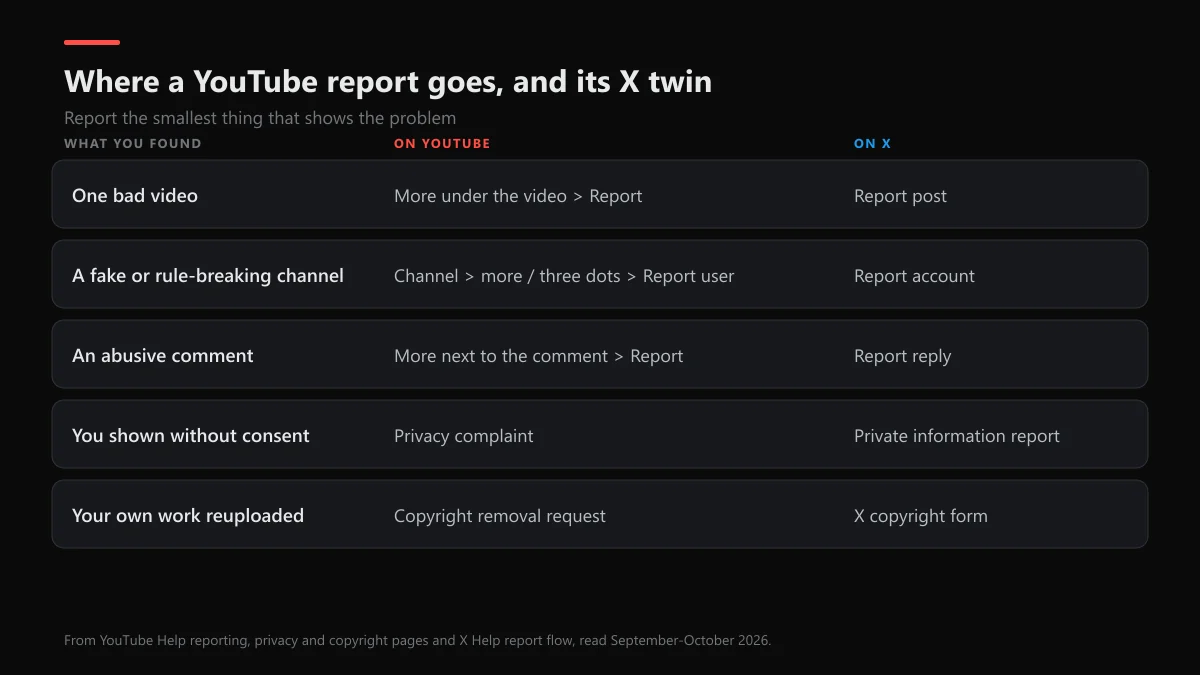
Video, channel or comment: which report fits the problem?
Report the smallest thing that shows the violation. One bad upload is a video report. A channel whose name, picture or whole catalogue breaks the rules is a channel report. A single abusive reply is a comment report. People reach for the channel report first because it feels stronger, but reviewers need something concrete to judge, and a channel report with no example is harder to act on.
| What you found | YouTube route | Same problem on X |
|---|---|---|
| One harmful or misleading video | More under the video, Report | Report post |
| A channel posing as someone, or built to break rules | Channel page, Report user | Report the account from its profile |
| An abusive comment or live chat line | More next to the comment, Report | Report the reply |
| A video showing you without consent | Privacy complaint | Private information or media report |
| Your own work reuploaded | Copyright removal request | X copyright form |
How to report a YouTube video on a phone or a computer
YouTube's reporting help page gives one menu path for every upload. These steps answer how do you report a youtube video, how to report a video on youtube and how to report youtube videos, Shorts included:
- Open the video. Play it in the YouTube app, or on youtube.com while signed in to your Google account.
- Open the menu. In the app, tap More under the video. On a computer, click the three dots below the player.
- Choose Report. Select Report from the menu.
- Pick the reason. Choose the reason that best fits the rule the video breaks, then add a timestamp if YouTube asks for one.
- Send it. Tap or click Report. On a computer, the flag then shows up in your Report history.
For inappropriate videos on YouTube, such as sexual content, graphic violence or something dangerous aimed at children, the reason list covers it directly. Pick the closest match rather than "spam" as a catch-all, because the reason decides which reviewers see it first. Reporting a YouTube video doesn't take it down by itself; a person or system checks it against the rules, and nothing changes if it passes.
How to report a YouTube channel on PC or in the app
On a computer, open the channel, click "more" at the end of the channel description, then click Report user. In the app, open the channel and tap the three-dot menu in the top corner, then Report. That's the whole answer to how do I report a YouTube channel, how to report a channel on youtube, and how to report someone's youtube channel or a yt channel. It also covers how to report someone on YouTube or a YouTube account, since a channel is the account's public face.
Reporting several channels on YouTube means repeating this for each one. There's no bulk option, and a wave of near-identical reports helps nobody. YouTube says it identifies "suspicious or exceptionally high flagging volumes" and excludes them from its data.
Which reason fits impersonation, ban evasion or bought subscribers?
The menu doesn't name every situation people search for. This is how each one maps onto what YouTube's rules actually cover:
| Situation | What to report | Rule it rests on |
|---|---|---|
| Report a YouTube channel for impersonation | Channel report, impersonation option | Impersonation policy: you may report your own or another creator's channel |
| Ban evasion after a termination | Channel report under the rule its videos break; name the old channel if there's a details box | Termination rules: a terminated creator may not use or create another channel |
| Buying subscribers | Videos that promote the seller, as spam or misleading | Fake engagement policy: no promoting services that inflate views, likes or subscribers |
| Inappropriate content on the whole channel | Channel report plus the worst single video | Community Guidelines; a channel built to break them can go after one case |
How to report a youtube channel for impersonation in practice: the copy usually adds "Official", "Backup", "Shorts" or "Live" to the real name, and YouTube's policy lists exactly those patterns. Bought subscribers are the hardest case to prove from outside. YouTube removes artificial counts without telling anyone, so a report that only says "these subs look fake" rarely changes anything.
How to report a YouTube comment or a live chat message
Tap or click More next to the comment, then Report, then pick the reason. Live chat works the same from the menu beside the message. If the comment breaks the guidelines it's removed, and the person may be told their commenting is paused. A creator can also hide a commenter from their own channel, which blocking someone on YouTube and on X walks through, and that works even when the comment breaks no rule.
Reading your Report history after you file
YouTube keeps a Report history page at youtube.com/reporthistory. It lists videos only, and only on a computer. The status column is the closest thing to an answer you'll get:
| What you see | What it means |
|---|---|
| Live | Not reviewed yet, or reviewed and found not to break the rules |
| Restricted | Kept up with a limit, such as an age restriction |
| Removed | Taken down for a policy violation |
| Your report isn't listed | Many others already flagged it, and it is under review from those flags |
| "Information about this video isn't available" | The creator removed it, or it is blocked in your country |
If you flagged the same video twice, only the latest report shows. Channel and comment reports don't appear at all, so for those the only sign is whether the content is still there. Flagged something by mistake? A video that breaks no rule stays Live, so there's nothing to undo. Instagram treats a mistaken report much the same way, as our note on un-reporting an Instagram post explains.
Are YouTube reports anonymous?
Yes, for ordinary reports. YouTube's help page says "Reporting content is anonymous, so other users can't tell who made the report." When a video is removed, the creator gets an email and a notice in channel settings that names the policy, not the reporter. So how to report a YouTube channel anonymously, or a video, is simply the normal report. YouTube still knows which account sent it.
Two routes are different. A privacy complaint keeps your name and contact details from the uploader, though YouTube may give them a chance to blur or cut the part that shows you first. A copyright removal request can pass the claimant's legal name to the uploader, which is why who can file a DMCA takedown on Instagram matters there too. The rule is close to Instagram's, which whether someone knows you reported them on Instagram covers.
If a video exposes you, a privacy complaint is the right route for how to report a YouTube video for privacy. If it's part of a threat to share intimate images, report it and keep the evidence. Our guide to reporting sextortion on Instagram lists the outside help lines, and what to do when someone posts your picture on Instagram and X covers the same photo spreading across apps.
Can you report a video on YouTube without an account?
Not with the button. When we tested this signed out in September 2026, clicking Report on a video only showed a prompt to sign in, and the channel panel offered nothing but Share channel. A free Google account is enough to report. If you won't make one, ask someone who has an account to report it, or use YouTube's legal and privacy forms where the issue fits them.
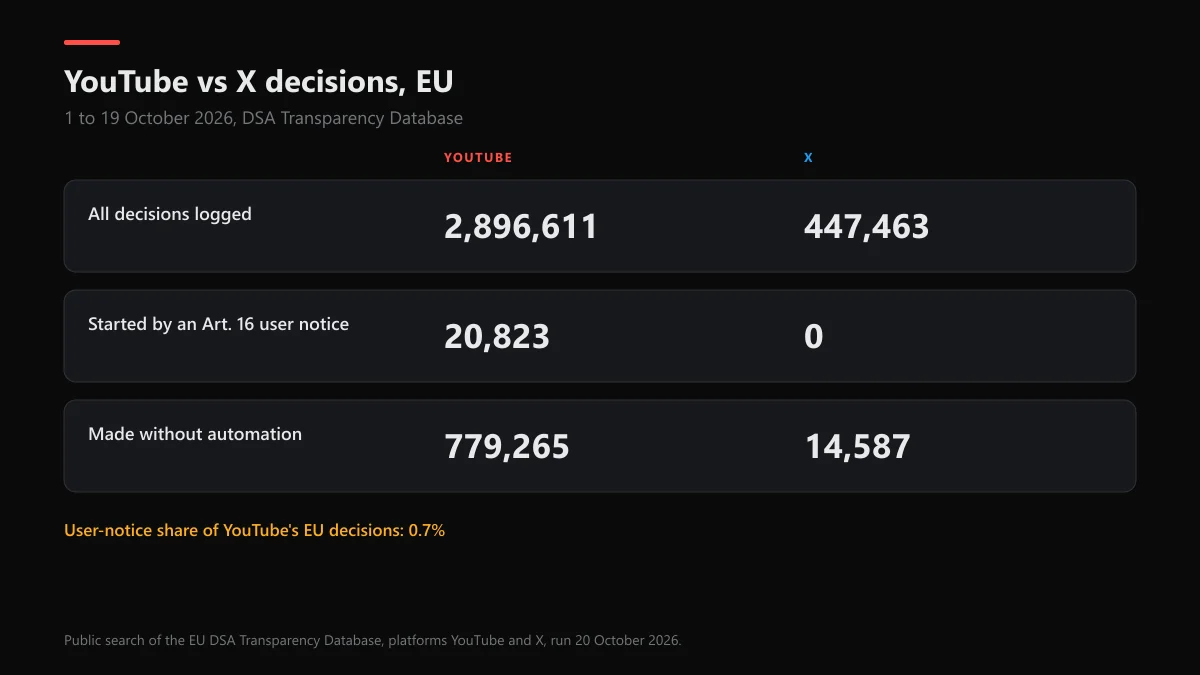
Do YouTube reports work, and how does X compare?
What happens when you report a YouTube video or channel is mostly decided by machines before you ever press the button. YouTube's Transparency Report for April to June 2026 shows 11,159,676 videos removed. Automated systems spotted 98.6% of them first, and user flags spotted 123,855, about 1.1%. That doesn't mean reports are useless. Reviewers check a flagged video "against all of our Community Guidelines and policies, regardless of why they were originally flagged".
We searched the EU DSA Transparency Database on 20 October 2026 for 1 to 19 October to see how each platform logs its decisions:
| 1–19 Oct 2026, EU | YouTube | X |
|---|---|---|
| All statements of reasons | 2,896,611 | 447,463 |
| Started by a user notice (Art. 16) | 20,823 (0.7%) | 0 |
| Made without automation | 779,265 (26.9%) | 14,587 (3.3%) |
YouTube tags about 0.7% of its EU decisions as coming from a user notice under Art. 16, and of those, 3,833 were decided without automation. X tags none of its rows that way, and its notice figures sit in its own DSA transparency reports instead: 178,028 illegal-content notices in April to June 2025, with 55% closed as no violation. Both are honest about one thing: your report starts a check against the rules, and it doesn't count as a vote.
When the same person is also on X
X's report flow starts with who the report is for: you, someone else, or everyone on X. For an account, X may ask you to pick the posts that show the problem. X says it acknowledges a report within 24 hours and usually resolves it in a few days, and the X report-to-ban timeline sets out what happens between those points. If the account runs a fake giveaway on both sites, the same proof rules apply as for reporting a scammer on Instagram.
Disputes sometimes spill back onto your own X account. A Twitter shadowban check shows whether your replies are being hidden, and reactivating an X account helps if you shut yours down in the heat of it and want it back inside 30 days. For anything the report button can't carry, the X support email addresses tell you which inbox still answers.
FAQ
Does YouTube tell you who reported your video?
No. YouTube's reporting page says reports are anonymous, so other users can't tell who made one, and a removal email names the policy, not the person. Copyright removals are the exception, because the claimant's legal name can be passed to the uploader.
Do YouTube reports work?
They do when the video breaks a rule. In April to June 2026, YouTube removed 11,159,676 videos, and 123,855 of them were first spotted by a user's flag. Reviewers check flagged videos against every guideline, so a weak reason doesn't sink a valid report.
How many reports does it take to get a YouTube channel removed?
There's no number. One report of a real violation is enough to start a review, and YouTube says it filters out suspicious or exceptionally high flagging volumes from its data. A channel is terminated after three strikes in 90 days, one severe case, or when the whole channel exists to break the rules.
Can I report a YouTube channel for ban evasion?
Yes. There's no ban evasion reason in the menu, so report the channel under the rule its uploads break and, if the form gives you a details box, name the terminated channel it replaces. YouTube's termination rules bar a terminated creator from using or creating any other channel.
How do I report a YouTube comment?
Tap More next to the comment, choose Report, pick the reason and tap Report again. If the comment breaks the Community Guidelines, it's removed, and the person who wrote it may lose the ability to comment for a while.
Can I take back a YouTube report?
Not that we've found. A report of a video that breaks no rule simply leaves it Live, so a mistaken flag costs the creator nothing. If the same person is also on X, reporting there follows its own rules, with an acknowledgement inside 24 hours.
Is it the same process on X?
Close, but not the same. X asks who the report is for first, may ask you to pick posts from the account, and says reports are usually resolved in a few days and can take up to thirty. Like YouTube, X says it doesn't disclose who sent the complaint.