16 October 2026 · Twitter Ban Service · 10 min read
How to take down a Facebook account (or a Page, post, photo or group), and how X handles the same request
How to take down a Facebook account depends on whose it is. Your own: delete it in Settings, and a Page gets 14 days before deletion is final. Someone else's: report the profile, or file Meta's impersonation, privacy or IP form. Meta removes it for a rule or legal breach, never for report volume.
Which kind of Facebook take down are you asking for?
There are three, and each one has its own door. Pick the one that matches your case before you click anything.
- You own it. Your profile, a Page you control with full access, a group you run, or a post you wrote. You remove it yourself with a switch in Settings. Nobody at Meta reviews it.
- Someone else owns it, and it breaks a Community Standard. A fake profile, a scam Page, a harassing post. You report it in the app and Meta reviews it.
- Someone else owns it, and the problem is legal. Your copyright, your trademark, a picture of you that local law protects. You file a written Facebook take down request on a Meta form, and the form asks for your name.
Most dead ends come from using the wrong one. An in-app report against a photo you took will usually come back with no action, because no Community Standard covers ownership. The copyright form would have worked.
How do I take down my Facebook page without losing it by accident?
Facebook gives a Page owner three switches, and only one of them deletes. You need "Facebook access with full control" for all three. The path is Settings & privacy, then Settings, then Access and control.
- Unpublish. The Page is hidden from the public, and you can still edit it.
- Deactivate. Hidden from everyone, followers included, and no edits. Deactivating a parent Page also deactivates its child and store Pages.
- Delete. We reread Meta's Page deletion article on 16 October 2026. It says Meta will "deactivate your Page immediately, but it won't be permanently deleted until 14 days have passed."
So how can I take down my Facebook page and keep a way back? Unpublish or deactivate. If you change your mind inside the 14 days, reactivate it from your personal profile under Your activity, then Reactivate a Page. The same article says this can't be done from the Page's business settings. That's how you take down your Facebook page safely, and it answers the related question of how do you take down your Facebook page if you're only an editor: you can't. Ask the person with full control.
How to get a Facebook page taken down when it isn't yours
Open the Page, tap the three dots or Options below the cover photo, and choose Report Page. Pick the reason that fits: scam, pretending to be someone, hate, or intellectual property. That's how do you take down a page on Facebook as an outsider; Meta then decides.
Before you report, open the Page's Transparency section. It lists when the Page was created, the countries its managers are based in, and every previous name. A Page that was called "Cheap Phone Deals" last month and now carries your shop's name is evidence worth quoting in the report. Meta says the section can't be removed or hidden.
Two things don't help. Asking 50 friends to report adds nothing, because Meta's reporting FAQ says "The number of times something is reported doesn't determine whether or not it's removed." And a Page you merely dislike stays up. To get a Facebook page taken down, it has to break a rule.
How to take down a Facebook post: yours, or somebody else's?
If you wrote it, tap the three dots on the post and choose Delete. Meta's help text says Delete post "Removes the post from Facebook entirely". Hide from profile does less: the post leaves your profile but stays on Facebook for its audience. That's how you take down a post on Facebook that you regret; it's the same on the app and the website.
How do you take down a Facebook post someone else wrote? You can't delete it, so you report it.
- It names or tags you. Remove the tag first. The post stays, but your name no longer links to it.
- It breaks a rule. Three dots, then Report post, then the reason. The reasons mirror Instagram's, and the walk-through for reporting an Instagram post shows the same menu on Meta's other app.
- It uses your work. Use the IP form, not the report button.
If the same person posted the same thing on Instagram, report it there too, because a Facebook post taken down doesn't take the Instagram copy with it. Removing an Instagram account, post or Reel covers that side.
How to take down a photo on Facebook, including a profile picture
Your own photo: open it, tap the three dots, Delete photo. For a profile picture the path is Photos, then Albums, then Profile pictures, then the picture, then Delete photo. Meta's help pages note that "Your profile picture is always public", and a temporary picture that has expired stays in that album until you delete it. That's how to take down profile picture on Facebook so it's gone from the album too.
A photo of you that someone else posted is harder. Meta's privacy form accepts reports only for images of "you, your child (under 13) or another person for whom you are the legal representative or guardian". A teenager from 13 to 17 files for themselves. For adults, the image rule leans on local law, so the outcome depends on where you live. The country rules and the X side are set out in what to do when someone posts a picture of you.
Do stock photos get taken down on Facebook?
Only when the rights holder acts. Meta doesn't check whether a Page bought a licence. A photo is removed when the agency or the photographer files a copyright report, or when the image matches one they've enrolled in Meta's Rights Manager. Most stock images on small Pages are never reported. If you paid for the licence and still got a notice, reply with the licence number; the legal grounds are compared in Meta's legal removal routes on Instagram, which use the same IP centre.
Does Facebook take down videos with copyrighted music?
Yes, sometimes. Facebook's music guidelines, in force since 26 March 2024, say video with music may be "blocked, muted or removed". A short clip in the background of a family video is often left alone or muted. Uploading whole songs is not.
The guidelines go further for repeated use: a Page, profile or group used to create a "music listening experience" can be deleted. If your video was muted or pulled and you hold the rights, or the music is licensed, dispute it from the notice Facebook sent you.
Facebook won't take down a fake profile of me: what still works?
Report the profile itself, not its posts: three dots on the profile, Report profile, Pretending to be someone, Me. If that comes back with no action, Meta has an impersonation route for people who aren't logged in or have no account, described in its impersonation help article. It asks for a photo of your ID.
Then ask for another review from the Support Inbox, under Reports about others. Meta says it usually answers "within 24 hours". If the same person copies you on Instagram or X too, file on each app; the forms are compared in stopping someone who impersonates you on Instagram and X.
Content taken down on Facebook: how do you appeal it?
This is the other side of every Facebook take down. When Meta removes your post, Page or group, it tells you in Feed and in the Support Inbox.
- Find the decision. Profile, then Help and support, then Account Status. For a Page, switch into it and open Page status from Options.
- Request a review. Write two or three sentences on why the content was within the rules. If the review upholds the decision, an Oversight Board option may appear.
- Clear a first strike. On a Page you manage, Page status has a "Fix it" button that removes a first-time strike. We read Meta's first-time strike article on 16 October 2026. It works only if the strike is your first within a year and you were the admin who posted the content. It warns, "Your content will not be restored."
So a content taken down Facebook appeal and a strike removal are two separate things. The strike button cleans your record; only the review can bring the post back. A Facebook page taken down appeal follows the same Page status route. A Facebook group taken down by Meta is appealed by its admins from the group's own notice; a group paused or archived by an admin isn't a takedown and can be undone by that admin. Restrictions expire after one year.
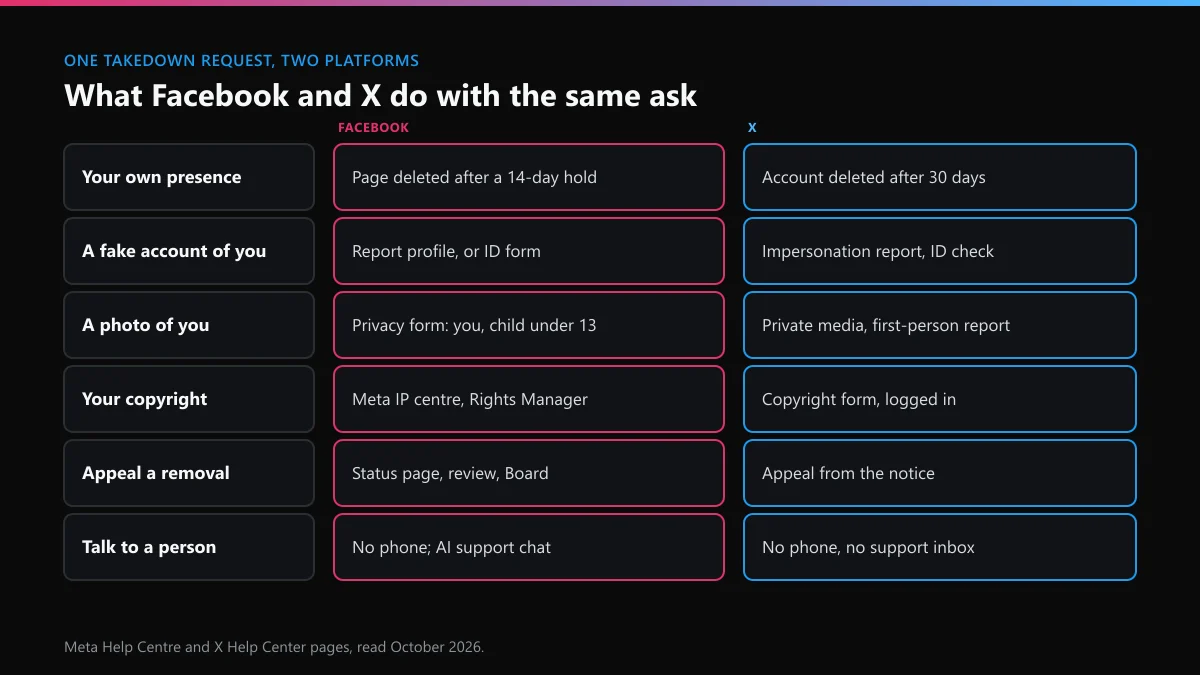
Same request, two platforms: how does X compare?
This site works on X, so here is the same set of requests on both. X has no Pages or groups; a brand on X is just an account.
| Request | X | |
|---|---|---|
| Remove your own presence | Unpublish, deactivate or delete a Page; deletion is final after 14 days | Deactivate the account; it's deleted after the 30-day window |
| A fake account of you | Report profile in the app, or the impersonation form with an ID photo | Impersonation report with an ID check |
| A photo of you | Privacy form for you, a child under 13, or someone you represent | Private media report from the person pictured or their representative |
| Your copyright | Meta's IP centre; Rights Manager for enrolled owners | Copyright form on help.x.com, logged in |
| Appeal a removal | Account Status or Page status, then a review, then possibly the Oversight Board | Appeal form from the notice or the suspension screen |
| Talk to a person | No phone line; Meta AI support assistant chat | No phone line and no general support inbox |
The last row trips people up on both sides. X has no number to call, as the routes that replace a Twitter helpline explain, and why X has no support inbox you can write to covers the email question.
What do the EU records say about Facebook take down requests?
We counted the EU's DSA Transparency Database on 16 October 2026 for decisions dated 1 to 15 October 2026.
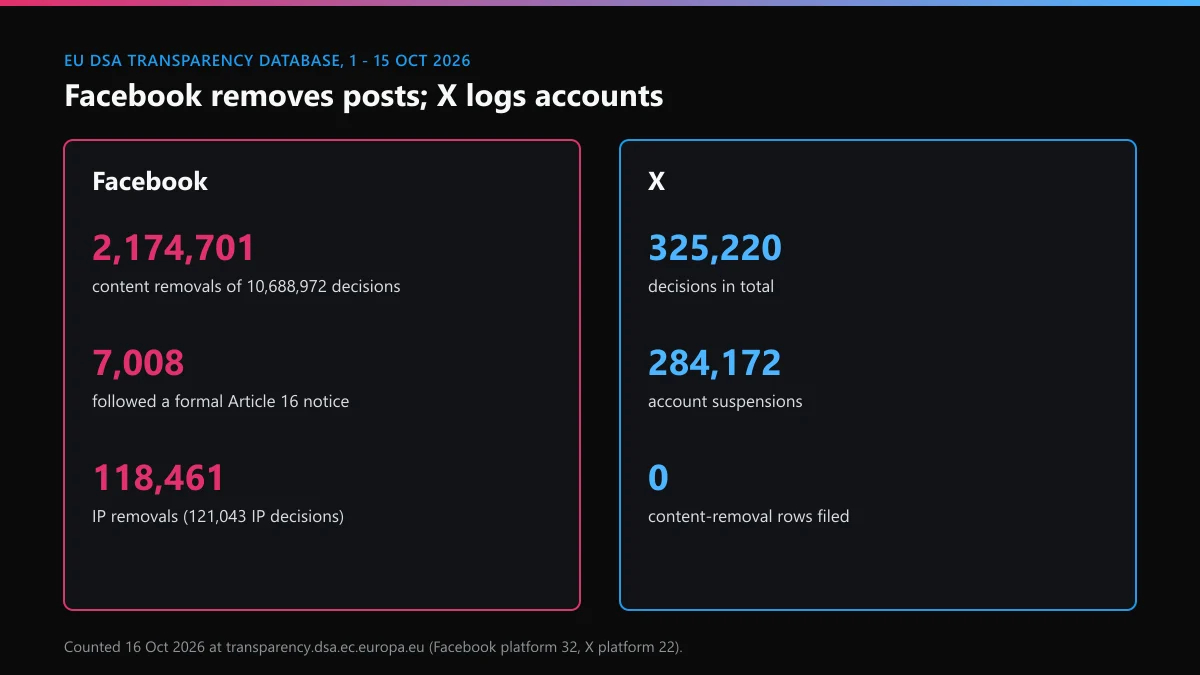
- Facebook logged 10,688,972 decisions. 2,174,701 removed a piece of content and 7,482,064 suspended an account; 12,118 were filed as terminations.
- 7,008 Facebook decisions followed a formal EU notice under Article 16, about one in 1,525.
- 121,043 were intellectual-property decisions, and 118,461 of those removed content. 4,494 came from a formal notice.
- X logged 325,220 decisions, 284,172 of them account suspensions and 1,599 in the IP category. X files no content-removal rows at all, so its records show accounts, not posts.
What that means for you: on Facebook, a post taken down is far more common than an account removed after a notice. A legal request usually ends with the content gone and the account still standing.
The same person moved to X: what should you check there?
People whose Facebook copy comes down often open one on X next. Ten minutes of checking is cheaper than a second report later.
- See whether your name is still free on X, and if it is, follow the steps for claiming an X handle before anyone else does.
- If a copy already holds your name, getting back a username someone else holds explains when X releases it.
- If X starts refusing your searches or reports with an error while you check, what the "rate limit exceeded" message means tells you which limit you hit and how long it lasts.
One thing we checked ourselves: on 23 September 2026 we loaded a Facebook Page address that had never existed. Facebook showed the same "content isn't available" screen it shows for a deleted Page or one hidden from you. So that screen doesn't prove a Facebook taken down result. The Support Inbox status of your report does.
FAQ
Can I take down a Facebook account by getting lots of people to report it?
No. Meta's Help Centre says the number of times something is reported doesn't decide whether it's removed. One accurate report that names the rule does more than a hundred vague ones, and coordinated false reports break Meta's own terms.
How long until a deleted Facebook Page is gone for good?
14 days. Meta deactivates the Page as soon as you ask, then deletes it permanently once 14 days have passed. Until then you can cancel by reactivating it from your personal profile, not from the Page's business settings.
Does removing a first-time strike bring my Facebook post back?
No. Meta's Page strike article says the strike is cleared but the content is not restored. To get the post back you still need to request a review. You also can't remove another strike for a year.
If I take down a Facebook post, does the Instagram copy go too?
No. Each app is reported separately, even when the same person posted the same picture on both. File on Facebook and again on Instagram, and keep each report's confirmation from the Support Inbox.
Will the person see my name if I file a copyright report on Facebook?
They may. Meta can pass the rights holder's name and contact details to the person whose content it removes, so they can respond. Ordinary in-app reports for rule breaks don't tell the account owner who reported them.
Can a lost Facebook Page be taken down if nobody can log in to it?
If no one has full control of a Page, Meta deactivates it on its own and schedules it for deletion. If you need the Page back first, Meta's Page access dispute route is the way in, not a report.