19 October 2026 · Twitter Ban Service · 9 min read
How to report a Snapchat account, and what the account goes through after you do
To report a Snapchat account, open Chat, press and hold the person's name, tap Manage Friendship, then Report, and choose the reason. Not friends? Report from Search or their Public Profile. Blocked, or on a computer? Use the web form at help.snapchat.com. Snap reviews it, and a breach can bring a strike, a lock or a device ban.
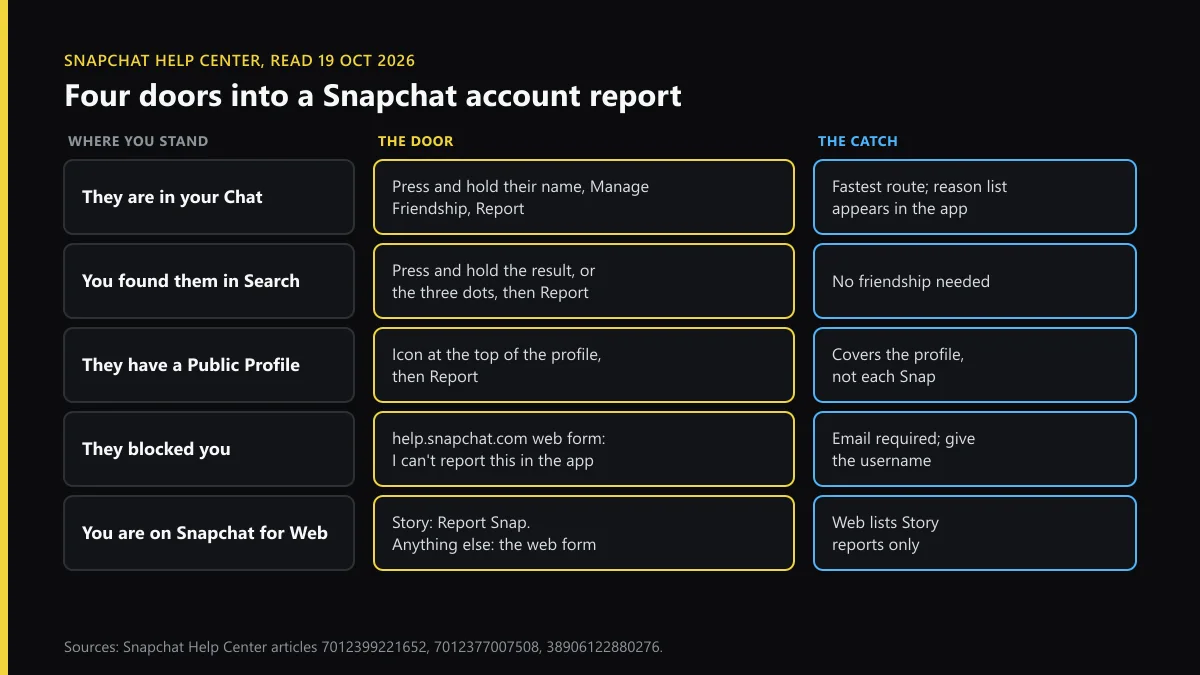
How to report a Snapchat account from the app
The door depends on how you know the person. Snapchat's abuse reporting article calls the app "the fastest and best way" and lists three ways in for an account:
- A friend or someone you've chatted with. Open Chat, press and hold their name, tap Manage Friendship, then Report.
- Someone you found in Search. The Search reporting article says to press and hold the result and tap Report, or tap the three dots, then Report.
- A Public Profile. Tap the icon at the top of the profile, then Report, pick the reason and Submit.
That's how to report an account on Snapchat. How to report people on Snapchat for one message rather than the whole account is different: press and hold the message and tap Report. A Snap or Story gets Report Snap. If what bothers you is one message, report it too, so the reviewer sees it next to the account.
How to report someone on Snapchat web
Snapchat for Web runs in Chrome, Edge or Safari at web.snapchat.com, and its reporting is thin. The Help Center's only web section is "I'm using Snapchat on the web and I want to report a Story": press and hold the Story and choose Report Snap.
For anything else on a computer, use the Snapchat Support web form:
- Choose "I want to report an account or content".
- Then pick "I can't report this issue in the Snapchat app" and the branch that fits.
- Say who you're reporting for, give your email (required), the username and your age bracket.
- Pick where it happened, from Chat to Snap Map, and describe it with dates.
It takes one person per form. A username left as "none" may limit the review, Snap warns, so copy it exactly.
How to report a Snapchat account that blocked you
A block shuts the in-app route. Snapchat's article on blocked accounts says you won't be able to report them in the app, but you can still report on the support site. Use the same web form as above.
Two details help. First, you need their exact username, which you may still have in an old screenshot or a shared group. Blocking doesn't remove either of you from group chats you share, Snap's blocking article says, so a group message can be reported in the app even after a block. Second, describe what happened before the block, with dates. The reviewer can't see the chat from your side once it is gone.
Which reason fits: harassment, bullying, impersonation or age?
Pick the reason that matches what the account did, not the worst word you can find. The app and the web form use different labels for the same thing:
| What happened | In-app reason | Web form branch | Have ready |
|---|---|---|---|
| Harassment or bullying | Bullying, harassment, and defamation | Bullying or harassment: me, someone else, or sexual harassment | The messages, the username, dates |
| Threats or abuse | Threats, violence, and dangerous behaviour | Threatening to leak, or actually sharing, images | The threat itself; don't delete the chat |
| Impersonation | Pretending to be someone | Other: Someone is pretending to be me (self only) | Your real username and the fake one |
| Under 13 | Under the minimum age | Under minimum age form | Why you think so; Snap may follow up |
| Scam or fake Snap staff | False information or deceptive practices | Fraud, scams or other deceptive practices | Payment handle, links, the chat |
How to report bullying on Snapchat and how to report someone on Snapchat for harassment both start from the first row. How to report abuse on Snapchat is the second row when it involves threats or images. For abuse that follows you between apps, the harassment reporting steps for Instagram and X set out the other two flows.
To report a Snapchat account for impersonation, use the "pretending to be me" branch; it has no ID upload. Impersonators rarely get their accounts back: of 731 impersonation appeals in the second half of 2025, Snap's figures show 35 reinstated. If the same fake runs on other apps, see what to do when someone impersonates you on Instagram and X. To report a Snapchat account for being underage, Snap's under-13 article links a dedicated form. The minimum age is 13 "with some regional variations", and Snap may not share the outcome.
What happens when you report someone on Snapchat?
The report goes to review against the Community Guidelines, usually "within a matter of hours", according to Snap's safety reporting page. If nothing breaks a rule, nothing happens. If something does, the account moves up a ladder:
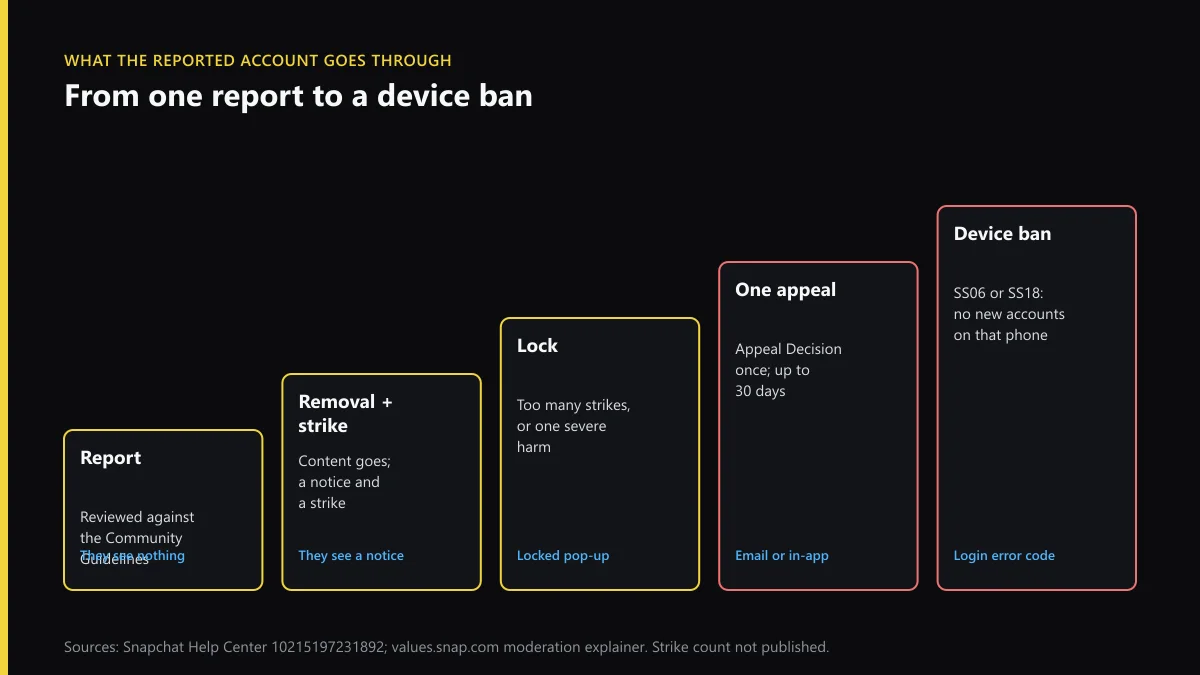
The content is removed and the owner gets a notice and a strike. Too many strikes over a defined period, a number Snap doesn't publish, locks the account. When we went through Snap's locked-account article on 19 October 2026, we saw one line that changes how people should think about this: a lock can be appealed once. The owner taps Appeal Decision on the pop-up, waits up to 30 days, and gets no second try. Appeals rarely win. In the second half of 2025 Snap took 471,892 appeals and reinstated 31,951 accounts, about 7%. EU users can then take it to an out-of-court dispute body under Article 21(3) of the DSA.
A device ban sits at the top. Error codes SS06 and SS18 mean the phone itself was banned for abuse, and no new account can be made on it. That's the closest Snapchat comes to keeping someone off for good.
How to report someone on Snapchat without them knowing
Every report already works that way. Snap says the reported person isn't told who reported them, "even if they appeal". What gives people away is timing. If you report a Snap they sent only to you, then block them a minute later, they can put it together. Report first, leave a gap, then block if you still want to.
Blocking itself sends no notification. Snap admits the other person "might realise", though, and a block also hides your Snap Map location from them, which some people notice within hours. Instagram handles it the same way, as the guide on whether people learn who reported them explains.
Can you get someone banned on Snapchat immediately?
Only for the worst cases. Snap's moderation explainer says severe harms, and accounts "created or used primarily to violate" the rules, are disabled promptly. Everything else goes through strikes. So can you get someone banned on Snapchat? Yes, if the account breaks the rules and you report the right thing with the right reason. How to get someone banned on Snapchat immediately, for a rude message or an argument, has no answer, and trying it costs you. Repeat reports are deprioritised. People who file frequent unfounded reports get a warning, then lose report reviews for up to a year.
The numbers show how much Snap acts. Its transparency report for the second half of 2025 counted enforcement against 4,548,479 unique accounts, with a median turnaround of about a minute. How to get someone banned on Snapchat, then, comes down to evidence that fits a rule.
When the same account is on X
People who harass on Snapchat often move to X, and X's routes differ:
- X has no support inbox for reports; the support email addresses X lists send you back to the forms.
- Filing several X reports in a row can trip a rate limit exceeded error, which clears with time.
- If the impersonator took the handle you want, see claiming an inactive Twitter username.
- If a counter-report hit your own X account and you deactivated it, reactivating an X account within 30 days gets it back.
- For one bad post on Instagram, reporting a single Instagram post is quicker than a profile report, and the Instagram scammer report covers the fake-support DMs that Snap warns about.
- Snaps you made that were saved and reposted are your work; who can file a DMCA takedown explains when that route applies.
Snapchat employees, Snap's article says, "will never contact you via Snap or Chat". An account offering to unban or ban someone for you is itself one to report.
FAQ
How do I report a Snapchat account without being their friend?
Search for the username, then press and hold the result and tap Report, or tap the three dots and Report. Snapchat's Help Center lists this route for accounts you aren't friends with. A Public Profile has its own Report option under the icon at the top.
Can I report a Snapchat account on a computer?
Only part of it. Snapchat for Web lists Story reports alone, through Report Snap; a whole account from a computer goes through the web form at help.snapchat.com.
How to report abuse on Snapchat when someone threatens to leak photos?
Press and hold the threatening message, tap Report, and choose the option for threats to leak or sharing of intimate images. Keep the chat. Then report the account from their name and block it. Under 18, Take It Down can hash the images so they are blocked from spreading; adults can use StopNCII. If you are in danger, call the police first.
What does the reported person see if their account is locked?
A pop-up when they try to log in. If the lock can be appealed, it has an Appeal Decision button. Snap allows one appeal per lock, says a decision can take up to 30 days, and sends it by email or in the app.
What are SS06, SS07 and SS18 on Snapchat?
Login error codes for a banned device. Snap says SS06 and SS18 mean the device was banned for abuse or repeated violations, and SS07 means too many accounts were linked to it. A banned device can't create new accounts.
Does reporting a Snapchat account many times get it banned faster?
No. Snap deprioritises duplicate reports and warns people who file frequent unfounded ones. After that it can stop reviewing their reports for up to a year. One clear report with the right reason does more than ten repeats.
Will Snapchat tell me if the account was banned?
Snap says it informs the reporter whether or not action was taken, and the report appears in My Reports for 30 days. A Complete status there doesn't say what Snap did to the account, so you may only notice it is gone.