24 October 2026 · Twitter Ban Service · 12 min read
How to get a YouTube video taken down: pick the form that fits the problem
To get a YouTube video taken down, file the one form that matches the problem: the copyright webform for stolen footage or music, a privacy complaint if it shows you, the Report button for Community Guidelines breaches, or Google's legal form for defamation and court orders. Report counts don't matter; the right form does.
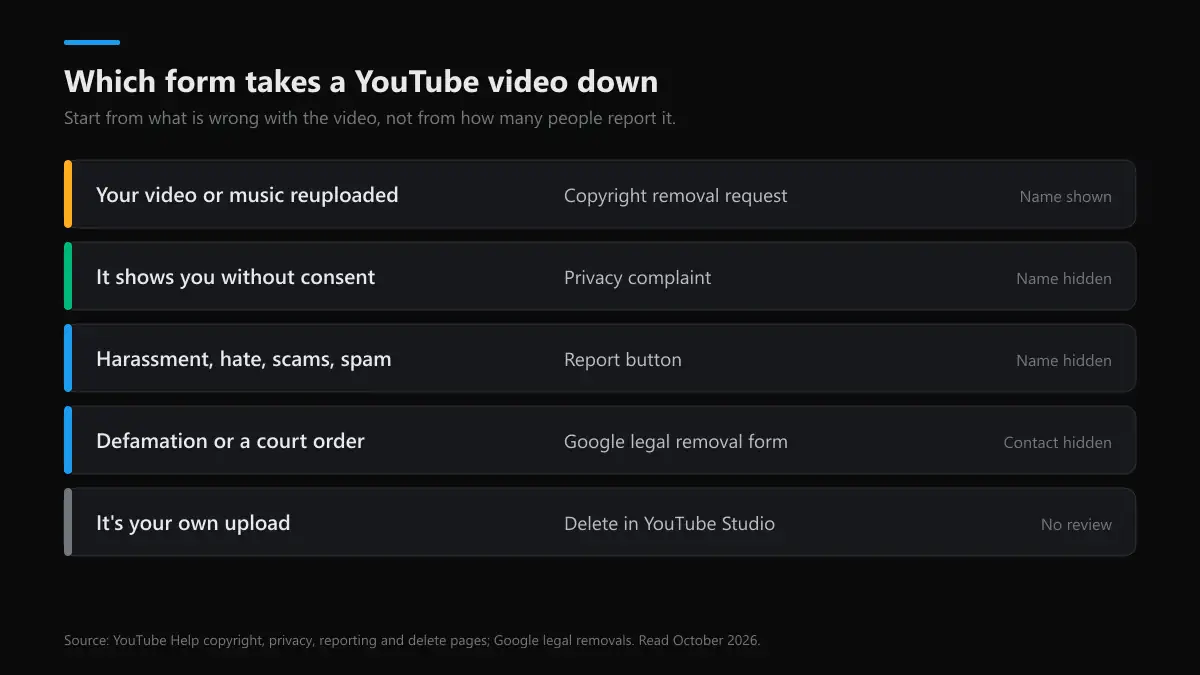
How to get a YouTube video taken down: match the problem to the form
Most failed attempts at a YouTube take down use the wrong door. A Report click on a reupload of your own film goes to a Community Guidelines reviewer who can't judge who owns it, and a copyright form about an embarrassing clip gets rejected because embarrassment isn't infringement. Start from what is actually wrong with the video:
| What's wrong | Form to use | Who can file | Uploader learns your name? |
|---|---|---|---|
| Your video, music or footage reuploaded | Copyright removal request | The owner or an agent | Yes, the legal name in the notice |
| Shows your face, name, address or voice without consent | Privacy complaint | The person shown (or a parent or legal representative) | No |
| Harassment, hate, scams, violence, spam | Report button on the video | Anyone signed in | No |
| Defamation, a court order, local law | Google legal removal form | The affected party or their lawyer | The notice may be published, minus your contact details |
| Intimate images shared without consent | YouTube's intimate-imagery form | The person shown | No |
| It's your own upload | Delete in YouTube Studio | The channel owner | – |
So how do you get a YouTube video taken down when two rows fit? File the stronger one first. A privacy complaint about a video that also harasses you is decided on privacy alone, and the harassment report can follow. Our page on who can file a YouTube privacy complaint covers that form's standing rules, and YouTube's harassment policy covers the evidence that gets a harassment report acted on.
How do you take down a YouTube video you uploaded yourself?
This is the only case with no review. How do I take down a YouTube video I posted? Open YouTube Studio on a computer, go to Content, hover over the video, choose Options and then Delete forever. In the app it's your profile picture, Your videos, the three-dot menu and Delete. The same steps answer how to take down a YouTube Short, because Shorts sit in the same Content list under their own tab.
If you only want it out of sight, switch it to Private or Unlisted instead; the views and comments survive and you can bring it back. That's the gentler way to take down old YouTube videos you might want later. Two warnings. Deleting doesn't remove a strike, per YouTube's Community Guidelines strike page. And a deleted video can't be restored, so download a copy first if you need one.
To take down your YouTube channel as a whole, go to Studio, Settings, Channel, Advanced settings and Remove YouTube Content, where you can hide it or delete it. You can't delete a channel from a phone. How to take down an old YouTube channel you can no longer sign in to? Recover the Google account first; YouTube won't delete a channel for someone who can't prove they own it.
How to get someone's YouTube video taken down
How to get someone's YouTube video taken down depends on the row above, but the Report path covers most cases. On the video, click the three dots under the player, choose Report, pick the closest reason, add a timestamp and a short note, and submit. On a phone the dots sit at the top of the player. That's the whole answer to how to ask YouTube to take down a video that breaks the rules; there's no separate request form for ordinary users.
- Pick the timestamp. Reviewers jump straight to it. A 40-minute video with one slur at 31:10 is decided on 31:10.
- Pick the narrowest reason. Harassment of a named person beats "spam or misleading" for a video that targets you.
- Watch Reporting History. On a computer, youtube.com/reporthistory shows Live, Restricted or Removed for every video you flagged.
For copyright, how to request YouTube to take down a video is a legal notice, not a report: the webform asks for your name, the original work, the infringing URL and a sworn statement. A YouTube take down request filed this way puts a copyright strike on the uploader when it succeeds. The uploader then gets a YouTube take down notice by email and in Studio naming the claimant. Reporting a whole channel works differently, which our guide on reporting a YouTube channel walks through.
How many reports to get a YouTube video taken down?
None in particular. How many reports to take down a YouTube video is the most common question on Reddit threads about how to get a YouTube video taken down, and the answer from YouTube is that it doesn't count. Reviewers check a flagged video against all of the Community Guidelines, whatever reason the reporter picked, and YouTube says it filters out "suspicious or exceptionally high flagging volumes" from its data.
Its own transparency report shows how little the crowd matters. Of 11,159,676 videos removed in April to June 2026, 11,005,420 (98.6%) were first caught by automated systems and about 1.1% by user flags. A user report rarely starts a removal; it usually confirms something that a reviewer can see in one viewing.
Can private or unlisted YouTube videos be taken down?
Yes. Can private YouTube videos be taken down? They can, because private and unlisted uploads follow the same Community Guidelines and copyright rules as public ones. Can YouTube take down private videos it hasn't been told about? It can, since its automated systems scan uploads whatever their visibility. Will YouTube take down private videos that copy yours? The Copyright Match Tool even finds matches where the first upload was private or unlisted.
The limit is access. Can unlisted YouTube videos be taken down by a report? Yes, if you have the link you can report them like any video, so can YouTube take down unlisted videos on your report alone? Yes, if they break a rule. Can a private YouTube video be taken down after you report it? Only if you can see it, which means its owner shared it with you. If you can't open it, you can't report it, and the copyright form also needs a working URL.
How to get a YouTube channel taken down
No single request takes a whole channel down. The copyright form works video by video, and a channel is terminated when it collects three Community Guidelines strikes within 90 days, commits one severe violation, or exists only to break the rules, such as a spam or impersonation channel. So how do you take down a YouTube channel? Report the channel itself for impersonation or spam, and report its worst videos one by one.
How to get someone's YouTube channel taken down, then, comes down to evidence. Report the channel from its About panel with Report user, then report three or four of its clearest violations with timestamps. That's also how to get a YouTube account taken down when the account is a fake copy of yours. Channels are terminated in bulk: YouTube removed 2,732,395 channels in April to June 2026, 84.5% of them for spam, scams and deceptive practices.
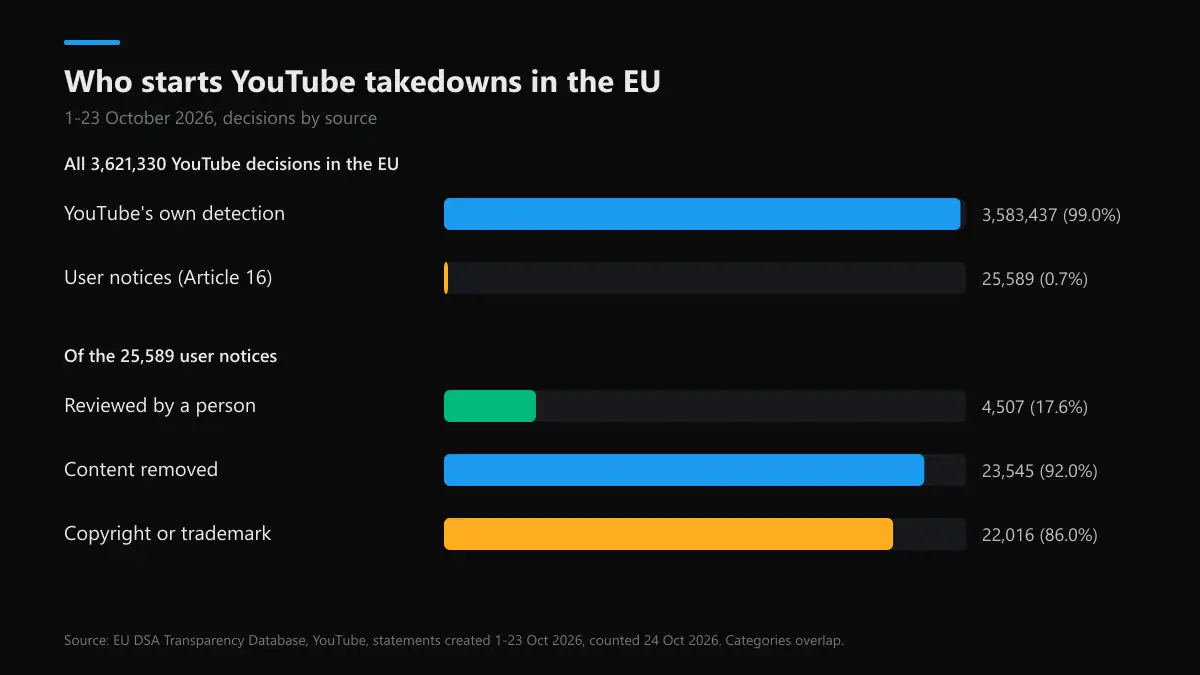
Who actually takes YouTube videos down?
YouTube takes down videos mostly on its own. We counted every decision YouTube filed in the EU DSA Transparency Database between 1 and 23 October 2026, searched on 24 October:
| YouTube, EU, 1–23 Oct 2026 | Decisions | Share |
|---|---|---|
| Decisions YouTube logged, all sources | 3,621,330 | – |
| Started by YouTube's own detection | 3,583,437 | 98.95% |
| Started by a user notice (Article 16) | 25,589 | 0.71% |
| of those, reviewed by a person | 4,507 | 17.61% |
| content removed | 23,545 | 92.01% |
| filed as copyright or trademark | 22,016 | 86.04% |
About one decision in 142 came from a formal user notice; 99.0% started with YouTube's own systems. The notices that did come in were mostly legal ones: 86% were copyright or trademark claims, and only 17.6% were decided by a person rather than matched by machine. Yet 92% of them ended with the content removed.
Read together, that says the copyright route is the one that reliably takes a YouTube video down on request, because it asks for proof a system can check. Every other route depends on a reviewer seeing the problem quickly, so one precise report with a timestamp beats fifty people clicking Report. YouTube logged no account terminations through this database in the window; channel removals show up in its own transparency report instead.
Why did YouTube take down my video?
If you're on the other side, the email and the banner in YouTube Studio name the reason. A Community Guidelines removal names the policy and starts with a warning for a first offence. A copyright takedown names the claimant. A privacy or legal removal says so. Why does YouTube take down videos that seemed fine for months? Usually because someone filed a notice recently, or because a policy update reached older uploads.
Music is the common worry. Does YouTube take down videos with copyrighted music? Rarely by itself. Content ID claims most of them and passes the money to the rights holder while the video stays up; over 90% of Content ID claims in 2025 were monetised rather than blocked. Will YouTube take down my video with music then? Only if the owner files a removal request, and that comes with a strike. How to not get your video taken down on YouTube: use licensed or YouTube Audio Library tracks, keep other people's clips short and commented, and don't film people who asked you not to.
Can you watch YouTube videos that were taken down?
Not on YouTube. Once a video is taken down the page shows Video unavailable and YouTube keeps no public copy, so how to watch taken down YouTube videos comes down to copies made before the removal. That's also the honest answer to how to see taken down YouTube videos, to view taken down YouTube videos, and to how to watch YouTube videos that were taken down:
- Reuploads. Search the exact title or a quote from it. To find taken down YouTube videos this way you'll usually land on mirrors, which may be taken down in turn.
- Archives. Paste the old URL into the Wayback Machine. It often saved the page, the title and the description, rarely the video file itself.
- Your own copy. If it was yours, check Google Takeout or your own drive. YouTube won't let you download taken down YouTube videos from Studio once removed or struck.
So how to find a YouTube video that was taken down is mostly detective work on the title and the date. And if someone took down a video showing you, the mirrors are the next problem: each reupload needs its own notice, the same way each copy needed its own takedown the first time.
YouTube vs X: taking down a video or a post
This site works mostly on X, and the logic carries over. Both companies remove items one at a time, and on both a report is a request for review, not a vote.
| Question | YouTube | X |
|---|---|---|
| Main route for rule breaches | Report button on the video | Report post or Report account |
| Copyright route | Copyright webform, strike on success | Copyright form, notice forwarded |
| Reporter named to the uploader? | Only in copyright notices | Only in copyright notices |
| Does the number of reports matter? | No | No |
| Account-level penalty | Three strikes in 90 days | Locks, then suspension |
| Hidden but reportable items | Private and unlisted videos | Protected posts, to followers |
If a takedown hit your own X account instead, X's customer service routes and the support email addresses X publishes are where an appeal starts, and our guide to reactivating an X account covers a deactivated one. When a takedown frees a handle, the rules differ: read how to get a taken Twitter username, whether you can claim a Twitter handle and where available Twitter usernames come from.
The same video on Instagram
Clips travel. A YouTube video that targets you is often cut into Reels within a day, and Instagram has its own doors. Our guides cover reporting a person on Instagram, the Instagram scam report, and Instagram's legal removal forms for defamation and court orders. For what removal looks like at each level, see how Instagram takes down accounts, posts and Reels.
If the clip is of you, what to do when someone posts your photo applies to stills as well as video. And if you worry about blowback, Instagram follows the same reporter rule as YouTube, as our page on whether someone knows you reported them explains.
YouTube take down searches that aren't about removal
A few of the searches people type have nothing to do with getting a video removed, so here's where they go. Take me down YouTube and youtube take me down mostly bring up songs: youtube alabama take me down is Alabama's country hit, youtube the pretty reckless take me down is the rock band's single, and youtube take me down to the little white church is Little Big Town's "Little White Church". Take you down YouTube results are songs too.
How to take down blinds YouTube searches, including how to take down blinds with hidden brackets YouTube, and how to take down a drone with lasers YouTube, are how-to and science videos, not takedowns. Did Project Zorgo take down YouTube? No; Project Zorgo is the fictional villain group in a family channel's storyline. And YouTube takes down Rick Roll is a joke headline: the official "Never Gonna Give You Up" video is still up and passed a billion views in 2021.
FAQ
How many reports does it take to get a YouTube video taken down?
There is no number. YouTube reviews a flagged video against all of its Community Guidelines, and one accurate report can be enough. Unusually high flagging volumes are filtered out of its data, so a pile of reports from friends doesn't speed anything up and can make a reviewer more careful.
Can private YouTube videos be taken down?
Yes. Private and unlisted videos follow the same Community Guidelines and copyright rules as public ones. The catch is access: you can only report a private video if it was shared with you, while an unlisted one can be reported by anyone who has the link.
Will the uploader know who asked YouTube to take the video down?
Not after a Community Guidelines report or a privacy complaint: YouTube says it won't share your name or contact details there. A copyright takedown is different. The legal name in the notice can be shown to the uploader, so many owners file through an agent or a company name.
Can you watch a YouTube video after it was taken down?
Not on YouTube. The page shows Video unavailable and YouTube keeps no public copy. You may find a reupload by searching the exact title, or an archived page in the Wayback Machine, but archives usually hold the page rather than the video file.
Why did YouTube take down my video?
The email and the notice in YouTube Studio name the reason: a Community Guidelines policy, a copyright takedown with the claimant's name, a privacy complaint or a legal request. Each one has its own fix, from an appeal to a counter notification or simply editing the part that was flagged.
Does YouTube take down videos with copyrighted music?
Usually not. Most music is caught by Content ID, which claims the video and sends the money to the rights holder while the video stays up. A takedown happens only when the owner files a removal request, which also puts a copyright strike on the channel.
Is taking down a video on YouTube like taking down a post on X?
Close. Both remove items one at a time, both count strikes or violations against the account, and both give the reporter no name on the reported side outside copyright. The differences are YouTube's three-strike rule and its private and unlisted videos, which X has no direct match for.