17 October 2026 · Twitter Ban Service · 11 min read
How to report a Facebook scammer, scam type by scam type, and how X compares
How to report a Facebook scammer: open the three-dot menu on their profile, post, ad, listing or Messenger chat, tap Report and choose the scam or fraud reason. Save screenshots and the profile link first, block them afterwards and follow the decision in your Support Inbox. If you sent money, call your bank before anything else.
How can I report a scam on Facebook? The short version
Every Facebook scam report starts from the thing that carries the scam. There's no general form where you paste a name. Meta's reporting help sends you to the content itself, and its page on avoiding scams puts it in five words: "don't respond. Please report it to us." Here's how to report a scam on Facebook in five steps:
- Save the evidence. Screenshot the profile, the messages and any payment request, and copy the profile link from the address bar or the Share option.
- Open the right menu. Tap the three dots on the profile, post, ad, listing or Messenger chat that carries the scam.
- Choose Report. Pick Report profile, Report post, Report ad or Report listing, whichever matches what you opened.
- Pick the scam reason. Choose the option for a scam or fraud. If the account pretends to be someone, choose the fake or impersonation reason instead.
- Block and follow up. Block the account after the report, then check your Support Inbox for Meta's decision.
The menu labels shift a little between the app and the website, but the order holds. Pick the most specific reason on offer. A report filed as "scam" when the account is really pretending to be your bank goes to a different queue than one filed as impersonation, and the wrong queue can come back as "doesn't go against our Community Standards".
Meta renamed the rule these reports are judged against on 9 September 2026. "Fraud, Scams and Deceptive Practices" is now called Prohibited Commercial Practices. The new page keeps the old scam families and adds a user-feedback clause. Where complaints about non-delivery or unauthorised charges persist "despite warnings", Meta says it may restrict or disable the account. Your report is one of those complaints.
Which report fits which Facebook scam?
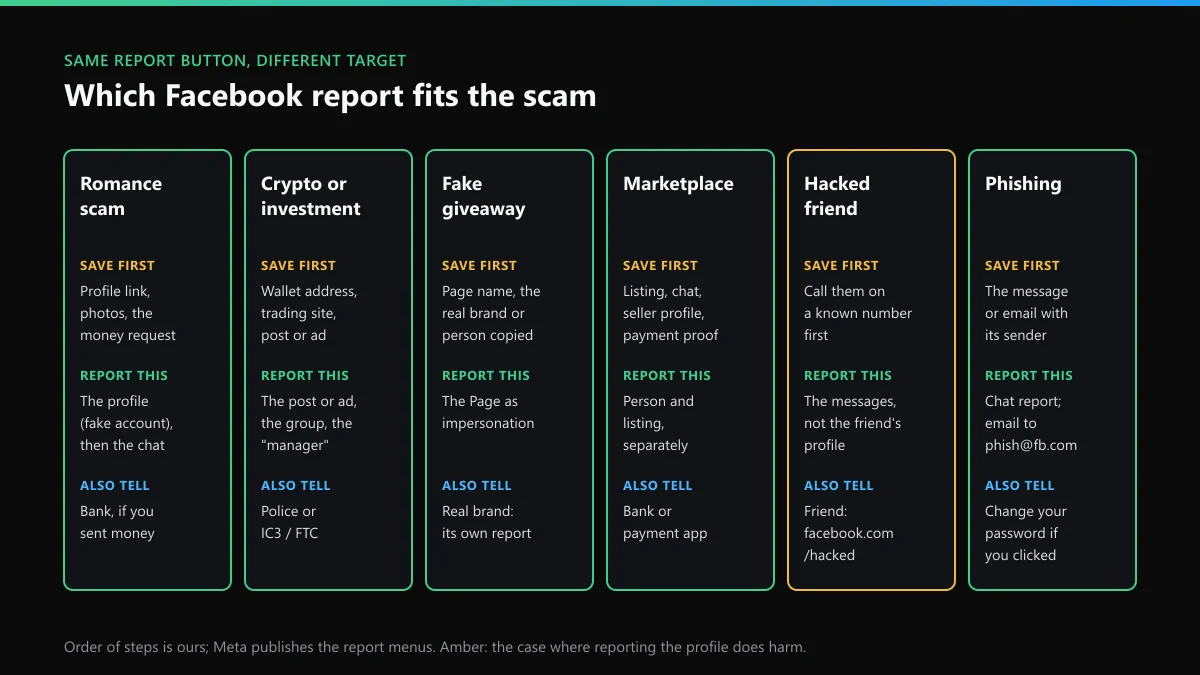
The button is always Report, but what you report differs by scam. Some scams live in a profile, some in a post or ad, some only in Messenger. The sorter above sums up six common types. Below is how to report Facebook scams of each kind, with the step people most often skip.
Romance and "friendship" scams
Report the profile, not the chat. A romance scammer's messages look harmless one by one, while the profile is usually stolen photos and a fake job. Open the profile, tap the three dots, choose Report profile and pick the fake account reason. Then report the conversation in Messenger as a scam. Meta's scam warning signs include "People asking you to move your conversation off Facebook". That move is the point to report, before any money changes hands.
Crypto and investment scams
These usually arrive as a post, a group invitation or an ad promising fixed returns. Report the post or ad itself, and report the group from its three-dot menu if the whole group exists to recruit. Screenshot the wallet address or trading site before you report, because the post can vanish after review and your bank or the police will want it. If an "account manager" contacted you after you clicked, report that profile as well. It's a second account with its own report.
Fake giveaways and impersonated brands or celebrities
Report the Page or profile as pretending to be someone, not as a scam. Impersonation is checked against the name and photos of the real person or company, which is quicker to prove than intent to defraud. The same scam often runs on X under the same stolen name. When someone is impersonating you on Instagram or X, those platforms take a report from you or your representative, and anyone can report from the fake profile.
Marketplace buyer and seller scams
Report the person and the listing separately. A buyer who "overpaid" by fake transfer or a seller who vanished after a deposit should be reported from the chat or their seller profile, using the Scam reason. A listing that's fake in itself, such as a rental that doesn't exist, is reported from the Options menu below its title. Meta's Marketplace reporting article lists the separate paths for buyers, sellers and listings.
A hacked friend asking for money
Call your friend on a number you already have before you report anything. If they didn't send it, report the messages in Messenger and tell them to use facebook.com/hacked to get the account back. Reporting a hacked friend's profile as fake can slow their recovery, since the account is real. Report the scam messages, not the person.
Phishing messages and fake "Meta support" emails
A message saying your Page will be deleted unless you "verify" is phishing. In Messenger, report it from the chat. For email, Meta's phishing help page gives phish@fb.com. That's the one email address that takes a Facebook scam report, and it is for fake emails only. Meta also warns that fake Business Manager partner requests can arrive from its real facebookmail.com address, so a genuine sender address doesn't make the request safe.
How to report a scammer to Facebook when you can't see them
Scammers block people as soon as the payment clears, so this comes up a lot. Once you're blocked, the profile and its Report button disappear for you. There are three ways round it:
- A friend reports for you. Send them the profile link, not a screenshot of the name. A link points to one account, while dozens of profiles can share a name.
- Report what you can still see. The Messenger thread usually stays in your inbox after a block. Report the messages from there.
- Report the money trail outside Facebook. Your bank and the police can act on the payment details even if Meta never sees the profile again.
What doesn't help is a crowd. Meta says the number of times something is reported doesn't decide whether it comes down, so twenty identical reports carry the same evidence as one. A coordinated wave can also look like false reporting, which works against you. The same is true on Instagram, where reporting a single Instagram post follows the same one-good-report logic.
Facebook scam report vs X scam report
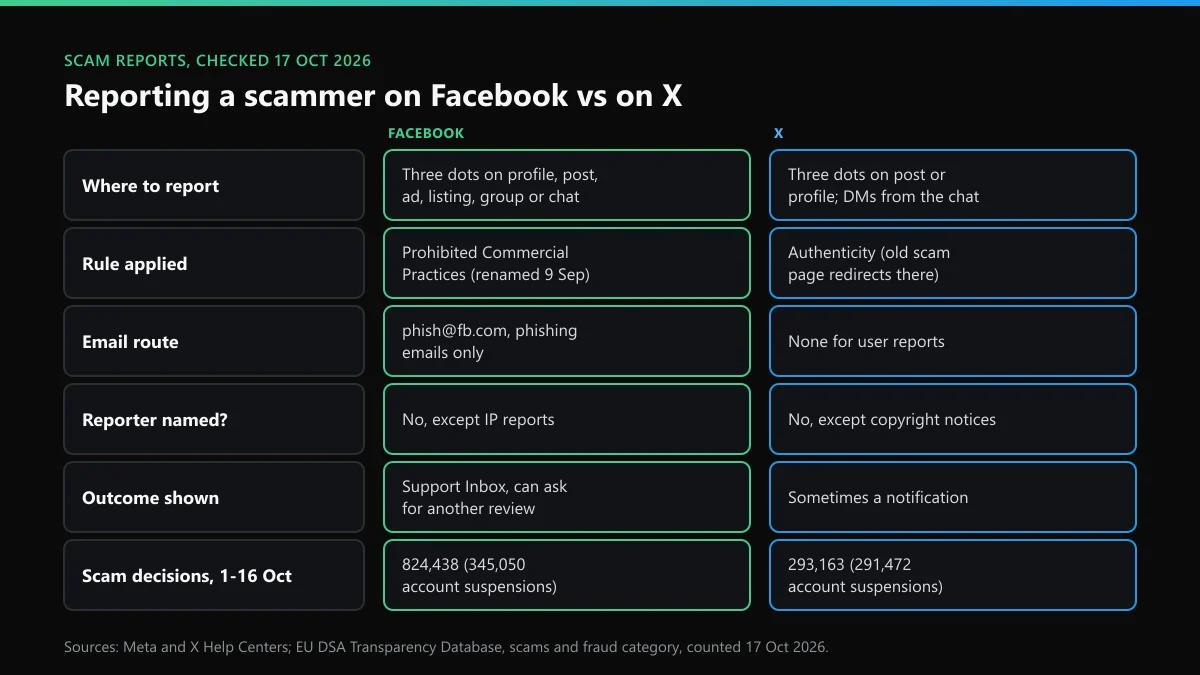
A lot of our readers already know X's report flow, and the habits don't carry over cleanly. The two platforms take scam reports in similar ways but review them under different rules:
| Question | X | |
|---|---|---|
| Where do you report? | Three-dot menu on the profile, post, ad, listing, group or chat | Three-dot menu on the post or profile; DMs from the conversation |
| Which rule decides it? | Prohibited Commercial Practices (renamed 9 Sep 2026) | Authenticity; the old financial-scam page now redirects there |
| Email route? | phish@fb.com, for phishing emails only | None for user reports; forms on help.x.com |
| Is the reporter named? | No, except intellectual-property reports | No, except copyright notices |
| Where's the outcome? | Support Inbox, with a request for another review | Sometimes a notification; no report history |
| Usual result | Content removed first; account suspended more often than deleted | Account suspension, almost always automated |
The rule row matters most when you report on X. X's authenticity policy treats scam accounts as fake personas or impersonation and scam links as malicious URLs, so pick those reasons. X has no inbox for user reports, and the addresses X publishes instead of a support inbox explain which one takes what. Its phone line isn't a shortcut either, as the X helpline and postal details make clear. For spotting the X side of a scam before you report it, these signs of an X scam account cover reply bots and fake support handles.
What happens to a Facebook scam report? The numbers
Meta and X both report each moderation decision that affects EU users to the EU DSA Transparency Database. We counted the scams and fraud category for 1 to 16 October 2026 on 17 October:
- Facebook: 824,438 scam decisions. 477,393 removed the post, ad or listing, 345,050 suspended an account, and 657 terminated one. Only 12,792 (1.6%) were made without automation.
- X: 293,163 scam decisions, with 291,472 account suspensions and 2,289 made without automation (0.8%).
Two things follow for a Facebook scammer report. First, report the account as well as the post. On Facebook a scam decision more often removes the content than the person, so a report on the post alone can leave the profile running. Second, expect a machine to read your report first. Specific reasons and clear screenshots help it land in the right place. Meta's Account Integrity rules also let it disable new accounts owned by someone whose earlier account was disabled. If the scammer comes back under a new name, report the new profile and say so.
How do you report a scam to Facebook if you lost money?
Report it to Facebook last. Facebook can take the scammer down, but it can't reverse a payment. Do these in order:
- Your bank, card issuer or payment app, the same day. Card disputes and transfer recalls depend on speed.
- The police or national fraud service. In the US, file with the FBI's IC3 and the FTC's ReportFraud site. UK readers outside Scotland file with Report Fraud, the service that took over from Action Fraud; Scottish readers call Police Scotland on 101.
- Facebook. Report the profile, then add the police or bank reference to your notes. If investigators need account data, they ask Meta directly.
Then watch for the second scam. People who post that they were scammed get offers to "recover" the money. The FTC says government agencies and legitimate organisations "will never ask for money to help you get a refund", and the FBI's IC3 has warned that law enforcement won't refer a victim to a paid recovery company.
Mistakes that slow down a Facebook scam report
- Blocking before you save. A block hides the profile from you, and its link with it. Copy the link first.
- Arguing with the scammer. It tells them to delete the chat and move on to a new account.
- Choosing "spam" for a scam. Spam reports are judged on volume. Pick scam, fraud or impersonation.
- Paying anyone to "mass report". Report counts don't decide outcomes, and selling report volume is itself against the rules.
- Hitting limits on X while you collect evidence. Scrolling and searching fast can trip a temporary block. What "rate limit exceeded" means on X lists those clocks, so you don't mistake one for a ban.
One scam type crosses both platforms often enough to name: handle and username sales. Someone in a Facebook group offers a rare X handle, takes payment and disappears. X sells handles only through its own Handle Marketplace, and how buying an X handle really works explains why every private sale breaks X's username squatting policy.
When the scammer is on Instagram or X as well
Each platform reviews only its own accounts, so the same person needs a report on every app they use. These are the routes we send people to most:
- On Instagram, reporting a scammer's Instagram account works the same way as on Facebook, from the profile's three dots. Abuse after you reported belongs in a harassment report on Instagram and X.
- For a legal demand rather than a rule report, such as a court order or a defamation claim, Instagram's legal request routes are separate from the in-app flow, and Facebook's are run by the same Meta team.
- On X, reporting a whole X account from its profile. To remove the Facebook profile itself, taking down a Facebook account, compared with X sets out the three routes.
Whichever platform it is, save first, report second and block last.
FAQ
How can I report a scam on Facebook without an account?
Ask someone with an account to report it, and give them the profile link rather than the name, since names aren't unique. Meta's own reporting page points people without an account, or who were blocked, to a separate route, and its Marketplace safety advice suggests the friend method.
Does the scammer know I reported them on Facebook?
No. A Facebook scam report doesn't name you to the person reported. The exceptions are intellectual-property reports, where Meta may pass the filer's contact details to the account owner. X works the same way: rule reports stay anonymous, copyright notices don't.
Is there an email to report Facebook scams?
Only for phishing. Meta takes fake emails that pretend to be from Facebook at phish@fb.com. Scam profiles, posts, ads and listings are reported from the three-dot menu, and Meta's "How do I report a scam?" help link now opens a Meta AI chat instead of a form.
How many reports does it take to ban a Facebook scammer?
One accurate report is enough to start a review. Meta says the number of reports doesn't decide whether something comes down, so asking twenty people to report the same profile doesn't speed it up and can look like coordinated false reporting.
Can Facebook get my money back after a scam?
No. Facebook can remove the scammer's account and posts, but refunds come from your bank, card issuer or payment app. Call them the same day, then file with the police or Report Fraud (UK), or IC3 and the FTC (US).
How do I report a Facebook scammer who also uses X?
Report each account on its own platform, because neither company acts on the other's evidence. On X, report from the profile or the post and pick the scam or impersonation reason. X has no inbox for user reports, so the in-app flow is the route.