17 October 2026 · Twitter Ban Service · 10 min read
Report abuse on Facebook: how to report someone, follow the report and appeal it, and where X differs
To report abuse on Facebook, open the profile, post, comment or chat, tap the three dots, choose Report and pick the reason that fits. That's the easy half. The report then lands in your Support Inbox, where you can delete it before review, read the decision and, if Facebook leaves the content up, ask for another review.
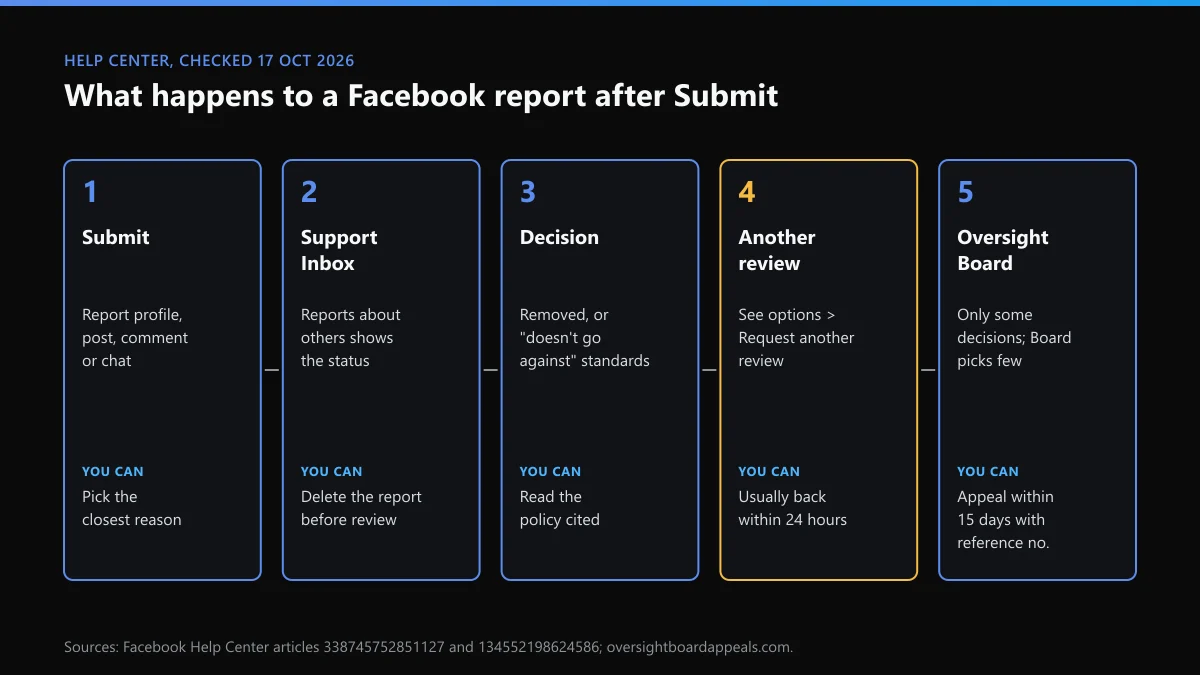
How can I report someone on Facebook?
From the thing that bothers you, not from a help form. Facebook's profile-reporting article gives the path for a whole account: go to the profile, click the three dots below the cover photo, choose Report profile and follow the screens. A single post uses the three dots at its top right, then Report post. A comment has its own dots or a long press. In Messenger you open the chat, tap the person's name and choose Report.
Those few paths answer how to report someone on Facebook, how to report a person in Facebook and how to report someone from Facebook, whichever wording you typed. They work the same on the app and the website. What changes the result is the reason you pick, so choose the narrowest one that is true. "Harassment" and "Scam" go to different reviewers than "Something else". To report abuse on FB from a phone, the menus are the same, only smaller.
Can you report someone on Facebook without an account? No. Reporting needs a logged-in account that can see the content. If they blocked you, ask a friend who can still open the profile to report it for you.
Where does a Facebook report go after you tap Submit?
To your Support Inbox, which most people never open. Facebook's article on unremoved reports says you get a notification there and that it will tell you whether the content "did or did not go against our Community Standards". Nothing arrives by email.
To find it, click your profile picture, then Help and support, then Support Inbox, then Reports about others. Each report shows what you reported, the reason you gave and where it stands. Clicking a report also links to the policy it was judged against. That's worth reading before you appeal, because it tells you which rule Facebook thinks applies.
One caveat. For some kinds of content Facebook treats your click as feedback for its systems rather than a report a person reviews, so not every tap creates an entry. If nothing shows up in Reports about others, report the specific post or message rather than the whole profile.
Can you cancel a report on Facebook?
Yes, but only while it's waiting. Facebook's report-status article says you can open a report in the Support Inbox and select Delete report, and adds that you "can only cancel your report if we haven't reviewed it yet". After that, the report stands.
This is one place Facebook gives you more than X. X keeps no list of the reports you filed and has no withdraw button for a rule report. If you reported someone on X by mistake, the only fix is that the reviewer finds no breach. The person is never told either way, a point covered for both apps in whether the account you reported ever finds out.
What happens if you report someone on Facebook?
A reviewer or an automated system checks the content against Facebook's Community Standards, and the result goes to your Support Inbox. The reported person isn't told who filed it. If the content breaks a rule, Facebook hides or removes it, and the account may get a strike. If it doesn't, Facebook says so and leaves it up. People who search what happen if you report someone on Facebook often expect a warning to reach the other person. Nothing does, unless a rule was broken.
Volume doesn't change the outcome. Facebook's Help Center states that "the number of times something is reported doesn't determine whether or not it's removed". That sentence answers most questions about what happens if you report someone on Facebook several times, or get friends to do the same.
Most reviews are run by software. In the EU's DSA Transparency Database, Facebook logged 73,265 decisions on cyber violence from 1 to 15 October 2026 (data runs to about the 14th). About 29% were decided without automation.
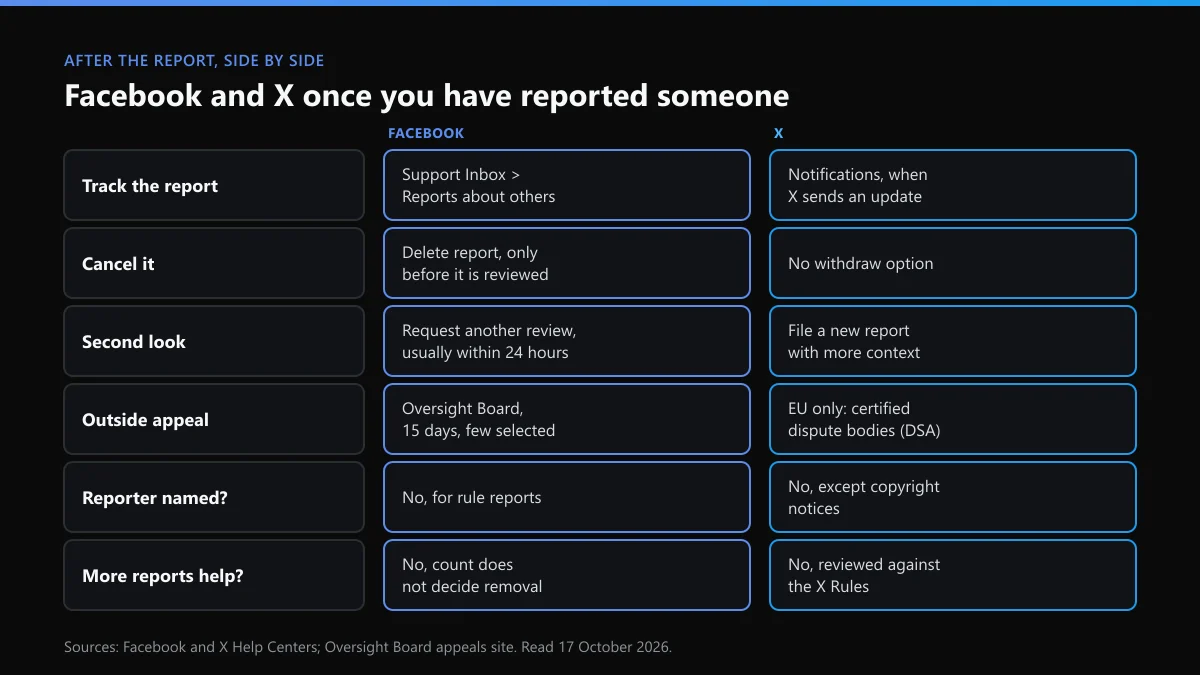
Facebook and X after the report: a side-by-side
Our readers usually know X's report flow and assume Facebook's matches. It doesn't once the report has gone in.
| After you report | X | |
|---|---|---|
| Where you see the status | Support Inbox, Reports about others | Notifications, when X sends an update |
| Cancel the report | Delete report, only before review | Not possible |
| Ask for a second look | Request another review, usually within 24 hours | File a new report with more context |
| Outside appeal | Oversight Board, within 15 days, few appeals picked | EU users only: certified out-of-court dispute bodies under the DSA |
| Does the count matter? | No, says the Help Center | No, each report is judged against the X Rules |
| Phone or email support | None; a Meta AI support chat | None; web forms instead |
The last row trips people up on both sides. X has no helpline for reports, which the page on X's phone and postal contacts explains, and the addresses X does publish won't take a report by email either.
Facebook says it doesn't go against the Community Standards. Now what?
Ask for another review, if the option is there. Facebook says that when it leaves reported content up "we usually offer the chance for you to request another review". The steps:
- Open Support Inbox. Click your profile picture at the top right of Facebook, choose Help and support, then Support Inbox.
- Go to Reports about others. Open the Reports about others tab. Each report you filed sits there with its current status.
- Open the decision. Open the message Facebook sent about the content you reported. It names the Community Standard it checked.
- Click See options. At the bottom of the message, click See options. If Request another review is listed, the decision can be checked again.
- Request another review. Click Request another review and follow the screens. Facebook says the second look usually takes about 24 hours.
If Facebook finds it got the first call wrong, it hides or removes the content and tells you. Some content types have no review button. Facebook says it is "adding more options", but that doesn't help today.
Can you take it to the Oversight Board?
Sometimes. If the second review upholds the first, the decision may be eligible for the Oversight Board. Its appeal site asks for an active account, a decision from the last 15 days and the reference number from your Support Inbox. The Board takes a limited number of cases, chosen for what they say about Meta's policies, so most appeals are never heard.
How to report someone on Facebook for scamming
Screenshot everything before you report or block: the profile link, the messages, the listing and any payment details. A report can end with the account gone and your evidence with it. Then report the message or listing and pick Scam or Fraud. If it happened on Marketplace, report the seller from the listing too.
Facebook can remove an account. It can't get your money back. If you paid, call your bank first, then report to Report Fraud in the UK or the FTC in the US. Scammers rarely stay on one app, so reporting the same scammer on Instagram is often the next stop.
How to report someone on Facebook for bullying
Facebook's bullying guidance lists three moves: unfriend, block and report. It also says not to retaliate, and to keep a record. Report each post or comment rather than the profile, choose Bullying or harassment, and say whether it is aimed at you or at someone else.
If the target is a child, also tell the school. If the posts threaten violence, go to the police and don't wait for Facebook. When the same person moves to X or Instagram to keep going, reporting harassment on Instagram and X covers those flows.
How to report someone on Facebook and get them deleted: does it work?
Only if the account breaks the rules. A report asks Facebook to check content against its Community Standards. It isn't a vote. One accurate report can lead to removal, and a hundred about a rival who did nothing wrong won't.
Two routes go further than the Report button. An account pretending to be you has its own impersonation form, and what to do when someone is impersonating you sets out the proof each platform asks for. Stolen photos or videos go through an intellectual-property claim. Who is allowed to file a copyright takedown applies to Facebook too, since Meta runs both forms. For a whole account that breaks the rules, taking down a Facebook account sets the same request on Facebook and X side by side.
When the account is on X or Instagram too
Each platform reviews its own reports, so a removal on Facebook changes nothing elsewhere. A few things to know before you start:
- On Instagram, the report forms that work without the app help if the account has blocked you.
- On X, an account that vanishes after you report it may only be deactivated. The 30-day window for restoring a deleted X account explains why it can come back.
- If X stops you mid-report with an error, it's usually a temporary counter. What rate limit exceeded means on X tells you how long to wait.
Whichever app you report on, save the evidence first and check the outcome where that platform shows it. On Facebook that means the Support Inbox.
FAQ
Will the person know I reported them on Facebook?
No. Facebook says it doesn't include any information about the person who filed the report when it contacts the reported account. X works the same way for rule reports. The exception on both is an intellectual-property notice, where the rights owner's details can be passed on.
Can I cancel a report on Facebook?
Yes, if Facebook hasn't reviewed it yet. Open Support Inbox, then Reports about others, click the report and choose Delete report. Once a reviewer has looked at it, the option disappears. X offers no way to withdraw a rule report.
How long does Facebook take to review a report?
Facebook publishes no clock for the first decision. It does say a requested second review usually comes back within 24 hours. The decision lands in your Support Inbox, not in your email.
Does reporting someone on Facebook many times help?
No. Facebook's Help Center says the number of times something is reported doesn't decide whether it is removed. Each review uses the same standards. One report with the right reason and clear evidence does more than twenty with the wrong one.
Can I report someone on Facebook if they blocked me?
Not from your own account, because you can't open their profile. Facebook suggests asking a friend who can still see it to report it. You can still report messages they sent you before the block from the chat.
What can I do if Facebook rejects my report twice?
If the second review upholds the first decision, you may be able to appeal to the Oversight Board within 15 days, using the reference number in your Support Inbox. The Board picks only a small number of appeals, so treat it as a long shot.