18 October 2026 · Twitter Ban Service · 11 min read
How can I report a fake Facebook account? Report Facebook impersonation, and what X asks for
How can I report a fake Facebook account? Open the fake profile, tap the three dots below the cover photo, choose Report profile and say it is pretending to be you, a friend or a public figure. No ID is needed for that. If you have no Facebook account, the Report an Impostor Account form asks for your ID, and X's own form asks for ID plus a selfie.
How can I report a fake Facebook account? Three routes, three levels of proof
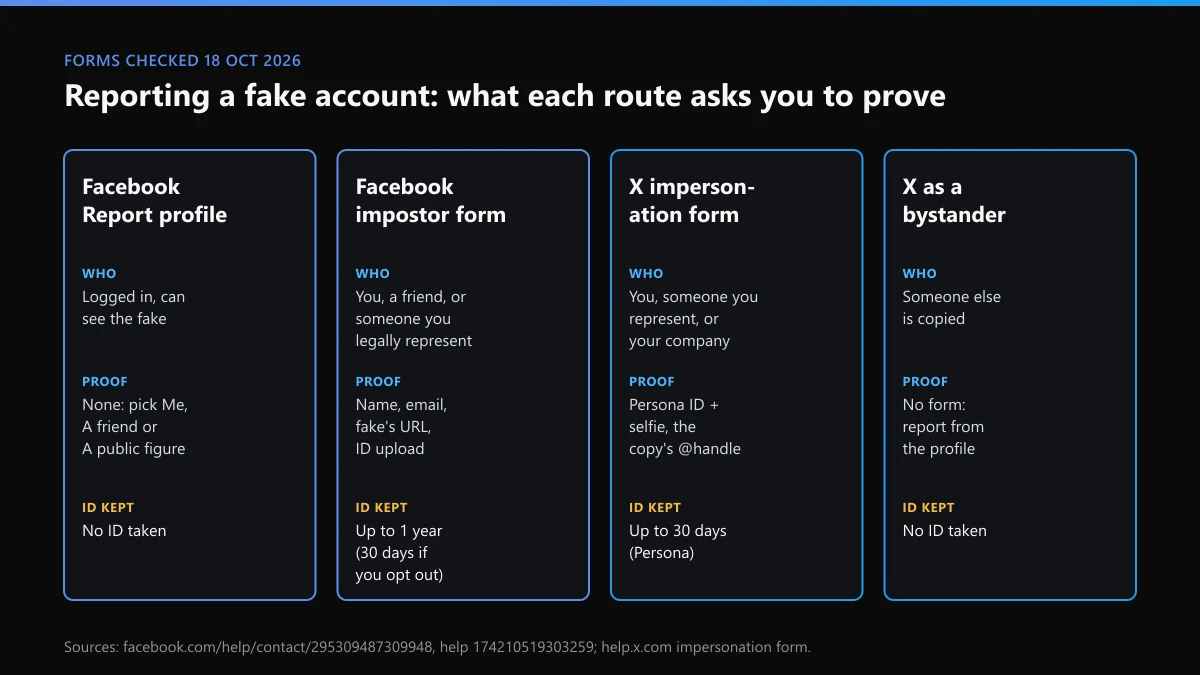
There are three ways in, and the right one depends on what you can show. If you have a Facebook account and can see the fake, report it from the profile. That asks for nothing but a few taps. If you have no account, or the fake has blocked you, Facebook's Report an Impostor Account form is the fallback, and it wants your ID. If the same copy also runs on X, X's form wants an ID check and a selfie before it opens.
Most guides answer how can i report fake facebook account with the first route only. That's fine for most people, but it leaves out what happens when the button isn't there. Here is what each route asked for when we went through them on 18 October 2026:
| Route | Who it's for | Proof asked for | Your ID kept |
|---|---|---|---|
| Report profile, in the app | Anyone logged in who can see the fake | None; you pick Me, A friend or A public figure | No ID taken |
| Facebook impostor form | You, your friend, or someone you legally represent, with or without an account | Full name, contact email, impostor's name and URL, ID upload | Up to 1 year, or deleted within 30 days if you opt out |
| X impersonation form | You, someone you represent, or your company | Persona ID check plus selfie, the copy's @handle, post links | Persona keeps it for up to 30 days |
| X, as a bystander | Someone else being copied | No form; report from the profile | No ID taken |
The ID retention line is the one people miss. The Facebook form says the ID may be stored "for up to one year" to improve its systems for spotting fake IDs, unless you turn that off in Identity Confirmation Settings.
How do I report a fake account on Facebook from the profile?
This is the route Facebook's impersonation help article gives first, and it covers how do i report a fake facebook account on the app and the website alike:
- Copy the profile link. Open the fake profile, copy its URL from the address bar or Share > Copy link, and screenshot the name, photo and any posts.
- Open the options menu. On the fake profile, click or tap the three dots below the cover photo.
- Choose Report profile. Pick Report profile, then the option saying the account is pretending to be someone or is a fake account.
- Say who is copied. Choose Me, A friend or A public figure. For a friend, Facebook asks you to pick their real profile.
- Submit and check Support Inbox. Send the report, then follow it in Help and support > Support Inbox > Reports about others.
That's also how to report a fake profile on Facebook from a phone. The three dots sit in the same place, just smaller. On a computer, how to report fake facebook account works the same, except you copy the link straight from the address bar. In Messenger, open the chat with the fake, tap its name and choose Report.
The short spellings land in the same place. How to report fake account on fb, how to report fake fb account, or an fb fake account report: all of them start at those three dots.
Save the link before you report. Once Facebook removes the fake, the URL stops working, and with it your evidence that it existed. A screenshot of the name, photo and any message asking for money is worth more than any amount of explaining later.
How do I report someone impersonating me on Facebook if I have no account?
Use the impostor form. It starts with one situation, "Someone created an account pretending to be me or a friend", then asks whether you have a Facebook account. Choose No, and it asks whether the account is impersonating you, someone you're the legal representative of (a parent or guardian, for example), or a friend.
For the "it's me" branch, the form wants your full name, a contact email, the name on the impostor profile, any email or phone shown on it, the impostor profile's link and a picture of your ID. It also says that if you can't see the profile, you can ask a friend who can. So for anyone asking how do i report to facebook someone is impersonating me without logging in, the trade is simple: no account needed, but you hand over ID.
If the fake used your personal data, such as your phone number or home address, Facebook's advice on impostors is to contact a lawyer or local police as well. A report removes the profile. It doesn't stop someone who has your details from using them elsewhere.
How to report impersonation on Facebook, and how X does the same job
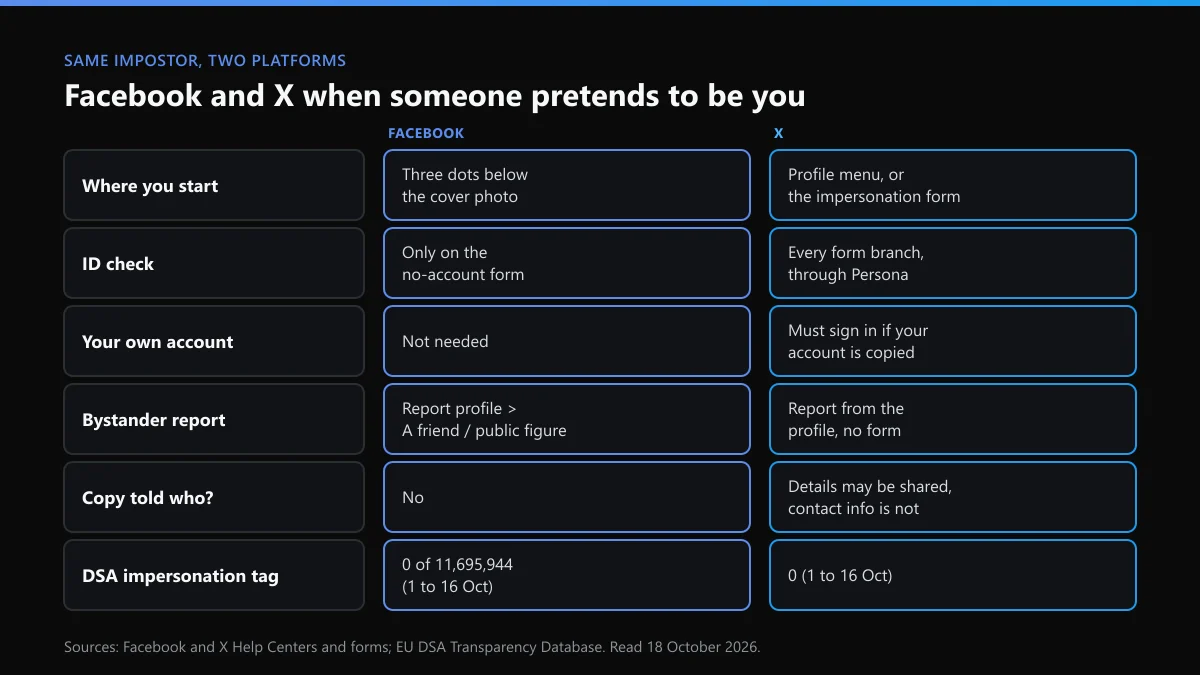
People who know X expect Facebook to work the same way. The checks are close, but the paperwork isn't. Facebook trusts an in-app report from a logged-in user and asks for ID only on its fallback form. X asks for ID on every branch of its impersonation form, through a Persona check that X says "usually takes about 5 minutes" and needs a working camera for a selfie.
If your own X account is the one being copied, X adds a condition. When we loaded the form signed out, it said you "must sign in to this account before proceeding". Facebook has no such rule. You can report the fake from any account, or from no account at all.
Bystanders get less on X. Pick "Someone else on X" and there is no form, only a pointer to report from the profile. On Facebook, how to report an impersonator on facebook as a bystander is the same Report profile flow anyone uses: you choose A friend or A public figure instead of Me. X's own lane for a copy of you is set out in the guide to someone impersonating you on Instagram and X.
The outcomes differ too. X's authenticity policy says an account that poses as someone "to deceive others" can be suspended or told to change. On Facebook, the profile is judged against its rules on misrepresenting identity, and the result shows in your Support Inbox.
How to report a Facebook page for impersonation
A Page that copies a brand, a shop or a public figure is reported the same way: open the Page, tap the three dots below the cover photo and choose Report Page. Pick the option saying it is pretending to be someone. If it copies your business, give the real Page's link when Facebook asks for it.
Check the Page's transparency section before you report. Click the Page name under the cover photo, then Transparency and privacy policy. It shows when the Page was created and any earlier names. A "brand" Page created last week that used to be called something unrelated is easy evidence to point at. The same check works for an Instagram account or business page report, where the About this account screen does the job.
A business with a registered trademark has another route besides impersonation. Meta runs a separate intellectual-property form for trademark claims. Our page on Instagram's legal request forms lists the Meta forms that sit outside the Report button.
Reporting fake accounts on Facebook that copy nobody
Not every fake is an impersonator. A profile with a stock photo, a made-up name and a story about a lost inheritance copies nobody, so the impersonation option is the wrong one. Report it as a fake account instead. When you're reporting fake facebook accounts like these, pick the reason that names what they do: scam, spam or fake account.
Meta's enforcement report estimates fake accounts at less than 5% of Facebook's monthly active users worldwide. It also counts a personal profile made for a pet or a business as fake, which is why such profiles get removed even when nobody complained. For fake accounts that message you about money, the route in how to report a scammer on Instagram carries over: report the message, not just the profile.
Facebook's note on feedback adds a catch. Some taps only send feedback to its systems, and "depending on your feedback, you may then be able to submit a report". If nothing appears in your Support Inbox afterwards, report a specific post or message from the fake instead.
What happens after a facebook fake account report?
The report lands in Support Inbox under Reports about others, where you can follow it. Facebook says a reviewed report gets a decision there, not by email. If the profile stays up, open the decision, click See options and look for Request another review. Facebook's article on reports it didn't act on says a second review usually takes about 24 hours.
Don't expect the numbers to help. In the EU's DSA Transparency Database, Facebook logged 11,695,944 moderation decisions from 1 to 16 October 2026. Not one carried the database's impersonation and account-hijacking tag. X's count for the same tag and dates was also 0, while all platforms together logged 3,710. Facebook and X file impersonation removals under other labels, so the database can't tell you how many fakes they took down.
When the second review fails, the reason is usually missing proof. Add a link to your real profile and a screenshot showing the copied photo side by side. If the fake was posting harmful things in your name, reporting a single post explains why a post report and a profile report are judged separately.
When the fake account copies you on X as well
Impostors rarely stop at one app. If the copy also runs on X, report it there separately. Removing it from Facebook changes nothing on X. A few checks before you start:
- If the fake took your exact handle, checking whether an X name is free tells you whether you can claim a close variant. X's form says a handle transfer needs Premium Business.
- X won't take an impersonation report by email. The email addresses X does publish point you back to the form.
- If you deactivated your own X account and an impostor moved in, reactivating your X account restores the original first, which makes the impersonation report much easier.
- X's report screen can stop you with a temporary error after several reports in a row. What rate limit exceeded means on X explains the wait.
If the impostor turns abusive once reported, which happens, reporting harassment on Instagram and X covers the next step. For the Facebook side of a copy that keeps returning, taking down a Facebook account sets Facebook's account-level removal against X's.
FAQ
Do I need ID to report a fake Facebook account?
Not for an in-app report. Reporting from the fake profile needs only your logged-in account. The no-account impostor form is different: when we checked on 18 October 2026, it asked you to upload ID before it would send.
How long does Facebook keep the ID I upload?
The form says Facebook may encrypt and store it for up to one year to train its fake-ID detection. If you switch that off in Identity Confirmation Settings, the copy is deleted within 30 days. X's form says Persona may store ID and selfie data for up to 30 days.
Will the fake account know I reported it?
Facebook doesn't tell the reported account who filed a report. On X, the impersonation form warns that some details may be shared with the reported user, but says your contact information will not be disclosed.
Can I report a fake Facebook account for a friend?
Yes. Report it from the fake profile and choose A friend, then select their real profile. The impostor form also has a branch for an account impersonating your friend. The friend can confirm it faster by reporting it themselves.
What if Facebook says the fake profile doesn't break the rules?
Open the decision in Support Inbox and check for Request another review under See options. Add what the first report lacked, such as a link to your real profile. A fake that copies nobody is judged under the fake-accounts rules, which is a different test.
Does reporting a fake Facebook account remove it from X too?
No. Each platform only reviews its own accounts. If the same impostor runs an X account, report it on X separately. X's impersonation form needs a government ID check and a selfie through Persona, plus the copy's @handle.