16 October 2026 · Twitter Ban Service · 10 min read
What happens if you report someone on WhatsApp, and how it differs from a report on X
What happens if you report someone on WhatsApp: WhatsApp gets a copy of up to five of the last messages they sent you, basic details of your last five calls and their account ID. They aren't told. Your chat keeps working unless you also block. WhatsApp then reviews the account, and a report alone doesn't guarantee a ban.
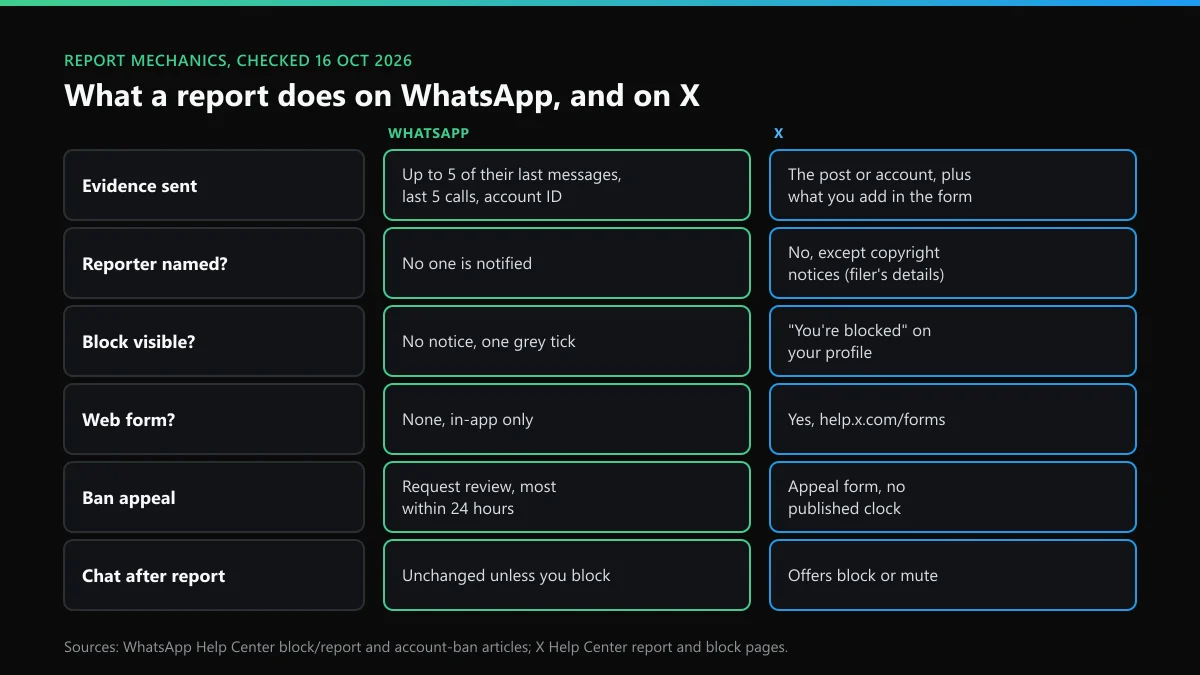
What happens if you report someone on WhatsApp?
A report is the one moment WhatsApp gets to see part of an encrypted chat. Your phone sends a copy of the evidence, and nothing else changes on either screen. We read WhatsApp's help pages for Android and iPhone again on 16 October 2026. They say what happens when you report someone on WhatsApp in three parts.
- What is copied: "up to five of the last messages they've sent to you", in WhatsApp's own words in its block and report article. Basic details of your last five calls are added, with the account ID and the time and type of each message. Your own messages aren't among the five.
- Who is told: nobody. "The user or group won't be notified." WhatsApp doesn't write back to you either.
- What changes: nothing until WhatsApp acts. Their messages keep arriving unless you block too. If WhatsApp decides the account broke its Terms, it can ban it without telling you.
That last part catches people out. The help page states that a report "won't necessarily result in us banning the user". A report hands WhatsApp evidence. It isn't a vote, and ten reports carrying the same five harmless messages prove nothing more than one.
What is report and block in WhatsApp?
It is a single button that does two jobs. Report and block in WhatsApp means the report described above plus a block on the number, so the person can no longer message you, call you, or see your last seen, online status, status updates or profile photo changes. People search "report and block whatsapp", "whatsapp report and block" and "report and block in whatsapp means" as though these were three features. It's one.
Report on its own does only the first job. WhatsApp's reporting article warns that reporting without blocking "won't stop you from receiving their messages, calls, and status updates". So, in WhatsApp, report and block means evidence to WhatsApp plus silence for you.
Where the button sits depends on the phone. On iPhone you tap the contact's name, scroll down, tap Report, then pick Report and block or Report. On Android the order can run the other way. The Block screen carries a "Report to WhatsApp" box that is already ticked, so a block on Android is also a report unless you untick it.
What happens when you report and block someone on WhatsApp?
The chat stays in your list with Unblock and Delete Chat at the bottom. Their messages and calls stop reaching you from then on. Messages they send while blocked never arrive, even if you unblock later. They aren't told, but a careful person can work it out: their messages stay on one grey tick and your photo stops updating for them.
X handles this the other way round. A blocked account that opens your X profile sees a plain "You're blocked" notice. On WhatsApp there is no notice at all, only the missing tick.
WhatsApp report vs X report: what each one actually does
Most of our readers know X's report flow better than WhatsApp's. Setting them side by side shows where the habits from one app mislead on the other.
| Question | X | |
|---|---|---|
| What evidence goes in? | Up to 5 recent messages from them, last 5 calls, account ID | The post or account you report, plus anything you add in the form |
| Can the platform read the rest? | No. Chats are end-to-end encrypted | Public posts, yes. It reviews the account's history |
| Is the reported person told who it was? | No | No for rule reports. Copyright notices are passed on with the filer's details |
| Is a block visible to them? | No notice, only a single grey tick | Yes, "You're blocked" on your profile |
| Web form for other users? | None. In-app only | Yes, help.x.com/forms, alongside in-app reports |
| Can you undo it? | No withdraw option. Only the block can be lifted | No withdraw option for rule reports |
| Appeal of a ban | Request review in the app, most within 24 hours | Appeal form, no published clock |
The reporter-privacy row matters most. Whether the other side ever learns your name is covered for Instagram and X in who finds out when you file a report on Instagram or X. On X, the report-to-suspension path runs on X's own review, and the X report-to-ban timeline shows the stages.
How to report a WhatsApp account, step by step
Everything happens inside the chat. WhatsApp says "the only way to report someone is to follow the in-app reporting process", so there's no page to paste a number into. This is how to report a WhatsApp account, a group or a business:
- Open the chat. Open the conversation with the account. A report works from a chat, because it sends messages from that chat.
- Tap the name. Tap the contact, group or business name at the top to open its info screen.
- Choose Report. Scroll to the bottom and tap Report, Report group or Report business. On Android, the chat menu also has More, then Report.
- Decide about the block. Tick or untick the block option. Leave it ticked if you want the messages to stop as well.
- Confirm. Tap Report again. WhatsApp copies the recent messages and won't contact you about the outcome.
An unsaved number that writes to you for the first time gets a Report or Block banner above the message. That is the quickest route for a stranger. X is different here. It has no inbox to report from, but it does run web forms, listed in the X contact routes that stand in for a support email.
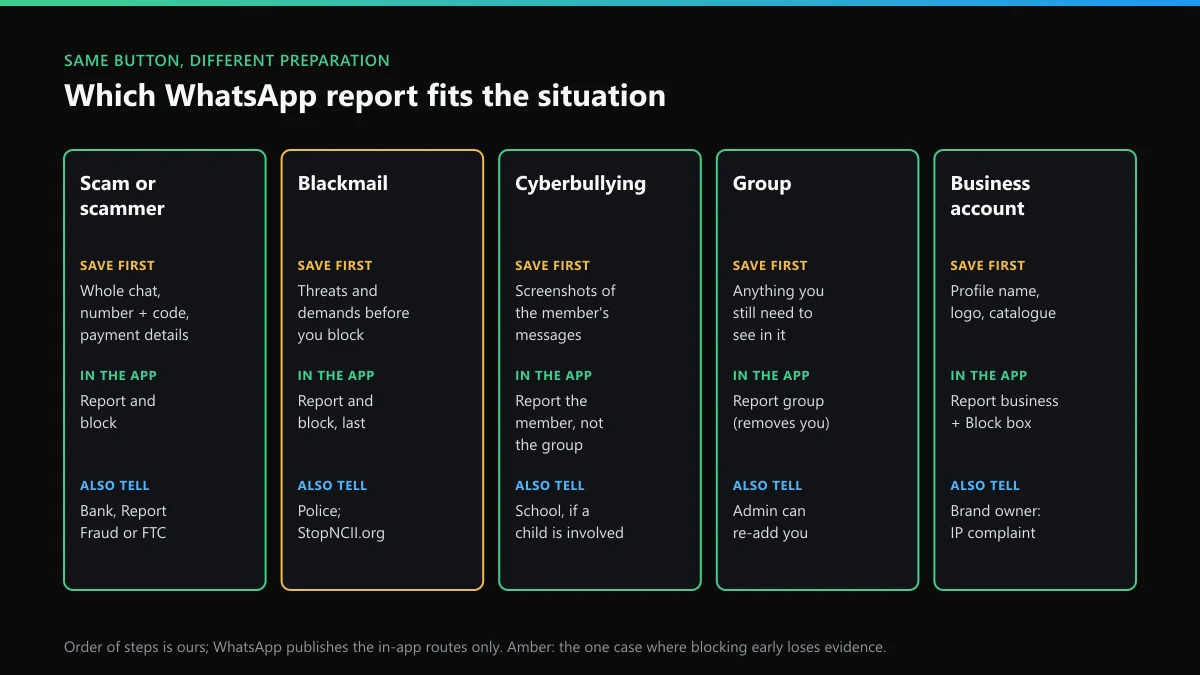
Which WhatsApp report fits your situation?
The Report button is the same in every case. What changes is what you save first, whether you block, and who else should hear about it. The sorter above sums it up, and the five cases follow.
How to report a WhatsApp scam or scammer
Screenshot first, report second. The in-app report gives WhatsApp five messages, while your bank and the police need the whole conversation, the number with its country code and any payment details. Then report and block in WhatsApp. That covers how to report a WhatsApp scam, how to report a WhatsApp scammer and how to report scam on WhatsApp, because the app gives every case the same button.
Then report the scam outside WhatsApp, because WhatsApp can only ban a number. To report WhatsApp scams where someone can follow the money, use Report Fraud in the UK (0300 123 2040; in Scotland, call 101) or the FTC's ReportFraud site in the US, and call your bank at once if you paid. The 7726 short code is for SMS texts only and doesn't take WhatsApp messages.
A WhatsApp report on a scammer rarely ends the scam, since the same person usually advertises somewhere else. Reporting the Instagram account that pushed you to WhatsApp closes the other door. On X, the signs of an X scam account help with the reply bots that post WhatsApp numbers.
How to report blackmail on WhatsApp
Save the evidence before you block. Report and block ends your contact with the account, so take screenshots of the threats, the number and any payment demand first. Don't pay. Then go to the police, and only then report and block. WhatsApp has no help page on sextortion, so this order is ours.
If the threat involves intimate images, StopNCII.org hashes the image on your phone so partner platforms can block uploads without the image leaving your device. For anyone under 18, WhatsApp points to NCMEC. Knowing how to report blackmailing on WhatsApp is half the job when the blackmailer found you on Instagram. The Instagram blackmail and sextortion report deals with that account.
How to report cyberbullying on WhatsApp
Report the person, not the group, when one member is the problem. That keeps you in the group, and WhatsApp still gets that person's last five messages. If the whole group exists to target someone, report the group. When a child is involved, tell the school too, since it can see more than five messages. Bullying that spills onto public profiles is easier to act on, because those platforms can read the posts. Reporting harassment on Instagram and X covers that side.
How to report a WhatsApp group
Tap the group name, scroll to the bottom and choose Report group. A WhatsApp group report sends the last five messages in the group, and WhatsApp says "no one in the group will know about the report". It also removes you from the group. On iPhone, the choice is Report and exit or Report. On Android and the web there's a box to exit and delete the chat as well. So before you work out how to report a WhatsApp group, decide whether you still need to see what is posted in it.
How to report a WhatsApp business account
Open the business profile, scroll down and tap Report business. A Block business box sits beside it. That is all WhatsApp offers on how to report a WhatsApp business account. Most of these reports are about a fake shop using a real brand's name. The brand owner has a stronger route in an intellectual-property complaint than in a user report. Those routes are set out, for Instagram, in who can file a copyright takedown on Instagram.
How to find a reported number on WhatsApp
You can't, because WhatsApp keeps no list of reports you've sent. It keeps a list of blocks. Go to Settings, then Privacy, then Blocked contacts. On some Android versions it's Privacy, then Contacts, then Blocked contacts. If you used Report and block, the number is there. If you only reported, the app keeps no record, so screenshot the chat or note the number when you report.
X doesn't give you a list of reports you've filed either. It does sometimes send an update on a report in your notifications. WhatsApp says it won't contact you again.
How to fix a WhatsApp banned number
Use the Request review button on the ban screen. WhatsApp's account-ban article quotes the notice ("This phone number can't use WhatsApp") and says "Most reviews are completed within 24 hours." If the screen has no Request review button, the ban is final and can't be appealed.
On a WhatsApp support email for a banned number: the ban page lists none. It warns that contacting WhatsApp outside the review process "won't expedite the review process or impact the decision". The only published address belongs to India's grievance officer. WhatsApp's India monthly report for August 2026 counted 15,106 ban appeals through that channel and 129 accounts actioned. That's under 1%.
X has the same gap. Its forms replace a support inbox, and X's phone and postal contact details explain why no number helps with a suspension. Not every lockout is a ban, either. On X, an action refused for a few hours is often a counter, and what "rate limit exceeded" means on X lists those clocks. WhatsApp also says that "third party services can't ... remove your account ban". That includes us. We don't sell unbans.
When the account is on X or Instagram as well
A WhatsApp report covers one number. The person behind it usually has other accounts, and each platform takes its own report under its own rules. These are the routes we point people to most:
- On X, reporting a whole X account from its profile, and X's private-information and blackmail reports if your number or address was posted.
- On Instagram, the Instagram report forms that open without an account, which suit people who were blocked before they could report from the app.
Whatever the platform, save the evidence before you report. The report is the last thing you do.
FAQ
Does the person know if I report them on WhatsApp?
No. WhatsApp's help article says the user or group won't be notified, and the report carries no reporter name to them. X works the same way for rule reports, but X shows a blocked account a "You're blocked" notice on your profile, which WhatsApp doesn't.
Is a report on WhatsApp the same as a block?
No. A report sends WhatsApp up to five recent messages and leaves the chat working. A block stops their messages and calls and sends WhatsApp nothing. Report and block does both in one tap.
Can I report a WhatsApp number from the website?
No. WhatsApp says the only way to report someone is the in-app process, so you need the chat on your phone, WhatsApp Web or desktop. Its web contact form only takes privacy questions.
Will WhatsApp ban someone after one report?
Not automatically. WhatsApp says a report won't necessarily lead to a ban and reviews the account against its Terms. Most bans aren't triggered by one person: in India in August 2026, 27% of the 6,202,400 banned accounts were removed before any user report.
Does reporting a WhatsApp group remove me from it?
Yes. Reporting a group takes you out of it, and only an admin can add you back. If you want to keep watching the group, take screenshots first or report the single member from their profile instead.
Who do I contact if my WhatsApp number is banned?
Nobody outside the app. The ban notice has a Request review button, and WhatsApp says most reviews finish within 24 hours. Emailing or writing from another account won't speed it up, and no button means the ban is final.