22 October 2026 · Twitter Ban Service · 10 min read
Twitter report notifications: what "We received your report" and each update mean
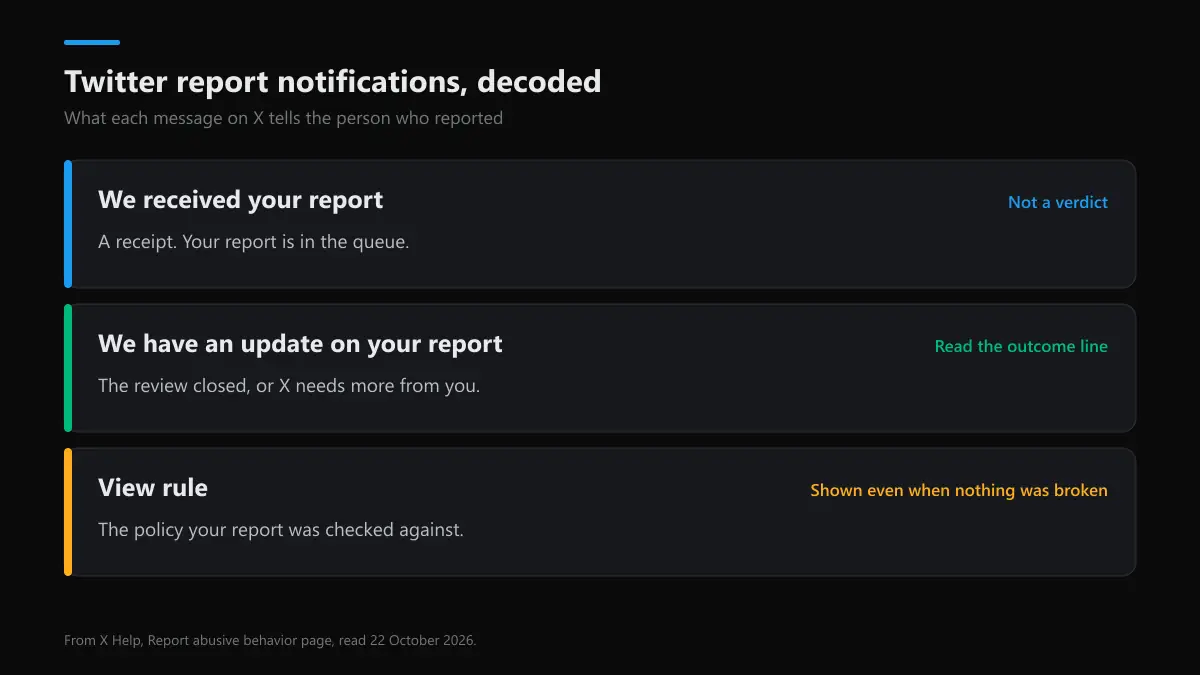
Twitter report notifications come in two steps. "We received your report" is a receipt: your report is in X's queue, and it can take up to 24 hours to appear. "We have an update on your report" comes after the review and says whether X found a violation. View rule opens the policy X checked the post against.
What do Twitter report notifications actually tell you?
They tell you where your report is, and very little else. X sends twitter report notifications to the person who filed the report, inside the Notifications tab and often by email as well. The first is a receipt. The second, if it comes, is the result. Between the two there is no progress bar, no case number you can quote and no named reviewer.
This page reads those messages from the reporter's side. If you still need to file, the steps for reporting a tweet cover the menus and categories, and the report-to-ban timeline covers how long a ban takes once a report holds up. Here the question is narrower: you've reported something, a message arrived, and you want to know what it means.
Twitter "We received your report": what the receipt means
When X shows "we received your report", Twitter is confirming one thing: your report reached the review queue. X's help page on reporting abuse says you will see a confirmation "alerting you that we received your report", and that it may take up to 24 hours before you see it. So a missing receipt an hour after you file is normal, not a failure.
The twitter we received your report notification also does two quieter things. The post you reported is replaced on your screen with a note that you reported it, though you can click through to read it. And if you left the box "Updates about this report can show these posts" ticked, the text of the reported posts is copied into later notifications and emails. Untick it if you'd rather not see the post again.
For a violent threat reported from a post, the receipt screen has an Email report button that sends you a copy for the police. Most searches for we received your report twitter come from exactly this point: the receipt arrived and nothing else has. The same wording follows DM reports, and a report filed for someone else gets the same receipt as one filed for yourself.
"We have an update on your report": reading the second message
When the twitter we have an update on your report message appears, the review closed, or X needs more information from you. X's help page lists both as the reasons it follows up. The update is where the outcome lives, so it's the one worth reading in full. This is what each version tends to say:
| What the update says | What it means | Your next step |
|---|---|---|
| X found a violation and took action | The post was removed, limited or the account was restricted | Nothing; keep the notification as your record |
| X didn't find a violation | The post was checked and stays up | Block or mute; re-report only with new posts or a better category |
| X needs more information | The report can't be judged without context | Answer it; an unanswered request usually ends the case |
| Action taken on an account you recently reported | Something happened to that account | Treat it as related, not proof: X says it "may or may not" come from your report |
| No update at all | Often a no-action close, or a duplicate of other reports | Check email, then decide whether new evidence is worth a fresh report |
Twitter update on your report messages never name the moderator or count how many other people reported the same account. We have an update on your report twitter messages also don't tell the reported person who you are; the anonymity side is covered in what a reported account sees.
What "View rule" means in a Twitter report update
View rule is the link under the update. Tap it and X opens the page in the X Rules that your report was judged against, such as abuse and harassment, private information or impersonation. A twitter report view rule link shows which rule was used, not whether it was broken. People misread this all the time: a twitter update on report view rule message can sit right under a "no violation" result.
So read view rule twitter report links as a hint. If X checked a harassment report against the harassment rule and found nothing, the post didn't cross that rule's line as written. If the rule shown doesn't fit what happened, your category was probably wrong, and a fresh report under the right one is the fix. That's the practical use of the report view rule twitter link: it shows you which rulebook entry the reviewer had in front of them.
How to check Twitter report status and history
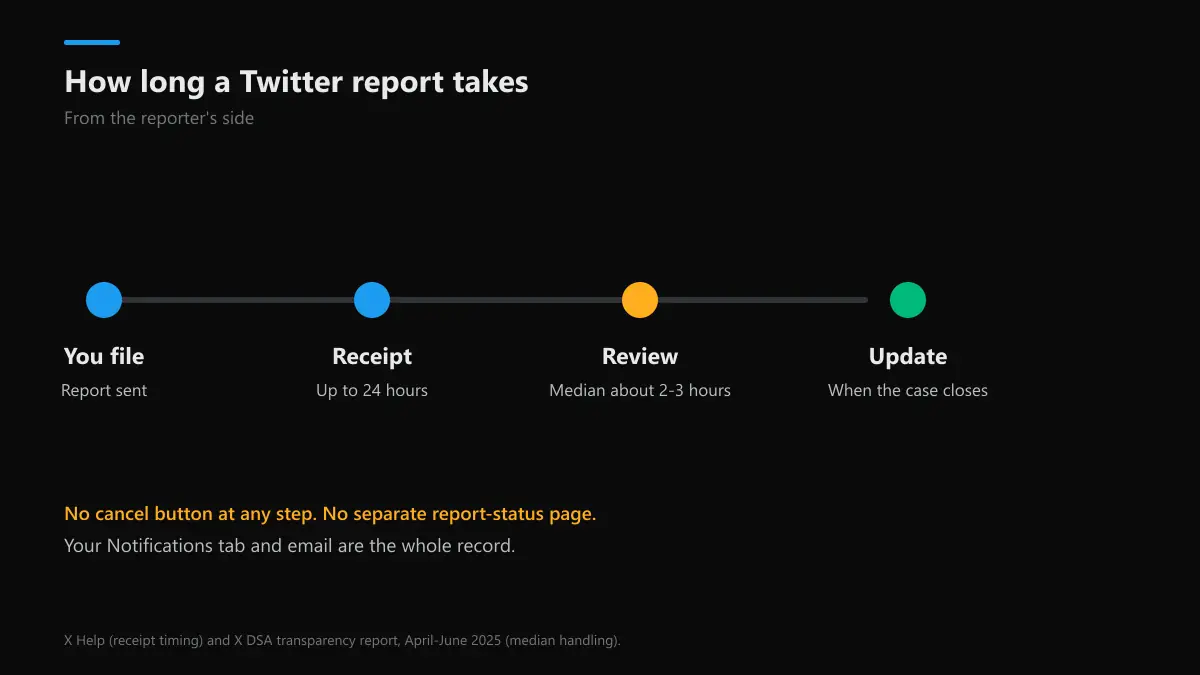
There's no status page. X's help pages describe no report dashboard, case number or report-history screen for users. How to check twitter report status, then, comes down to two places: the Notifications tab, where the receipt and any update sit, and your email inbox, where X sends follow-ups that quote the reported posts. That's how to check twitter reports in practice.
- Open Notifications in the X app and scroll back; filtering to "All" rather than "Mentions" keeps report messages in view.
- Search your email for "your report" from X. Old updates stay there after notifications scroll off.
- Save a screenshot of each update. A twitter report history you keep yourself is the only one that lasts.
- If an update says action was taken, check the account directly. A suspended profile shows a notice; a removed post shows a tombstone.
When people search to view twitter reports, or for twitter view reports in Settings, they're often looking for something Instagram has: Instagram lists reports under Support requests. X doesn't. The twitter report status you see is whatever your notifications and emails say, and a twitter report update never moves into a separate archive.
How long do Twitter reports take?
Usually hours, not days. How long does twitter take to review a report? X's DSA transparency report for April to June 2025 put the median handling time for most EU notice categories at about two to three hours. How long does a twitter report take to show any sign of life? The receipt can lag up to 24 hours, and the update arrives when the case closes.
Three things stretch it. A report that needs a person rather than an automated check waits in a human queue. A report X asks you to add to stalls until you answer. And reports about impersonation, private information or copyright go through forms with their own checks. So how long do twitter reports take overall? A simple spam or abuse report is often closed the same day. How long does it take twitter to review a report about impersonation? Expect days, not hours.
How long does twitter take to respond to a report when nothing ever arrives? There's no published deadline. Inside the EU, the Digital Services Act makes platforms confirm receipt of illegal-content notices and decide "in a timely, diligent, non-arbitrary and objective manner", without a fixed number of hours. If a week passes with no update, assume the case closed without action.
How to cancel a report on Twitter, and why you can't
There's no cancel button. How to cancel a report on twitter is a common search after a misclick, but once it's sent, the report is in the queue and X offers no withdraw option in the app, the help pages or the forms. How to cancel report on twitter, then, has a practical answer: let the review run. If the post breaks no rule, nothing happens to the account.
How to un report someone on twitter after a misunderstanding? You can't take back the report, but you can undo what came with it. If the report flow blocked or muted the account, unblock or unmute it from their profile. If you reported by mistake over and over, stop: X's Authenticity policy counts false or duplicate reports "in large numbers" as platform manipulation. A single honest mistake isn't that.
Twitter report not working? The usual causes
"Twitter report not working" means one of two things: the button fails, or the report goes through and nothing happens. A failing button is usually a rate limit or app glitch. If X has throttled your account, the rate limit exceeded message explains why reports and posts both fail. A locked account can't report at all until it's unlocked, which recovering a locked Twitter account walks through.
If the report goes through and the post stays up, the cause is usually the category or the rule. Rude, false or annoying posts are often allowed. Picking "spam" for a harassment campaign sends it down the wrong check. And if you think the account was hidden rather than removed, a Twitter shadowban check shows whether its reach was cut.
Do Twitter reports work, and does reporting on Twitter do anything?
Yes, when the reported post breaks a written rule. Do twitter reports work for posts that are hurtful but allowed? Mostly no. X's own figures show how lopsided enforcement is. In April to June 2025 it suspended 27,834,297 EU accounts, and only 104,301 of those came from a user report; most of the rest were spam caught by machines. Of 178,028 illegal-content notices in that report, about 55% closed with no violation found.
The public record can't settle it either. We searched the EU DSA Transparency Database on 22 October 2026 for every decision X logged from 1 to 21 October: 494,910 statements of reasons. Every one carried the source label "other type of notification". X logged 0 as an Article 16 user notice and 0 as its own initiative, so the database gives no way to tell which actions a report triggered.
So does reporting on twitter do anything? It puts a specific post in front of a review, which is the only route to removal for most harassment, threats and impersonation. What happens if you report someone on twitter is a check against one rule, and what happens when you report a post on twitter is that the post, not the person, gets judged first. One accurate report with the right category does more than many vague ones.
What reports look like on other apps
Other platforms send their own receipts, and some show more. YouTube keeps a list, covered in reporting a YouTube channel and its Report history, with its harassment policy set against X's, a separate report route for a YouTube ad, and controls to block someone on YouTube and X. On TikTok, reporting someone on TikTok and X sends a status to your inbox, and copyright goes through TikTok's copyright report form.
Snapchat has reporting someone on Snapchat compared with X and the account-level Snapchat report. WhatsApp is closer to X: what happens after you report someone on WhatsApp differs mainly because recent messages go with it, and reporting a WhatsApp number is the number-level route. Facebook splits reports into abuse reports on Facebook, single post and Page reports, Facebook impersonation reports, scammer reports and, for whole accounts, taking down a Facebook account.
Some cases skip the report button entirely. Court orders and legal claims on Instagram run through Instagram's legal request routes, and threats to share intimate images belong in the sextortion report steps, not a standard report.
When a report ends in a suspension, what happens to the handle?
If your report ends with the account suspended, its handle doesn't become free. Suspended names stay locked, which is why checking Twitter name availability or a Twitter handle checker still shows them as taken. Lists of available Twitter usernames are a better place to look. Anyone offering the suspended handle through a Twitter handle marketplace is selling something X's rules forbid, and what buying a Twitter handle involves covers why those sales get reversed.
FAQ
What does "We received your report" mean on Twitter?
It is a receipt, not a verdict. X is confirming that your report reached its review queue. It says nothing about whether the post breaks a rule, and X notes the receipt itself can take up to 24 hours to show.
What does "We have an update on your report" mean?
The review has finished, or X needs more from you. The update says whether X found a violation and, if it did, what it did about the post or account. When X found nothing, the update says so and the post stays up.
What is "View rule" in a Twitter report update?
It opens the X Rules page for the policy X used to judge your report. It tells you which rule the post was checked against, not that the rule was broken; read the line above it for the outcome.
How do I check my Twitter report status?
Open the Notifications tab in the X app and look for the receipt and any update, then search your email for the follow-up X sends. X has no separate report-status page, so those two places are the whole record.
How long does it take Twitter to review a report?
Most reports are handled within hours. X's EU transparency report gave a median of about two to three hours for most notice types, while the receipt can take up to 24 hours to appear. Complex or appealed cases take longer.
Can you cancel a report on Twitter?
No. X has no button to withdraw or un-report someone once a report is sent. If the post breaks no rule, the review simply closes with no action, so a mistaken report costs the other person nothing.
Do Twitter reports actually work?
They work when the post breaks a written rule. X acts on the content, not the number of reports, so one accurate report beats fifty vague ones. Reports about posts that are rude but allowed usually come back as no violation.