21 October 2026 · Twitter Ban Service · 11 min read
How to report on Twitter: every report button, form and route on X
To report on Twitter, open the post, profile or message, tap the three-dot more icon (or the info icon in a DM), choose Report, say who the problem affects and pick the issue. Communities, child exploitation and illegal content also have Help Center forms, and those forms work without an X account.
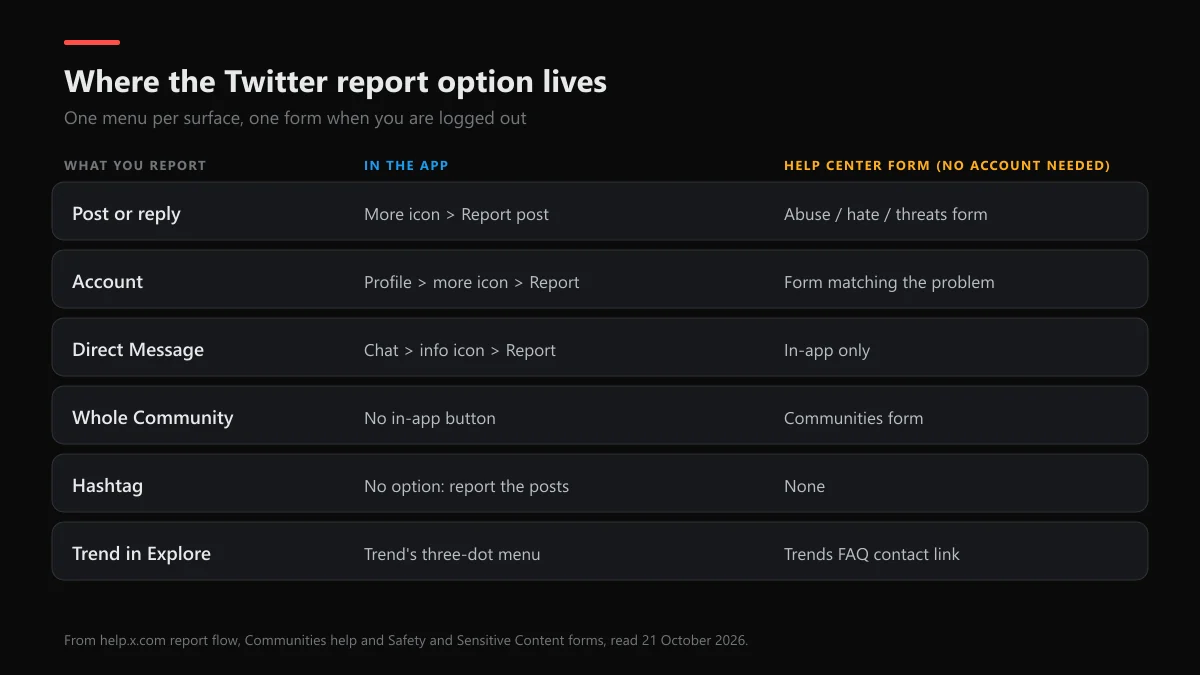
Where is the Twitter report button on each part of X?
The Twitter report button is never a standalone button. Twitter reporting runs through menus, and the menu moves depending on what you're looking at. Most "I can't find it" problems come from looking for a flag icon that X doesn't have. This is where reporting on Twitter starts for each surface, and which form takes over when the button isn't there or you aren't signed in:
| What you want to report | Where the report option is | Help Center form instead |
|---|---|---|
| A post or reply | Three-dot more icon on the post, Report post | The abuse, hate or threats form, with the post link |
| An account | Profile, more icon, Report | The form that matches the problem, with the profile link |
| A Direct Message | Open the chat, info icon, Report @username | None; DMs are reported in the app |
| A post inside a Community | More icon on the post, Report Post | The Communities form |
| A whole Community | No in-app button for the Community itself | Communities form: name, cover photo, description or rules |
| A List, Moment or Space | The List or Space menu, Report | Safety forms accept List, Moment and Space links |
| A hashtag | No option; report the posts using it | None for the tag itself |
| A trend in Explore | The trend's three-dot menu | The contact link in X's Trends FAQ |
| An ad | More icon on the ad, Report ad | The ads form |
The same idea runs on other apps. Snapchat hides its report behind a long press, as the steps for reporting a Snapchat account show, and Facebook splits reports between posts and Pages, which the Facebook post and Page report routes lay out.
How to report a post on Twitter (X) in 2026
This is the route most people mean when they ask how to report a Twitter post or how to report something on Twitter. X's report flow has kept the same shape since its symptoms-first redesign, and on 21 October 2026 it ran like this on iOS, Android and x.com:
- Open the post. Go to the post on X in the app or on x.com, signed in to your account.
- Open the menu. Tap or click the three-dot more icon at the top right of the post.
- Choose Report post. Select Report post from the menu.
- Say who it affects. Pick Myself, Someone else or a specific group of people, or Everyone on X.
- Describe the problem. Choose the issue, add more posts from the same account if X offers it, and submit.
Searches for how to report a post on X Twitter 2026 land on these same five taps, since the rebrand didn't change the menu, and the flow doubles as how to report in Twitter when the problem is a single reply. The second question matters more than people think. A report for "Myself" can unlock rules that X only enforces when it hears from the target, such as misgendering or some harassment cases. A bystander report of the same post may get a different result. Once you send it, the post is swapped for a "you reported this" notice that only you see.
For copyright, trademark or a fake account, the post menu isn't the right door. Those go through dedicated legal and impersonation forms, and our walkthrough of each X report form, from DMCA to impersonation covers them one by one.
How to report a Twitter account, a DM or someone harassing you
Open the profile, tap the more icon, choose Report and pick the issue. X may then ask you to select posts from the account, and picking the clearest two or three helps. That's the whole answer to how to report a Twitter account, and to how to report to Twitter about someone harassing you across several posts. For a Direct Message, open the chat, tap the info icon and choose Report @username.
A report doesn't stop the contact on its own, so mute or block right after. If the person is on other apps too, the steps differ: reporting someone on TikTok and on X and reporting a person on Snapchat and X put the two flows side by side, and YouTube's version is in blocking someone on YouTube and X. Harassment that follows a video creator onto X is easier to judge once you know how YouTube's harassment policy compares with X's.
How to report a Twitter community, or one post inside it
This one confuses people because there are two different reports. A single post inside a Community is reported from its more icon, like any post. X's Communities help page adds one twist: if you choose "It breaks the Community rules", the report goes to the Community's own moderators, not to X. Pick an X Rules reason instead when the post would break the rules anywhere on X.
How to report a community on Twitter as a whole: there's no button for that inside the app. You use the Communities form at help.x.com. It asks for your email (X sends a code), the Community's direct URL, what part breaks the rules (name, cover photo, description or rules) and whether it targets you or somebody else. So how to report a Twitter community is a web form job, and the Community link is the one thing you can't skip.
Can you report a hashtag on Twitter?
No, not directly. People search twitter report hashtag expecting a button, but a hashtag is just text anyone can type, so X has nothing to remove at the tag level. How to report a hashtag on Twitter in practice means reporting the posts and accounts that push it, one report each, with the worst examples first.
Trends are a little different. On the Explore tab, a trend has its own three-dot menu, and that's where you flag a trend as harmful or spammy. X's Trends FAQ also points to a contact link for concerns about curated trend content. Neither one bans the tag. They only affect whether X keeps promoting it.
How to report a Twitter account without an account
You can, through the Help Center. X's Safety and Sensitive Content forms cover private content, harassment, hate, violent threats, self-harm, child sexual exploitation, underage users, ads, Communities, paid partnerships, illegal and regulated behaviours, and US Take It Down Act requests. Each form asks for your email address, sends a code to check it, and wants the link to the post, account, List, Moment or Space.
That's what twitter help center file a report means in practice, and it's the only way to file a report Twitter-side when you're logged out or your own account is suspended. If yours is suspended, getting a Twitter account unbanned comes first, and if you've lost the login, recovering an X account without the username can get you back in to report from the app.
How to file a report on Twitter with the official form
When the problem is serious or the button keeps failing, reporting to Twitter by form is the stronger route, because you can add every link and a written summary. To use the Twitter report form, pick the issue from the menu at help.x.com/forms, verify your email, paste each link on its own line, and write two or three plain sentences about what happened and when. Then tick the statement that the information is true and submit.
Treat it like a short case file. Links beat screenshots, dates beat adjectives, and one report with ten examples beats ten reports with one each. X says multiple posts in the same report give reviewers better context. It's also the plain answer to how to report Twitter content formally, and to twitter file a report searches from people who want something more formal than a tap. Other platforms work the same way, as Instagram's own report forms show.
How to report CSAM on Twitter
Report child sexual abuse material straight away, and don't download it, screenshot it or send it to anyone, even to prove it exists. In the app, use Report post and choose the child safety option. Without an account, use the child sexual exploitation form linked from the forms menu, which asks for the username, links and any details you have.
X's child safety policy says accounts sharing this material are usually suspended at once and permanently, and are reported to the US National Center for Missing & Exploited Children. It also tells you to file yourself through the NCMEC CyberTipline or by calling 1-800-843-5678, and to call local police if a child is in immediate danger. Outside the US, your national hotline or police take the same report.
How to report illegal or inappropriate content on Twitter
How to report inappropriate content on Twitter depends on whether it breaks X's rules or the law. Rule-breaking content, like graphic violence posted without a warning or targeted abuse, goes through the normal Report post flow. Content that's illegal where you live is a separate route. For twitter report illegal content in the EU, X runs a Digital Services Act form, and in the UK there's an Online Safety Act form. These legal reports can lead to the post being withheld in one country even when it stays up elsewhere.
Private information, intimate images and threats are the cases where speed matters most. Sextortion reports work much the same across apps, and if a fake account is using someone's name to do it, the Facebook impersonation route and reporting an Instagram account or page help when it has spread past X.
Is there a Twitter report email or a support line?
No. People look for a twitter report email or a twitter support report address, but X doesn't accept reports by email, and old addresses from the Twitter era don't open cases. The email that matters is the one you enter on a form, because that's where X writes back. After certain reports, such as violent threats, X offers to email you a copy of the report so you can hand it to police.
For anything the report flow can't carry, the X support email addresses that still answer lists which inbox handles what. The same no-email rule holds elsewhere: WhatsApp reports go in-app too, as reporting a WhatsApp number explains, and what happens after a WhatsApp report covers the part after you tap.
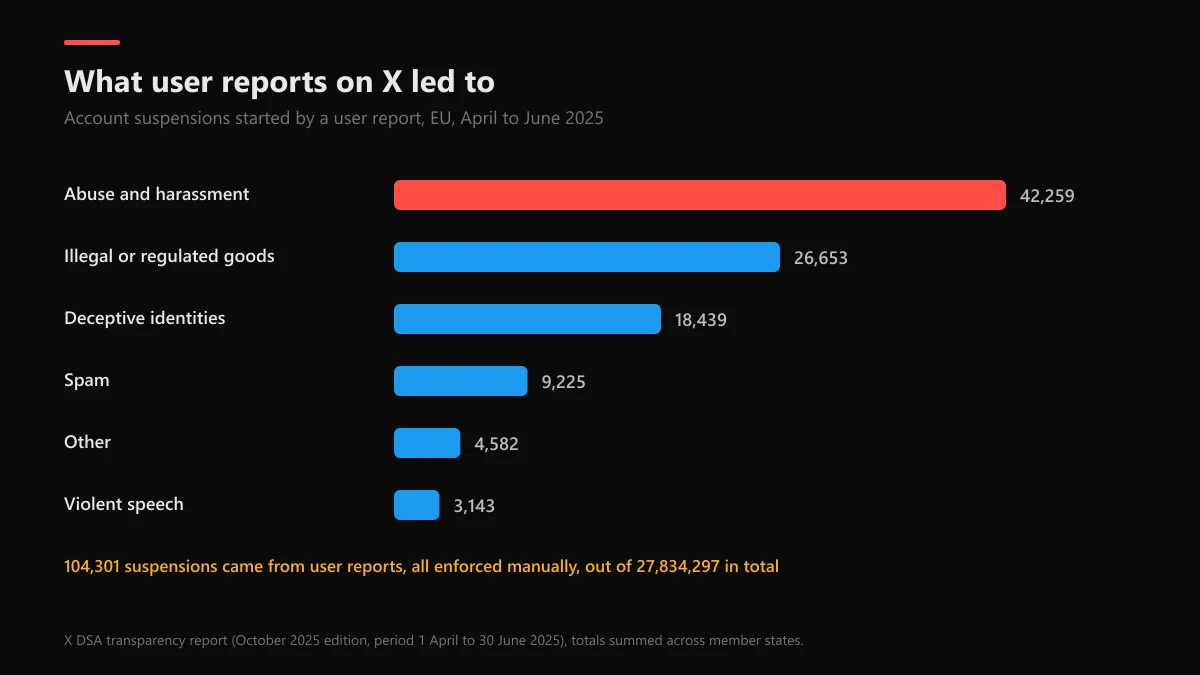
Who reads the reports Twitter gets, and do they work?
Twitter reports are read by people more often than the rest of X's enforcement, and the numbers show why one good report beats a pile of weak ones. In its EU DSA transparency report for April to June 2025, X suspended 27,834,297 accounts. Almost all of those were automated spam sweeps. Only 104,301 suspensions started from a user report, and every one of those was enforced manually.
| Policy behind a user-report suspension | Accounts, Apr–Jun 2025 |
|---|---|
| Abuse and harassment | 42,259 |
| Illegal or regulated goods | 26,653 |
| Deceptive identities | 18,439 |
| Spam | 9,225 |
| Violent speech | 3,143 |
| Other | 4,582 |
The same report shows the other side. X received 178,028 illegal-content notices in the EU, and 55% were closed with no violation found. So a report is a request for review, not a vote. X's response timeframe promises an acknowledgement within 24 hours and a result in a few days, up to thirty. What happens between those points is in the X report-to-ban timeline.
When the account is also on other apps
Scam and impersonation accounts rarely live on one site. If the same person runs fake giveaways elsewhere, reporting an Instagram scammer and reporting a Facebook scammer use the same proof. When the goal is to remove the whole Facebook profile, start with taking down a Facebook account, and for abuse in comments, Facebook's abuse report. On video apps, see how to report a YouTube channel, reporting a YouTube ad and TikTok's video and copyright reports.
Reported something by mistake? X has no undo, but a report of content that breaks no rule changes nothing. Instagram works the same way, as the note on un-reporting an Instagram post explains.
After the report: when the fight is over your handle
Some reports are really about a username: someone grabbed your name or is squatting on it. X doesn't release handles because of a report. Start with a Twitter username check to see if it's free, read how inactive X usernames are handled, and if it's taken, the options for a taken Twitter username lists what actually works.
FAQ
How do you report on Twitter?
Open the post, profile or message, tap the three-dot more icon or the info icon, and choose Report. X first asks who the problem affects, then what kind of issue it is. You can add several posts from the same account to one report, which gives the reviewer more context.
Can you report a hashtag on Twitter?
Not the hashtag itself. A hashtag has no report option, because anyone can type it. Report the posts and accounts that use it for abuse or spam. If a trend in Explore is harmful or spammy, use the trend's three-dot menu, and X's Trends FAQ also links a contact form for concerns about curated Trends.
How do I report a Twitter account without an account?
Use the Help Center forms at help.x.com/forms. They ask for an email address, which X verifies with a code, and a link to the account or post. X's child safety policy says plainly that an X account is not needed to report potential violations of that policy.
Is there a Twitter report email?
No general one. X doesn't take reports by email. The address that matters is your own: forms send replies to the email you enter, and after a violent-threat report X offers to email you a copy of the report to give to police.
How do I report CSAM on Twitter?
Use Report post in the app, or the child sexual exploitation form at help.x.com, and don't download, screenshot or share the material. Then file with NCMEC's CyberTipline or call 1-800-843-5678. If a child is in immediate danger, call local police first.
Does the person know I reported them on Twitter?
No. X says it doesn't disclose who submitted a complaint, and an enforcement notice names the rule and the content, not the reporter. The exception is copyright and some legal requests, where the complaint itself may be shared with the account owner.
How long does a Twitter report take?
X says it acknowledges reports within 24 hours, usually resolves them in a few days, and can take up to thirty. In its EU report for April to June 2025, median handling times for EU illegal-content notices were two to seven hours depending on the category.